Trusted Links
Java mod listed for Minecraft 26.x. Downloads from the MC Java Mods app on Android.
Skip link warnings for trusted HTTP/HTTPS hostnames while preserving Minecraft’s confirmation for every other URL.
⬇ Download on Modrinth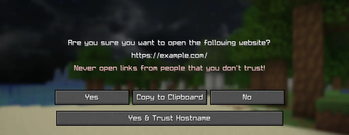
Trusted Links
Trusted Links lets you skip Minecraft's external-link confirmation for websites you explicitly trust, while keeping the normal warning for every unknown link.
It is useful for links you open regularly from chat or other Minecraft screens. Instead of confirming the same website every time, click Yes & Trust Hostname once. Future HTTP and HTTPS links from that hostname will open immediately.
How it works
When Minecraft asks whether you want to open a link, Trusted Links adds a new option:
Yes & Trust Hostname
This opens the link and remembers its exact hostname. For example, trusting a link from:
https://store.example.com/products/123
saves:
store.example.com
It does not automatically trust the broader example.com domain or unrelated hostnames such as blog.example.com.
A trusted hostname also covers its deeper subdomains:
| Trusted hostname | Clicked hostname | Result |
|---|---|---|
example.com |
example.com |
Opens immediately |
example.com |
www.example.com |
Opens immediately |
store.example.com |
cdn.store.example.com |
Opens immediately |
store.example.com |
example.com |
Shows confirmation |
store.example.com |
blog.example.com |
Shows confirmation |
example.com |
example.com.evil.com |
Shows confirmation |
example.com |
evil-example.com |
Shows confirmation |
Safety
Trusted Links does not disable Minecraft's link warning globally.
- Only explicitly trusted hostnames can bypass confirmation.
- Only normal HTTP and HTTPS links are eligible.
- The real URL hostname is checked, not the visible link text.
- Malformed links and unsupported URL types keep Minecraft's normal behavior.
- If the configuration is missing or invalid, the mod safely uses an empty trust list.
Configuration
Trusted hostnames are saved in:
.minecraft/config/trusted-links.json
You can also view and remove trusted hostnames from the Mod Menu configuration screen.
You normally do not need to edit this file because hostnames can be added from the confirmation screen. If needed, it can also be edited manually while Minecraft is closed:
{
  "trustedDomains": [
    "hypixel.net",
    "store.example.com"
  ]
}
Requirements
- Minecraft Java Edition 26.1.2
- Fabric Loader
- Fabric API
- Java 25
Trusted Links is client-side only. It works on multiplayer servers without being installed on the server.
Installation
Install Trusted Links and its listed dependencies with the Modrinth App, or place the downloaded JAR in your Fabric mods folder.
Open source
Trusted Links is open source under the MIT License. Issues and contributions are welcome on GitHub.
- Edition: Minecraft Java
- File type: .jar
- Minecraft version listed: 26.1.2
- How to install: Install the matching mod loader (Forge, Fabric or NeoForge) for your Minecraft version. → Download the .jar. → Put it in the .minecraft/mods folder and launch that loader profile.
- Where to get it: Opens on Modrinth — not every file is mirrored on our own servers.
Install steps are the general flow for this file type — How to install Minecraft Java mods & modpacks walks through it step by step.
- Ships as trusted-links-1.1.0.jar — drop this file into the mods folder
- Download size: 24 KB
- Download link checked 9 Oct 2026 — working
These come from our own check of the pack file, not from the source page.