
Black GUI's
Java resource pack listed for Minecraft 1.20–26.x. Downloads from the MC Java Mods app on Android.
This resource pack offers both crisp white and deep black variants for Minecraft's health, armor, and hunger bars, delivering a customizable, sleek, and…
⬇ Download on Modrinth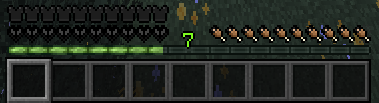
This resource pack expands on the monochrome aesthetic by introducing a dark edition alongside the white version. By completely redesigning the health, armor, and hunger indicators using crisp white and deep black tones, it gives you full control over your HUD's look and feel.
Key Highlights
Dual Minimalist Themes: Choose between a clean, bright white setup or a sleek, pitch-black "Dark Mode" HUD to match your personal playstyle and resource pack combination.
Enhanced Contrast Options: The high-contrast black edition provides exceptional visibility in bright biomes like deserts and snow peaks, while the white edition excels in dark caves and nighttime conditions.
Distraction-Free Oled-Style Aesthetic: Eliminating bright saturated colors keeps your screen clean, giving the interface a high-end, contemporary game feel without visual clutter.
Tailored for Immersion & PvP: Whether you need maximum focus during combat or an unobtrusive layout for survival building, both variants keep essential stats clear and stylish.
- Edition: Minecraft Java
- File type: .zip (resource pack)
- Minecraft versions listed: 1.20, 1.20.1, 1.20.2
- How to install: Download the .zip resource pack — do not unzip it. → Put it in .minecraft/resourcepacks. → Enable it in Options → Resource Packs.
- Where to get it: Opens on Modrinth — not every file is mirrored on our own servers.
Install steps are the general flow for this file type — How to install Minecraft Java resource packs walks through it step by step.
- Downloads as BlackGUI's.zip
- Download size: 7 KB
- Download link checked 30 Oct 2026 — working
These come from our own check of the pack file, not from the source page.