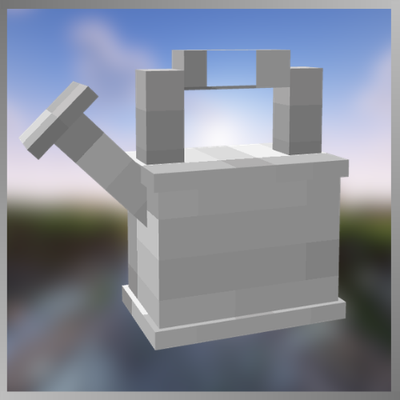
Watering Cans
Bedrock add-on listed for Minecraft 1.21–26.x (behavior + resource pack). File opened and checked on 29 Aug 2026; installs from the MC Bedrock Mods app on Android.
Watering Cans adds five animated 3D cans with tiered speed, capacity and watering areas. Refill them at a four-level water tank, place them in your world…
⬇ Download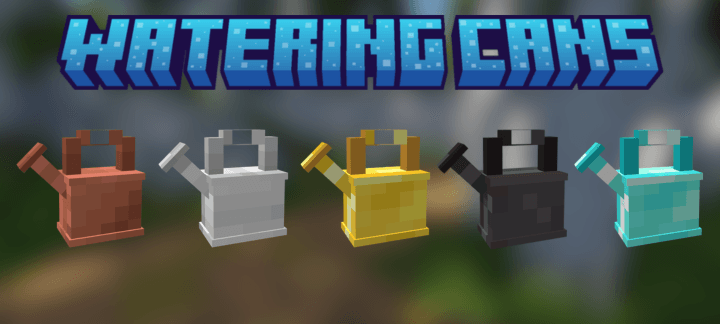

Bring a practical watering system to your Minecraft Bedrock farms with Watering Cans, created by Iced Fox Studios.
Craft five fully animated watering cans made from Copper, Iron, Gold, Diamond and Netherite. Every tier improves different parts of the experience, including watering speed, water capacity, durability and the number of crops covered with each use.
Each watering can has its own hand-crafted 3D appearance, item sprite, holding pose and pouring animation. Water flows directly from the spout with a clean particle effect while nearby farmland is hydrated and crops receive a growth boost.
Progression
• Copper Watering Can: waters 1 crop and holds 6 uses.
• Iron Watering Can: waters 2 crops and holds 7 uses.
• Golden Watering Can: waters 2 crops with the fastest early-game action and holds 6 uses.
• Diamond Watering Can: waters a 2×2 area and holds 8 uses.
• Netherite Watering Can: waters a 3×3 area and holds 10 uses.
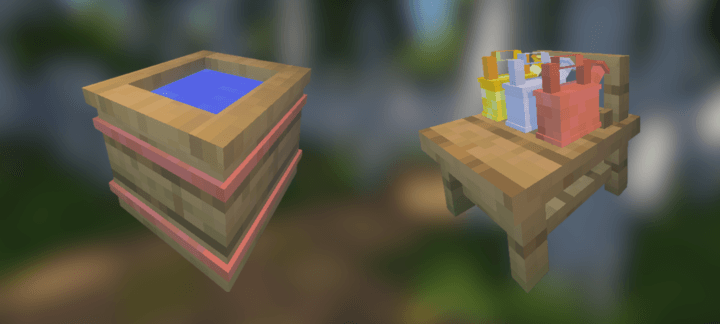
Water management is part of the experience. Fill the Water Tank with up to four buckets, then use one stored level to completely refill a watering can. The visible water level changes as the tank is filled or emptied.
You can also place watering cans directly in the world or store three of them on the wooden Watering Can Stand. Stored cans keep their material, remaining water, durability, custom name and lore.
Watering Cans is designed to make farming more useful and satisfying without replacing Minecraft’s familiar survival progression.
SHOWCASE
🌟 Support Our Creative Journey!
Help us continue delivering exceptional content! Every contribution fuels development, enhances resources, and drives innovation. If our work enriches your Minecraft experience, consider supporting our growth. Your generosity means everything! 💖
[Donate Now]
🌐 Exclusive Early Access
Discover all our addons and be the first to experience new updates on our official website! Latest versions debut here before anywhere else.
[Visit Official Website]
❄️🦊 Join Iced Fox Studios! 🦊❄️
Unlock Minecraft's full potential with our hub for mods, tools, and exclusive rewards:
| Feature | Highlights |
|---|---|
| 🎁 Daily Rewards | Free skins, textures, and loot + seasonal event cosmetics. |
| 🛠️ Pro Tools | World editors, texture creators, auto-updaters (beginner to expert). |
| 🕹️ Minigames | Play to support us + earn redeemable points. |
| 🌐 Community | Forums, Discord, achievement tracking & collaborative projects. |
JOIN PLATFORM
JOIN DISCORD --> Click Here

- Edition: Minecraft Bedrock
- File type: .mcpack or .mcaddon
- Minecraft versions listed: 1.21.30, 1.21.50, 1.21.81
- How to install: Download the .mcpack or .mcaddon file. → Open it — Minecraft imports it. → In your world: Behavior Packs → Available → Activate, then the same under Resource Packs.
- Where to get it: In MCModsHub, or directly above on this page.
Install steps are the general flow for this file type — How to install Minecraft Bedrock addons & mods walks through it step by step.
- Pack type: .mcaddon — behaviour and resource pack in one file
- Complete pack — everything it depends on is inside the file
- Download size: 238 KB
- Download link checked 29 Aug 2026 — working
These come from our own check of the pack file, not from the source page.