Max’s health bar
Bedrock add-on listed for Minecraft 26.x. Download on the author's site.
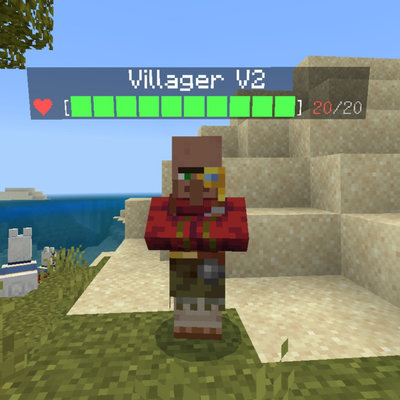
Now every mob has a health bar above its head! Including players. Very useful in PvP and battles or for mobs. Created by Maxmoder1113 the Creater.
⬇ Download on CurseForgeHello all!! Thanks for downloading my mods. It would be soo appreciated if you could subscribe to my YouTube channel and view my videos. Because I'm trying to unlock live streaming mode. You will be able to watch me play my mods and gameplay and play servers and join me in my streams. Please subscribe. Thanks! And here's the link to my YouTube channel. https://m.youtube.com/channel/UCdczrq2FmsHGoTXU5gmzoQg?
Max’s Health Bar – Minecraft Bedrock Add-on
Max’s Health Bar adds a clean, floating health bar above every mob and player in your world, so you always know exactly how much HP everything has.
Features
-
✅ Works on all entities
Players, hostile mobs, passive animals, and bosses all get visible health bars. -
✅ Live updating health
The bar updates instantly as mobs take damage or heal, so you can see exactly how close they are to dying. -
✅ Great for survival & multiplayer
See your own health, your friends’ health, and your enemies’ health at a glance. Perfect for PvP, boss fights, and mob arenas. -
✅ No commands or setup needed
Just install the.mcaddon, enable the behavior/resource pack in your world settings, and play.
How to Install
- Download the Max’s Health Bar
.mcaddonfile. - Open it to import it into Minecraft Bedrock.
- In World Settings → Behavior Packs & Resource Packs, activate Max’s Health Bar.
- Start the world and enjoy visible HP bars above every mob and player.
-
Credits & Notes
- Concept, code, and assets by: [Maxmoder1113 / Darkness studios]
- Tested on: [Minecraft bedrock/version 26.40]
- Known issues: [Alex Ai might not answer specific questions. But it's being fixed so it can answer almost anything.]
- I BE MAKING A NEW VERSION OF THIS SO YOU CAN USE IT ON SERVERS LIKE ON GLOBAL PACKS!!
- Edition: Minecraft Bedrock
- File type: .mcpack or .mcaddon
- Minecraft version listed: 26.40
- How to install: Download the .mcpack or .mcaddon file. → Open it — Minecraft imports it. → In your world: Behavior Packs → Available → Activate, then the same under Resource Packs.
- Where to get it: Opens on CurseForge — not every file is mirrored on our own servers.
Install steps are the general flow for this file type — How to install Minecraft Bedrock addons & mods walks through it step by step.
Max’s health bar is a free Minecraft Bedrock addon. Compatible with Minecraft 26.40. Downloaded 150 times (via CurseForge). Download it and open it directly in the game.