
Settler Villager
Hire a Settler Villager who builds structures block by block from schematics. Hand him a plan, place the hologram, and watch him work. Import your own…
⬇ Download on Modrinth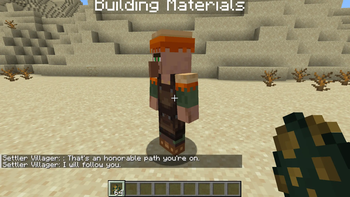
Settler Villager
An addon for Villager Workers and Villager Recruits that adds a hireable Settler Villager — a companion who follows you and builds real structures, block by block, from schematics.
Unlike the Workers mod's Builder, the Settler isn't tied to a work area. You take him with you, hand him a building plan, and point at the ground. He walks there and starts working.
How it works
- Hire him from a Noble Villager (
workerstrader type, level 2) for 24 emeralds - Ctrl + Right-click him to open the build menu
- Pick a structure → Build → see exactly which blocks it needs
- Take Plan → a Building Plan appears in your hand
- Right-click the ground → a translucent hologram shows where it will go
- Right-click the same block again → he starts building
He places roughly one block per second and walks to each position, so a house takes real time to go up. Fill his Building Materials chest and he'll work through it.
Features
- Live hologram preview — see the full structure before committing
- Automatic foundations — on sloped terrain he fills the gap under the build down to solid ground, so nothing floats
- Two separate inventories — his gear (weapons, food) stays separate from a 54-slot building materials chest
- Exact material costs — the menu lists every block the structure needs
- Import your own schematics — click + Add Schematic and pick any
.nbtfile straight from your file explorer. No config editing, no restart. - Cancel & Undo — stop a build, or stop it and have him take every placed block back into his chest
- Containers come out empty — chests are never filled from the schematic, so you can't farm loot by rebuilding the same structure
Where to get schematics
Save any build with a vanilla Structure Block, or drop .nbt files into:
- Edition: Minecraft Java
- File type: .jar
- Minecraft versions listed: 1.20.1, 1.20.2, 1.20.3
- How to install: Install the matching mod loader (Forge, Fabric or NeoForge) for your Minecraft version. → Download the .jar. → Put it in the .minecraft/mods folder and launch that loader profile.
- Where to get it: Opens on Modrinth — not every file is mirrored on our own servers.
Install steps are the general flow for this file type — How to install Minecraft Java mods & modpacks walks through it step by step.
- Ships as villagebuilder-1.20.1-1.0.0.jar — drop this file into the mods folder
- Download size: 86 KB
- Download link checked 31 Aug 2026 — working
These come from our own check of the pack file, not from the source page.