Panini Projection
Java resource pack listed for Minecraft 26.x. Downloads from the MC Java Mods app on Android.
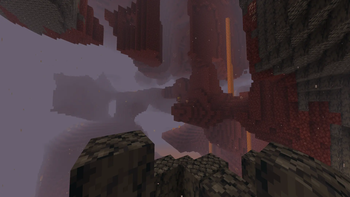
Uses post-processing to warp the game into the Panini Projection. Allows wider peripheral vision without making the center of the screen too small to see.
⬇ Download on Modrinth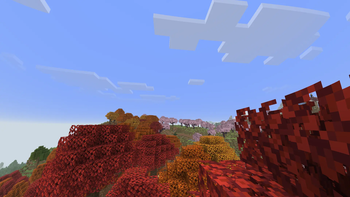
This resource pack was created by Claude. I cannot gaurantee support for any other versions or hardware than what I tested on (An M1 Mac Mini).
Why Panini Projection?
Minecraft, by default, uses a system known as Rectillinear Perspective Projection to turn the 3D world into the 2D image you see. This system has inherent flaws because it prioritizes keeping straight lines straight so that curves are clear. In Minecraft, a game without curves, this is unnecessary. This pack shifts to a different projection method via a post-processing shader. This method keeps the center of the screen large and easy to see, while evenly distorting curvature, size, and rotation to make the effects of all three distortions less noticable. If you have problems with motion sickenss at high FOVs, this pack may help!
Setup and configuration
There is a glsl configuration file with some parameters in /assets/panini/shaders/include/panini_config.glsl. These can be tweaked as desired.
WARNING: By default, this resource pack requires the in-game FOV setting to be 110 ("Quake Pro") or it will not project correctly. Make sure the setting in the config file matches your FOV or the image will be distorted incorrectly.
Inspiration
I learned about Panini Projection via the linked video. This pack would nto have been made without it. https://youtu.be/LE9kxUQ-l14?si=cl-7iV9YX7jmPh7S
- Edition: Minecraft Java
- File type: .zip (resource pack)
- Minecraft version listed: 26.3-snapshot-10
- How to install: Download the .zip resource pack — do not unzip it. → Put it in .minecraft/resourcepacks. → Enable it in Options → Resource Packs.
- Where to get it: Opens on Modrinth — not every file is mirrored on our own servers.
Install steps are the general flow for this file type — How to install Minecraft Java resource packs walks through it step by step.
- Downloads as PaniniProjection.zip
- Download size: 12 KB
- Download link checked 11 Oct 2026 — working
These come from our own check of the pack file, not from the source page.