AFKverse: Cinematic AFK System
Bedrock add-on listed for Minecraft 26.x (behavior + resource pack). File opened and checked on 3 Oct 2026; installs from the MC Bedrock Mods app on Android.
Cinematic AFK addon for Minecraft Bedrock with a dynamic orbiting camera, chill music, and a damage shield, fully achievement friendly with no…
⬇ Download on CurseForgeThe author built this one for Minecraft 26.12–26.40. On other versions it may install and then do nothing.
AFKverse: Cinematic AFK System
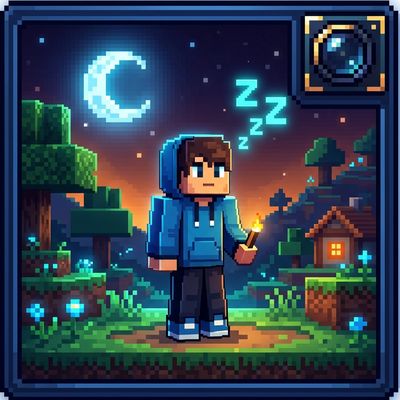
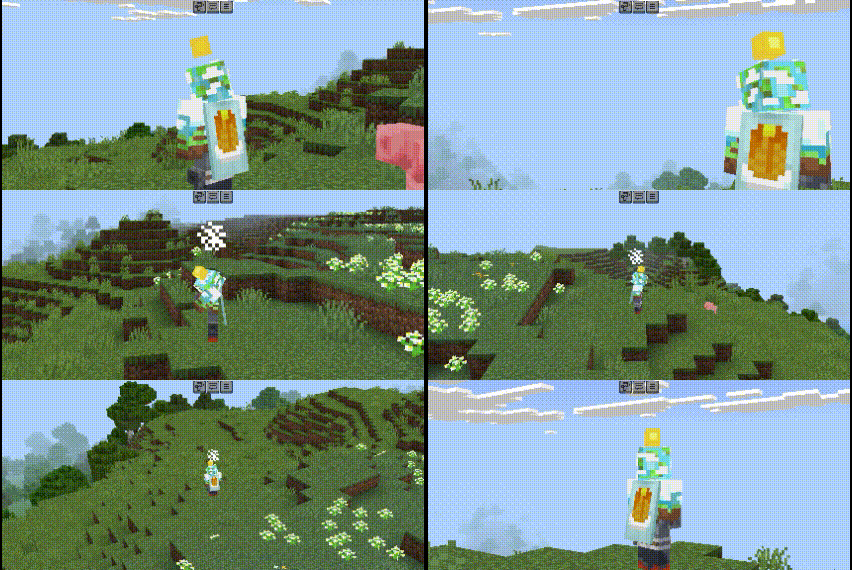
Transform your idle moments in Minecraft Bedrock into a breathtaking cinematic experience. AFKverse automatically activates a dynamic orbiting cinematic camera, plays relaxing background music, triggers floating Zzz particles, and protects you with a balanced 15-hit AFK Shield with Damage Deflect and an Immovable Position Anchor whenever you go idle.
Achievement Friendly: this addon is fully achievement friendly, achievements stay enabled in your world even with experimental toggles active.
What's New in v1.1.0
- 15-Hit Shield Capacity: AFK shield protection increased from 3 hits to 15 full-protection hits.
- Hit Deflect: monster attacks are reflected back at the attacker with critical particle effects and a sharp deflect sound.
- 10-Second Anti-Swarm Window: losing 1 shield hit grants a full 10 seconds of immunity, so rapid mob-swarm attacks during that window won't drain any more of your remaining hits.
- 1-Minute Auto-Reset: the shield automatically recharges back to full (15/15) if the player goes 1 minute without taking any hits.
- Immovable Position Anchor: the character is locked firmly at the AFK spot and won't be pushed back even a millimeter by monster knockback.
- Continuous Jukebox Playlist: NCS music now plays continuously, automatically switching to a random track every 2.5 minutes while in AFK mode.
- Idle Time Tuning: time to enter AFK mode is set to 1 minute (60 seconds) of standing still, for a more relaxed, less intrusive trigger.
Key Features
Dynamic Cinematic Camera
14 dynamic camera angles, including wide establishing shots, low-angle hero views, over-the-shoulder perspectives, and dramatic top-down angles. Smooth 60+ FPS easing, gentle bobbing, and camera collision avoidance so the view never clips into solid walls.
Balanced 15-Hit AFK Shield (Deflect, Anti-Swarm Window & Auto-Reset)
- Hits 1-14 (Full Protection + Deflect + Repel Blast): absorbs 100% of damage (Resistance V + Regeneration II), deflects damage back to the attacker with thorns and critical effects, and knocks mobs 3.5 blocks away without interrupting your AFK state.
- 10-Second Anti-Swarm Window: each hit deduction grants 10 seconds of invulnerability, so a rapid mob swarm during that window still takes deflected damage and knockback but won't drain your shield counter further.
- 1-Minute Out-of-Combat Auto-Reset: staying free from attacks for 1 minute fully recharges the shield back to 15/15.
- Immovable Position Anchor: prevents knockback entirely, your character stays locked at the exact AFK spot even under heavy attack, so you won't get pushed off a cliff or into lava.
- Hit 15 (Shield Shatter): the shield shatters with an explosion and glass-breaking sound, immediately waking you up so you can defend yourself.
Continuous NCS Lo-Fi & Chill Jukebox
Plays a random track from your customizable NCS music playlist as soon as AFK mode triggers, then keeps playing continuously, automatically switching to a new random track every 2.5 minutes for as long as you stay AFK, along with soothing ambient sound effects (glowing Beacon resonance and Amethyst crystal chimes).
Aesthetic Visuals & Clean HUD
Automatically hides the HUD and action bars during AFK mode for clean cinematic recording, and spawns floating cyan Zzz particles above your character's head with gentle idle poses.
Music Credits & NCS Attribution
The background music featured in AFKverse is provided by NoCopyrightSounds (NCS).
Track 1
- Song: springs! - Magnetic [NCS Release]
- Music provided by: NoCopyrightSounds
- Free Download/Stream: http://ncs.io/Magnetic
- Watch: http://ncs.lnk.to/MagneticAT/youtube
Track 2
- Song: Lost Sky - Dreams [NCS Release]
- Music provided by: NoCopyrightSounds
- Free Download/Stream: http://ncs.io/Dreams
- Watch: http://youtu.be/SHFTHDncw0g
Track 3
- Song: Zachz Winner - blu [NCS Release]
- Music provided by: NoCopyrightSounds
- Free Download/Stream: http://ncs.io/blu
- Watch: http://ncs.lnk.to/bluAT/youtube
Note for content creators: you can freely stream or record gameplay with AFKverse active on YouTube, Twitch, and TikTok without copyright strikes.
Installation
- Open the
.mcaddonor.mcpackfile to import AFKverse into Minecraft Bedrock Edition. - Add the AFKverse Behavior Pack and Resource Pack to your World Settings.
- Turn on the Beta APIs/Script API toggle under World Settings > Experiments. Achievements stay fully enabled even with this toggle active.
- Stand still for 60 seconds (1 minute) in-game to trigger cinematic mode.
Customizing NCS Music Tracks
- Convert your audio files to
.oggand name themncs_music_1.ogg,ncs_music_2.ogg,ncs_music_3.ogg. - Place them inside
RP/sounds/afkin/. - Edit
BP/scripts/voice-system.jsto enable additional track slots if needed.
- Edition: Minecraft Bedrock
- File type: .mcpack or .mcaddon
- Minecraft versions listed: 26.12, 26.20, 26.13
- How to install: Download the .mcpack or .mcaddon file. → Open it — Minecraft imports it. → In your world: Behavior Packs → Available → Activate, then the same under Resource Packs.
- Where to get it: Opens on CurseForge — not every file is mirrored on our own servers.
Install steps are the general flow for this file type — How to install Minecraft Bedrock addons & mods walks through it step by step.
- Pack type: .mcaddon — behaviour and resource pack in one file
- Complete pack — everything it depends on is inside the file
- Download size: 7.0 MB
- Download link checked 11 Oct 2026 — working
These come from our own check of the pack file, not from the source page.