
Calibrated Warden
Java mod listed for Minecraft 26.x. Downloads from the MC Java Mods app on Android.
⬇ Download on Modrinth
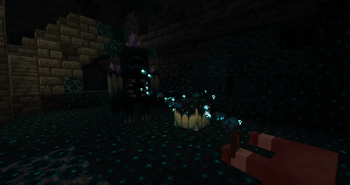
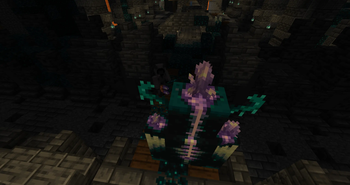
Calibrated Warden Mod
Gain a powerful ally by calibrating the chaotic dissonance of sculk.
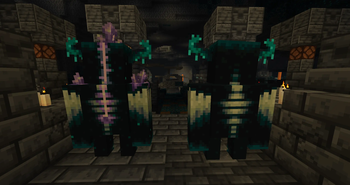
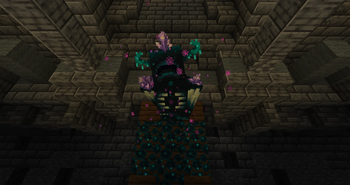
Calibrated Warden Mod allows you to take control of one of sculk's most powerful creatures - the Warden. By claiming its flesh, you can calibrate it with amethyst crystals and transplant it into another Warden, triggering a bizarre transformation into a Calibrated Warden - a creature that may be controlled, yet remains dangerous.
Calibrated Warden
This newly created creature is controlled through the beautiful resonance of an Amethyst Tuning Fork. With it, the creature can be switched between a passive mode, in which it simply remains in place, and an active mode, in which it follows its owner and attacks the targets you designate.
Its new nature is sensitive to amethyst vibrations, allowing it to sense and follow you even across great distances, traveling through strange underground tunnels unseen by human eyes.
How to Calibrate a Warden
First, kill a regular Warden. If you are lucky enough, it will drop Warden Flesh.
Combine it with an Amethyst Shard in a crafting grid or directly in your inventory. This will calibrate the flesh, creating Calibrated Warden Flesh.
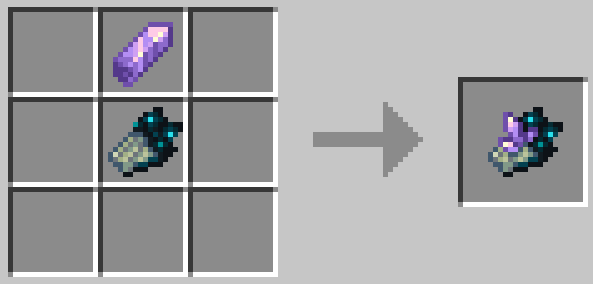
Use this item on any Warden. The item will be consumed, beginning a painful process of calibration. Once the transformation is complete, your own Calibrated Warden will be standing beside you.
Amethyst Tuning Fork
This simple tool, crafted from 3 Copper Ingots and 2 Amethyst Shards, possesses a strange ability to resonate with both the Warden and an Echo Shard.
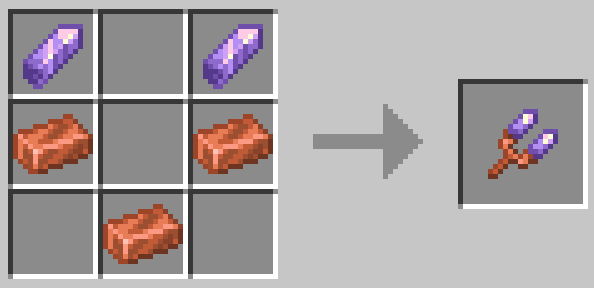
By holding an Echo Shard in your offhand and the tuning fork in your main hand, you can alter its resonance and switch between its available modes.
Using the tuning fork on a Calibrated Warden with the right mouse button applies the currently selected mode to the creature.
The mod currently includes 2 modes:
STAY - the creature remains in place and will neither follow you nor engage in combat.
FOLLOW - the creature stays close to you and attacks the targets you attack.
Combat Behavior
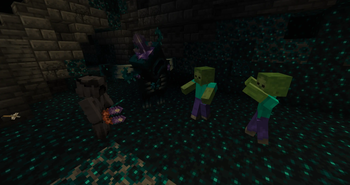
The Calibrated Warden retains all the combat abilities of its wild brethren. However, this is no tame little pet. It will not protect you simply because you are in danger. From now on, it is a weapon - one that kills only those you command it to kill.
With a thunderous roar, it plunges the chosen enemy you have struck into darkness, where it will ultimately take their life. The Darkness effect is applied exclusively to the creature currently selected as the Warden's target.
However, the nature of sculk prevents your Wardens from killing their wild brethren. Village guardians - Iron Golems - will also refuse to allow such a dangerous creature to enter their home peacefully.
Amethyst vibrations, in turn, allow Calibrated Wardens to distinguish the creatures belonging to other owners from their own allies. As a result, multiple Calibrated Wardens belonging to the same owner will never fight each other, while they can still be commanded to attack Calibrated Wardens belonging to other players.
Health Recovery
The Calibrated Warden also retains its connection to the world of sculk.
If an injured Calibrated Warden is near a Sculk Catalyst when another creature dies nearby, the Catalyst will redirect the soul energy it absorbed from the dead creature. Instead of using that energy to spread sculk, it will transfer it into the wounded Calibrated Warden, gradually restoring part of its health.
The more valuable the slain creature is, the more health your Warden will be able to recover.
Features
- Calibrated Warden - a new mob with a custom model, textures, and animations.
- Amethyst Tuning Fork - a tool that allows you to switch the Warden between different behavior modes.
- STAY / FOLLOW - two behavior modes are currently available: passive STAY and active FOLLOW, in which the Warden follows you and fights alongside you.
- Ownership - a Calibrated Warden belongs only to the player who calibrated it. It will never select its owner as a target or apply Darkness to them. Multiple Calibrated Wardens belonging to the same owner will also never fight each other.
- Combat behavior - during combat, the Warden attacks only creatures that you have attacked. The Darkness effect is applied only to the creature currently targeted by the Warden.
- Burrowing - instead of teleporting like a wolf when separated from its owner by a great distance, the Warden burrows into the ground at its current position and emerges again somewhere near you.
- Catalyst healing - a unique healing mechanic based around the Sculk Catalyst. If an injured Calibrated Warden is near a Catalyst while creatures die nearby, the Catalyst uses their energy not to spread sculk, but to restore the Calibrated Warden's health.
- Multiplayer support - the mod supports multiplayer gameplay.
- Localization - the mod is available in 8 languages: English, Ukrainian, German, French, Spanish, Simplified Chinese, Japanese, and Korean.
Compatibility
- Minecraft
26.1.2 - NeoForge
- Required on both client and server
- No additional dependencies
- Edition: Minecraft Java
- File type: .jar
- Minecraft version listed: 26.1.2
- How to install: Install the matching mod loader (Forge, Fabric or NeoForge) for your Minecraft version. → Download the .jar. → Put it in the .minecraft/mods folder and launch that loader profile.
- Where to get it: Opens on Modrinth — not every file is mirrored on our own servers.
Install steps are the general flow for this file type — How to install Minecraft Java mods & modpacks walks through it step by step.
- Ships as calibratedwarden-1.0.0.jar — drop this file into the mods folder
- Download size: 88 KB
- Download link checked 12 Oct 2026 — working
These come from our own check of the pack file, not from the source page.