
ModsJava
Mc cape
Java mod listed for Minecraft 1.21. Downloads from the MC Java Mods app on Android.
Mc Cape is a Fabric mod that allows players to create, customize, import and share unique Minecraft capes with an easy-to-use editor. Designed to be…
⬇ Download on Modrinth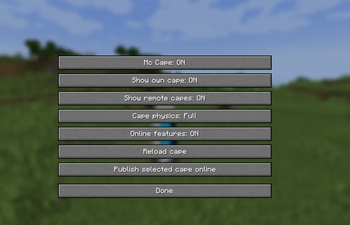
Mc Cape Mc Cape is a client-side Fabric mod that lets you create, import, edit, and use custom capes in Minecraft Java Edition. Features
- Import PNG cape files
- Create and manage a personal cape library
- Quickly equip or remove capes
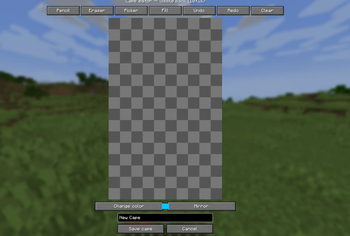
- Edit capes directly inside Minecraft
- Use pencil, eraser, fill, mirror, undo, and redo tools
- Create and use animated capes
- Choose between multiple physics modes
- Rename, duplicate, and export capes
- English and French translations
- Securely publish capes online
- See capes shared by other Mc Cape users in multiplayer
- Preview capes before equipping them
- Fully client-side with no server installation required Usage Press C in-game to open the Mc Cape menu. From there, you can import a PNG image, create a new cape with the built-in editor, or select one from your saved cape library. To see other players’ Mc Cape capes in multiplayer, each player must have the mod installed. Mc Cape remains compatible with standard Minecraft servers and does not need to be installed on the server. Online features use the Mc Cape service only to publish and retrieve cape textures. Installation
- Install Fabric Loader.
- Install Fabric API.
- Download the Mc Cape version that matches your Minecraft version.
- Place the Mc Cape .jar file in your mods folder.
- Launch Minecraft. Requirements
- Minecraft Java Edition 1.21.4
- Fabric Loader
- Fabric API
- Java 21 Compatibility Mc Cape is a client-side Fabric mod. A dedicated build is provided for each supported Minecraft version. Always download the version that matches your Minecraft installation.
Quick facts
- Edition: Minecraft Java
- File type: .jar
- Minecraft versions listed: 1.21.4, 1.21.5, 1.21.6
- How to install: Install the matching mod loader (Forge, Fabric or NeoForge) for your Minecraft version. → Download the .jar. → Put it in the .minecraft/mods folder and launch that loader profile.
- Where to get it: Opens on Modrinth — not every file is mirrored on our own servers.
Install steps are the general flow for this file type — How to install Minecraft Java mods & modpacks walks through it step by step.
File checked by MCModsHub
- Ships as mccape-1.21.4-0.1.0.jar — drop this file into the mods folder
- Download size: 103 KB
- Download link checked 13 Oct 2026 — working
These come from our own check of the pack file, not from the source page.