

PageBlock is a Minecraft Forge mod that allows you to read real PDF documents directly inside Minecraft.
Whether you're creating adventure maps, RPG servers, educational worlds, or simply want to keep manuals and documentation available in-game, PageBlock provides an immersive reading experience without requiring players to leave Minecraft.
Features
- Read PDF files inside Minecraft.
- Custom PDF Book item.
- Supports reading books placed on lecterns.
Installation
- Install Minecraft Forge 1.20.1.
- Place the PageBlock mod inside your mods folder.
- Launch Minecraft once.
After the first launch, the mod will automatically create the following folder:
pageblock/
Simply copy your PDF files into this folder.
How to Use
Place your PDF files Copy your PDF documents into the pageblock folder.
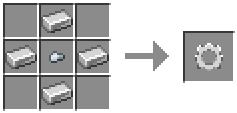
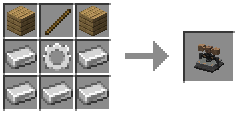
Craft the Printing Press Craft and place the Printing Press.
Select a PDF Open the Printing Press and choose one of the available PDF files.
Print the Paper Insert a paper into the Printing Press to create a printed paper.
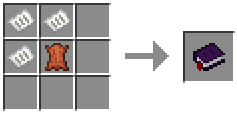
Craft the printed book
Read your PDF Right-click the PDF Book to open the document. You can also place the book on a Lectern and read it from there.
- Edition: Minecraft Java
- File type: .jar
- Minecraft versions listed: 1.20.1, 1.20.2, 1.20.3
- How to install: Install the matching mod loader (Forge, Fabric or NeoForge) for your Minecraft version. → Download the .jar. → Put it in the .minecraft/mods folder and launch that loader profile.
- Where to get it: Opens on Modrinth — not every file is mirrored on our own servers.
Install steps are the general flow for this file type — see the MC Java Mods guides for the full walkthrough.
- Ships as PageBlock-mc1.20.1-0.2.0beta.jar — drop this file into the mods folder
- Download size: 7.3 MB
- Download link checked 2 Sept 2026 — working
These come from our own check of the pack file, not from the source page.