Discord Viper
ViperBridge is a high-performance, Server-Side ONLY bidirectional gateway bridging Minecraft, Discord, and REST APIs for Minecraft. Seamless chat relay…
I don't know my version or loader

ViperBridge
ViperBridge is a high-performance, Server-Side ONLY bidirectional gateway bridging Minecraft, Discord, and REST APIs for Minecraft 1.21.x, 26.1.x, and 26.2.x. Seamless chat relay, moderation commands from Discord, player info queries, and full server controlno client mods required.
Supported Versions
| Version | Java | Status |
|---|---|---|
| 1.21.x | 21 | Full support |
| 26.1.x | 25 | Full support |
| 26.2.x | 25 | Full support |
Purpose & Function
The core mission of this project is to give server administrators total control over their server through Discord and REST API integration.
- Bridge Chat: Minecraft Discord chat relay in real-time with rich embeds and colored formatting.
- Moderation From Discord: Kick, ban, IP-ban players directly from your Discord server using simple commands.
- Player Info on Demand: Query player health, hunger, XP, inventory, IP, and ping from Discord or REST API.
- Execute Any Command: Run any Minecraft command remotely via Discord or REST APIno console access needed.
Key Features
| Feature | Description | Default |
|---|---|---|
| Chat Relay | Bidirectional chat between Discord and Minecraft | ON |
| Join/Leave Alerts | Rich embed notifications when players join/leave | ON |
| Death Messages | Death announcements with red embeds and death reason | ON |
| Advancement Alerts | Advancement completions with cyan embeds | ON |
| Server Start/Stop | Green/red embeds when server starts/stops | ON |
| Discord Moderation | Kick, ban, IP-ban from Discord (!kick, !ban, !ipban) |
OFF |
| Player List | List online players with ping from Discord (!players) |
ON |
| Player Info | Health, hunger, XP, IP, inventory via Discord (!player) |
ON |
| Broadcast | Send server-wide messages from Discord (!say) |
ON |
| Remote Stop | Stop the server from Discord (!stop) |
OFF |
| Custom Commands | Execute any MC command from Discord (!cmd) |
OFF |
| Uptime | Check server uptime from Discord (!uptime) |
ON |
| Performance | Server ticks and uptime info (!tps) |
ON |
| Memory | RAM usage stats (!memory) |
ON |
| World Seed | Get world seed from Discord (!seed) |
ON |
| Bot Ping | Discord bot latency (!ping) |
ON |
| Bot Presence | Shows online player count in bot status (auto-updates) | ON |
| Console Forwarding | Forward server console output to a Discord channel | OFF |
| REST API | Full REST API for health, players, player info, command execution | OFF |
| Role-Based Auth | Restrict Discord commands to specific roles/users | |
| Rich Embeds | Colorful Discord embeds for all events | ON |
Enhance your server setup! Check out my other server-side mods over at : Fabric Server Essentials
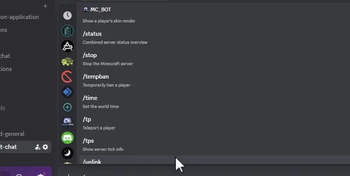
Discord Commands
All commands use the chatRelayChannelId channel. Authorization is controlled by allowedRoles and allowedUsers in config.
| Command | Permission | Description |
|---|---|---|
!help |
Authorized | Show available commands |
!players |
Authorized | List online players with ping |
!player <name> |
Authorized | Show player health, hunger, XP, gamemode, IP, inventory |
!kick <name> [reason] |
Authorized | Kick a player from the server |
!ban <name> [reason] |
Authorized | Ban a player |
!ipban <name> [reason] |
Authorized | IP ban a player |
!say <message> |
Authorized | Broadcast a message to all players |
!stop |
Authorized | Stop the Minecraft server |
!cmd <command> |
Authorized | Execute any Minecraft command |
!uptime |
Authorized | Show server uptime |
!tps |
Authorized | Server ticks and uptime info |
!memory |
Authorized | RAM usage statistics |
!seed |
Authorized | Display the world seed |
!ping |
Authorized | Discord bot latency |
REST API Endpoints
| Method | Endpoint | Auth | Description |
|---|---|---|---|
| GET | /api/health |
Optional | Server status, player count, tick count |
| GET | /api/players |
Required | All online players with full stats |
| GET | /api/player/{name} |
Required | Single player health, hunger, XP, IP, inventory |
| POST | /api/command |
Required | Execute any MC command {"command": "say hello"} |
Auth header: Authorization: Bearer <apiSecretToken>
Configuration
Edit world/viperbridge/viperbridge.json after first launch:
{
"discordBotToken": "YOUR_BOT_TOKEN",
"discordGuildId": "your-guild-id",
"channels": {
"chatRelayChannelId": "channel-id",
"consoleForwardChannelId": "channel-id",
"liveStatusChannelId": "channel-id"
},
"webApi": {
"enabled": false,
"port": 8080,
"apiSecretToken": "your-secret"
},
"commandPrefix": "!",
"enableDiscordCommands": true,
"allowedRoles": ["role-id-1", "role-id-2"],
"allowedUsers": ["user-id-1"],
"botActivityText": "%count%/%max% players online"
}
Hot-reload config in-game: /viperbridge reload
Installation
- Drop the JAR into your server's
mods/folder - Install Fabric Loader (0.16.x+ for 1.21.x, 0.17.x+ for 26.x)
- Install Fabric API (1.21.x requires it; 26.x also requires it)
- Start the server config auto-creates at
world/viperbridge/viperbridge.json - Edit the config with your Discord bot token and channel IDs
- Enable MESSAGE CONTENT INTENT and SERVER MEMBERS INTENT in Discord Developer Portal
- Restart the server
Built for administrators who demand seamless Discord-Minecraft integration with zero client overhead. Every message, command, and query flows through secure, authorized channels.
- Ships as discord-viper-2.0.0.jar — drop this file into the mods folder
- Download size: 9.7 MB
- Download link checked 2 Sept 2026 — working
These come from our own check of the pack file, not from the source page.