HomeJavaModsMiClient
MiClient
ModsJava

MiClient

by Migood · on Modrinth

This is a pvp/helpful lunar kind of like mod/client! made to make your experince cool.

⬇ Download on Modrinth
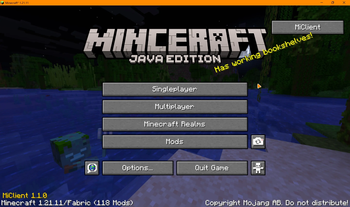
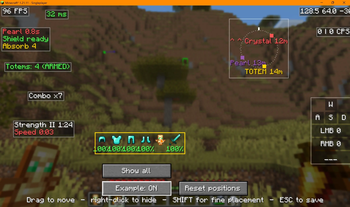
MiClient — screenshot 1MiClient — screenshot 2

MiClient

A PvP helper for Minecraft 1.21.11 (Fabric).

MiClient helps you by showing you things and saving you time. It does not play the game for you. It never swings, clicks, aims or targets. Everything it shows is stuff your game already knows about.

What it does

Totem Helper Open your inventory and your mouse is already on a totem. Press F and it goes to your offhand. That's it. You still open the inventory yourself, and you still press F yourself. The mod only moves your mouse.

It also tells you when you pop a totem, so you know to grab another one.

FreeLook Hold LEFT ALT to look around without turning. Your body keeps facing and moving the same way. Good for checking behind you while running.

Sound Radar (off by default) A little compass that shows where sounds came from. Pearls, wind charges, crystals, anchors, totems, bows, arrows, hits, eating, armour swaps. It only shows sounds you already heard.

Elytra Radar (off by default) Look at someone flying and the radar remembers where they are for a few seconds. You have to actually look at them first. It will never show you someone you didn't look at.

Hitbox Outlines Makes hitboxes easier to see. You pick the colour and how thick the lines are. The hitbox itself is not changed at all, only the outline you see.

Combat HUD FPS, ping, CPS, coordinates, keystrokes, potion timers, armour and durability, totem count, combo counter, pearl and shield cooldowns, server TPS.

Damage numbers Floating numbers when something takes damage or heals. They follow the target and stack up during a combo instead of covering your screen.

Hit direction Shows you which way you just got hit from.

Low HP alert Red edge on your screen and a sound when you get low. You choose the health.

Nearest enemy Shows the closest player's health, distance and what they're holding.

Quality of life Zoom, toggle sprint, toggle sneak, fullbright, low durability warnings, auto reconnect.

Settings and HUD editor Press RIGHT SHIFT for settings. Press RIGHT CTRL to drag your HUD around. There's an Example button so you can see everything while you move it.

Keys

Key What it does
LEFT ALT (hold) FreeLook
C (hold) Zoom
RIGHT SHIFT Settings
RIGHT CTRL HUD editor
your sprint key Toggle sprint (if you turn it on)

You can change all of these in normal Minecraft controls.

Installing

You need Fabric and Fabric API for 1.21.11.

  1. Install Fabric Loader for 1.21.11
  2. Put Fabric API in your mods folder
  3. Put MiClient in your mods folder

Mod Menu is optional. It just adds a settings button.

For server owners

There's a plugin for Paper and Spigot servers. It lets you turn off any MiClient feature for players on your server.

It does not change anyone's settings. It just switches lets you switch things off on there end while they're connected, and everything comes back when they leave.

Put the plugin in your plugins folder, list what you want blocked in its config.yml, and run /miclient reload. If you want this plugin then when downloading choose paper or spigot.

Please play fair

Most of this is normal client stuff that other clients have too, like FreeLook, zoom and HUD overlays.

A few things are worth thinking about. The totem mouse helper and the elytra radar are the main ones. They don't do anything you couldn't do yourself, but some servers might not want them.

If a server knows about MiClient and says don't use something, then don't use it. It's not worth it. Play fair.

You can check what the server disabled or what rules you want to your singleplayer world in the Rules Tab.

Verified by MCModsHub

These come from our own check of the pack file, not from the source page.

Explore more