
Dark Cube UI
Java resource pack listed for Minecraft 26.x. Downloads from the MC Java Mods app on Android.
⬇ Download on Modrinth
Dark Cube UI
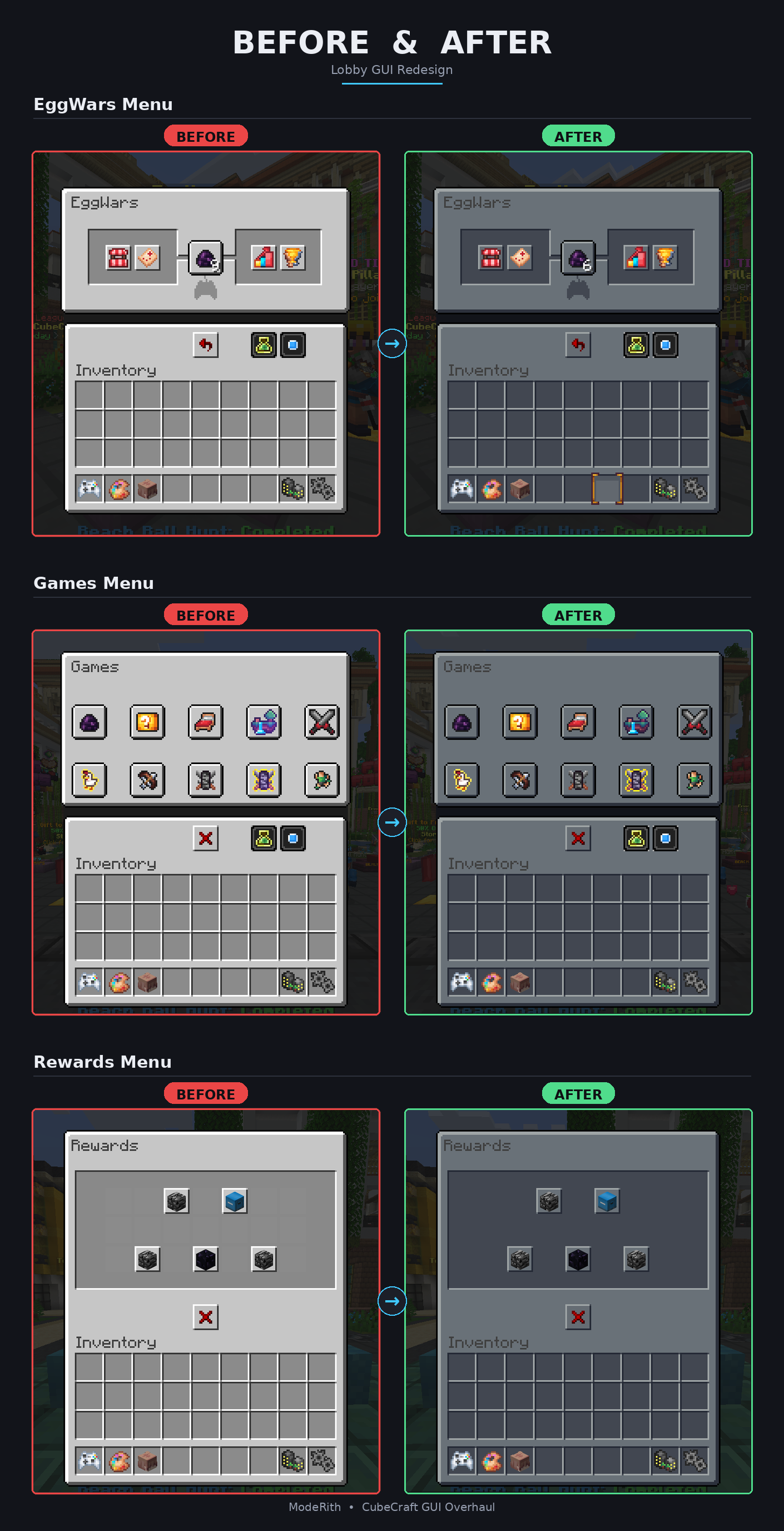
A complete dark navy reskin for CubeCraft covers both CubeCraft's own forced lobby/menu textures and the full vanilla Minecraft interface, so you get one consistent dark theme everywhere instead of CubeCraft's default light grey GUI colliding with a separately-installed dark vanilla pack.
What's included
- CubeCraft UI, fully reskinned lobby screens, kit selectors, shop menus, reward chests, pause screen, settings, and tab/button icons, all recolored to a dark navy palette while keeping CubeCraft's blue brand accent intact.
- Full vanilla dark mode crafting table, furnace, anvil, enchanting table, beacon, inventory, boss bars, advancements, and more, so nothing reverts to bright white/grey outside of CubeCraft's own screens.
Screenshots
Installation
1. Get the resource pack working
- Drop
Dark Cube UI.zipinto your.minecraft/resourcepacksfolder - In-game: Options → Resource Packs, move it into Selected
2. Let it actually override CubeCraft's forced pack
CubeCraft pushes its own resource pack on join and pins it at the top of your list, so by default you can't move this pack above it or fully turn it off. To fix that, you need Server Pack Unlocker (Fabric, client-side only):
- Install Fabric Loader for your Minecraft version from fabricmc.net if you don't have it already
- Download Server Pack Unlocker from its Modrinth page it supports Minecraft 1.17.x through 26.x
- Drop the downloaded
.jarinto your.minecraft/modsfolder - Launch Minecraft using the Fabric profile
- Go to multiplayer → Select Cubecraft → Click edit and set it to Disabled
- Make sure Dark Cube UI is enabled in your Selected list
That's it CubeCraft's forced pack no longer downloads or applies, and this pack renders instead.
This mod is client-side only, open source, and doesn't modify gameplay it just unlocks resource pack menu behavior that's normally locked when a server marks its pack as required.
Credits
- Server Pack Unlocker by TheMysterys
- CubeCraft UI recolor by TakeKB
- CubeCraft is a trademark of CubeCraft Games; this is an unofficial fan reskin, not affiliated with or endorsed by CubeCraft.
Compatibility
see the Versions tab for supported releases.
- Edition: Minecraft Java
- File type: .zip (resource pack)
- Minecraft version listed: 26.2
- How to install: Download the .zip resource pack — do not unzip it. → Put it in .minecraft/resourcepacks. → Enable it in Options → Resource Packs.
- Where to get it: Opens on Modrinth — not every file is mirrored on our own servers.
Install steps are the general flow for this file type — How to install Minecraft Java resource packs walks through it step by step.
- Downloads as Dark Cube UI.zip
- Download size: 4.4 MB
- Download link checked 14 Oct 2026 — working
These come from our own check of the pack file, not from the source page.