Teleport anywhere!
Bedrock add-on listed for Minecraft 26.x. Download on the author's site.
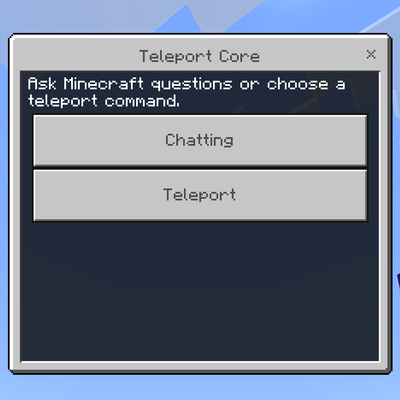
Teleport Anywhere adds a teleport item and a Minecraft chat button. Use natural commands like “teleport me to a plains biome” or “nearby village”, and…
⬇ Download on CurseForgeTeleport Anywhere is a Minecraft Bedrock addon focused on fast, smart teleportation and in‑game Minecraft help, designed to make exploring and playing more efficient and enjoyable.
With this addon you receive a special teleport item. When you use it, a text input UI opens where you can type natural language commands instead of memorizing coordinates or commands. The addon interprets what you type and teleports you accordingly. Examples of supported requests include:
- Teleport to specific biomes:
- “Teleport me to a plains biome”
- “Take me to a desert”
- “Find a jungle biome”
- Teleport to structures and locations:
- “Bring me to the nearest village”
- “Teleport to a stronghold”
- “Go to a nearby ruined portal”
- Teleport to objects and containers:
- “Teleport me to the closest chest”
- “Find my nearest ender chest”
- Teleport related to mobs and players:
- “Teleport to the nearest creeper”
- “Take me to my friend <playername>”
- Random and free‑form requests:
- “Random teleport”
- General location requests written in your own words
The goal of Teleport Anywhere is to remove the friction of moving around your world, so you can explore, build, and find things much faster.
Minecraft Help Chat Button (Minecraft Questions Only)
This addon also includes a chat button dedicated to Minecraft questions.
Important: this feature is only for Minecraft‑related questions, not for social chatting.
Use the chat button to ask things like:
- “What is the best level to mine diamonds?”
- “How do I find a stronghold?”
- “What do villagers need for farming?”
- “How do I get to the End?”
It is meant to assist you with gameplay, mechanics, and tips inside Minecraft, not for general social conversation.
Ongoing Updates
Teleporter Anywhere is an active project. I plan to:
- Improve detection of more natural phrases and commands
- Add support for more biomes, structures, and special locations
- Refine teleport accuracy and speed
- Expand the Minecraft help responses and make them smarter over time
You can expect regular updates, improvements, and new features as the addon evolves.
Feedback & Community
If you have ideas, suggestions, or find bugs, I’d love to hear from you.
Join the Discord to share feedback, report issues, or talk about future features:
Discord: https://discord.gg/pkegU7AMu
- Edition: Minecraft Bedrock
- File type: .mcpack or .mcaddon
- Minecraft version listed: 26.40
- How to install: Download the .mcpack or .mcaddon file. → Open it — Minecraft imports it. → In your world: Behavior Packs → Available → Activate, then the same under Resource Packs.
- Where to get it: Opens on CurseForge — not every file is mirrored on our own servers.
Install steps are the general flow for this file type — How to install Minecraft Bedrock addons & mods walks through it step by step.
Teleport anywhere! is a free Minecraft Bedrock addon. Compatible with Minecraft 26.40. Downloaded 257 times (via CurseForge). Download it and open it directly in the game.