HomeJavaModsjustTeams
justTeams
ModsJava

justTeams

by kotorinet · on Modrinth

A powerful teams plugin for multi-server environments with full Folia, Paper, Spigot, and Purpur support. Free Minecraft Java mod for 1.21, 1.21.1, 1.21.2.

⬇ Download on Modrinth
justTeams — screenshot 1justTeams — screenshot 2

thumbnail

bstats

JustTeams

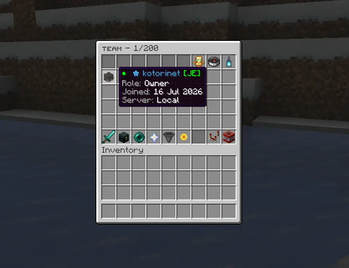
A teams, clans, and guilds plugin for Paper, Folia, and proxy networks. Players form a team with a tag and a name, invite members, and run the whole thing from clean in game menus. It handles roles and per member permissions, a shared bank and ender chest, homes and warps, allies, PvP, a five tier upgrade system, quests, points, and leaderboards, and it speaks to every player in their own language. The goal is to stay fast and stable on busy servers and in sync across a network.

Runs on Minecraft 1.21.11 up to 26.2, on Paper, Folia, and Folia forks like Purpur and CanvasMC. No internal server code, so it keeps working across the 26.x line.

How it works

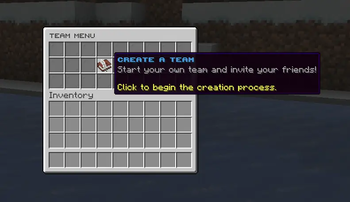
Create a team with /team create <tag> <name>, where the tag comes first and the name can have spaces. Set a solid colour or a hex gradient with /team setcolor, and it follows the tag, the name, chat, and the tab list everywhere. Everything runs from a central menu (/team), and every menu, message, and command is configurable and translatable.

Teams live in a database, so nothing is tied to one server. On a network the same team, bank, points, and ender chest are the same everywhere, and changes show up on the other servers as they happen.

Roles and permissions

Bank, upgrades, and storage

Homes, warps, chat, and allies

Quests, points, and leaderboards

Per player languages

Delegated pricing

You decide which team actions a team owner may price for their own team, and the cap for each. Owners set their prices from /team prices, members pay the team's price, and the owner and permitted co owners do not. Critical actions like creation and rename stay locked to your defaults. Everything is stored per team and syncs across the network.

Network and cross server

Admin and technical

Commands

Command What it does
/team Open the team menu
/team create <tag> <name> Create a team
/team invite <player> Invite a player
/team join <team> Join a public team or request to join
/team bank Open the team bank
/team enderchest Open the shared ender chest
/team sethome / /team home Set and teleport to the team home
/team setwarp <name> / /team warp <name> Create and use team warps
/team setcolor Set the team colour or gradient
/team chat Toggle team chat
/team quests Open the quests menu
/team points View team points
/team top Open the leaderboards
/team prices Set the team's own action prices
/team usersettings Choose your language
/team admin Open the staff management panel

The full command and permission list is in the docs.

Compatibility

Setup

  1. Put the jar in your plugins folder
  2. Start the server once to generate the config files
  3. Set your options in config.yml, and the menus and messages in gui.yml and messages.yml
  4. Run /team admin reload

Updating is safe. New options are merged into your existing files, your old configs are backed up first, and your comments and layout stay where you put them.

Visual Description

image image image image image image image image image image image image

ignore: teams, clan, guild, factions

Verified by MCModsHub

These come from our own check of the pack file, not from the source page.

Explore more