
NimbusNetwork
Java mod listed for Minecraft 1.21–26.x. Downloads from the MC Java Mods app on Android.
I don't know my version or loader
NimbusNetwork
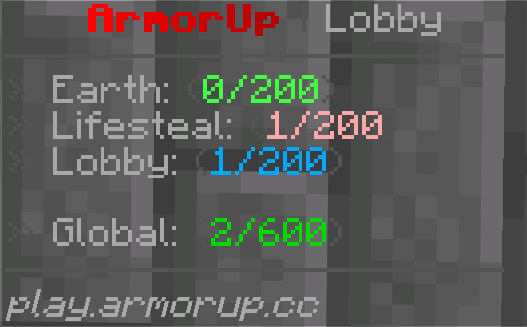
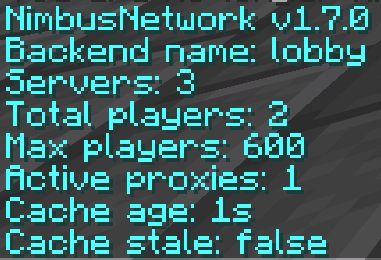
NimbusNetwork shows live network status, player counts, max players, fallback targets, and cache health for Velocity + Paper networks.
NimbusNetworkCoreruns on each Velocity proxy.NimbusNetworkruns on Paper servers that need PlaceholderAPI placeholders or backend whitelist/max-player reporting.- Sync can be
LOCALorMYSQL.
Requirements
- Java 21
- Velocity 3.5+
- Paper 1.21+
- PlaceholderAPI on each Paper server using the placeholders
Installation
Velocity
- Put
NimbusNetworkCore-1.7.3.jarin thepluginsfolder of every Velocity proxy. - Restart Velocity once.
- Edit
plugins/nimbusnetworkcore/config.yml. - Add every backend server you want tracked under
servers.
Example:
proxy-id: "proxy-1"

sync:
  mode: "LOCAL"

servers:
  lobby:
    display-name: "Lobby"
    whitelisted: false
    use-paper-whitelist-report: true
    max-players-override: -1

  earth:
    display-name: "smp"
    whitelisted: false
    use-paper-whitelist-report: true
    max-players-override: -1
Use a unique proxy-id on each Velocity proxy.
Paper
- Put
NimbusNetwork-1.7.3.jarin thepluginsfolder of each Paper server that needs placeholders. - Make sure PlaceholderAPI is installed.
- Restart Paper once.
- Edit
plugins/NimbusNetwork/config.yml. - Set
backend-server-nameto the exact server name used in Velocity.
Example:
backend-server-name: "lobby"

backend-reporting:
  enabled: true
  report-whitelist: true
  report-max-players: true
Backend reporting lets Velocity know when the Paper server is whitelisted and what max player count Bukkit is using. This is useful because a normal Velocity ping does not reliably expose Paper whitelist state.
Paper backends must only accept connections through trusted Velocity proxies. Velocity consumes the NimbusNetwork channel before client messages can be forwarded, but direct client access to a backend bypasses that protection.
Sync Modes
Local
LOCAL is the default mode and needs no database.
sync:
  mode: "LOCAL"
Use this for a single-proxy network, or when each proxy can ping the same backend servers directly.
MySQL
MYSQL shares snapshots between multiple Velocity proxies.
sync:
  mode: "MYSQL"

mysql:
  host: "127.0.0.1"
  port: 3306
  database: "nimbus"
  username: "user"
  password: "password"
  table-prefix: "nimbus_"
  ssl-mode: "VERIFY_IDENTITY"
  allow-public-key-retrieval: false
  connect-timeout-millis: 5000
  socket-timeout-millis: 5000
  maximum-pool-size: 2
The plugin creates and updates its snapshot table automatically.
Database work runs on a dedicated worker and uses a bounded HikariCP connection pool. MySQL sync retries automatically
after connection failures. VERIFY_IDENTITY is the secure default and requires a
certificate valid for the configured database hostname. Use DISABLED explicitly only for a trusted local connection
without TLS.
Placeholders
Network placeholders:
%nimbus_total%
%nimbus_max%
%nimbus_network_max%
%nimbus_server_count%
%nimbus_proxy_count%
%nimbus_cache_age%
%nimbus_cache_stale%
Server placeholders:
%nimbus_players_lobby%
%nimbus_status_lobby%
%nimbus_max_lobby%
Fallback placeholders:
%nimbus_fallback_main%
%nimbus_fallback_status_main%
Replace lobby and main with your configured server or fallback group names.
Example scoreboard or hologram lines:
Status: %nimbus_status_lobby%
Players: %nimbus_players_lobby%/%nimbus_max_lobby%
Network: %nimbus_total%/%nimbus_max%
Commands
Permission:
nimbusnetwork.admin
Velocity commands:
/nimbusnetwork debug
/nimbusnetwork debug sync
/nimbusnetwork debug proxies
/nimbusnetwork debug server <server>
/nimbusnetwork debug fallback <group>
/nimbusnetwork refresh
Velocity alias:
/nnc
Paper commands:
/nimbusnetwork
/nimbusnetwork <server>
/nimbusnetwork debug <server>
/nimbusnetwork refresh
Paper alias:
/nph
Examples:
/nph lobby
/nph debug earth
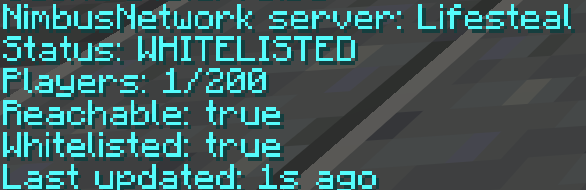
Both commands show status, player count, max players, reachability, whitelist state, and last update age for the selected server.
Statuses
Statuses are resolved in this order:
OFFLINE      server did not respond to Velocity ping
WHITELISTED  Paper backend report or Velocity config says whitelist is on
FULL         players are at or above max players
ONLINE       server is reachable and available
If a Paper server has no players online, plugin messages from that backend cannot be sent until a player joins. The Velocity config value whitelisted is used as the fallback when no fresh Paper whitelist report is available.
- Edition: Minecraft Java
- File type: .jar
- Minecraft versions listed: 1.21, 1.21.1, 1.21.2
- How to install: Install the matching mod loader (Forge, Fabric or NeoForge) for your Minecraft version. → Download the .jar. → Put it in the .minecraft/mods folder and launch that loader profile.
- Where to get it: Opens on Modrinth — not every file is mirrored on our own servers.
Install steps are the general flow for this file type — How to install Minecraft Java mods & modpacks walks through it step by step.
- Ships as NimbusNetworkCore-1.7.3.jar — drop this file into the mods folder
- Download size: 5.0 MB
- Download link checked 14 Oct 2026 — working
These come from our own check of the pack file, not from the source page.