HomeJavaModsAnyBind
AnyBind
ModsJava

AnyBind

by sawiq_ · on Modrinth

Create custom keybinds in the controls menu that can open URLs, files and apps, run scripts, or send chat and game commands.

Which Minecraft do you have?

Every version of the game needs its own build. Pick yours, then download — the wrong build installs fine and then does nothing in the game. This mod is built for Fabric only.

⬇ Download for 26.2⬇ Download for 26.1–26.1.2⬇ Download for 1.21.9–1.21.11⬇ Download for 1.21–1.21.8
I don't know my version or loader
Open the Minecraft launcher and look at the profile you play on — it names both, like fabric-loader-1.21.4. The version also shows in the bottom-right corner of the game's main menu.
No loader in the profile name? Then it's plain Minecraft, and these mods won't run — you need Fabric or NeoForge installed first.
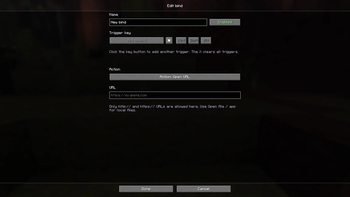
AnyBind — screenshot 1

Fabric Minecraft License

EN

AnyBind is a client-side Fabric mod that lets you create custom keybinds directly inside the vanilla Minecraft controls menu.

Use any keyboard key or mouse button, add Ctrl / Shift / Alt requirements, assign several trigger keys to the same bind, and run useful actions like opening links, launching apps, running scripts, or sending chat commands.

✨ Features

⚙️ Action Modes

🖥️ Command Interpreters

🕹️ How To Use

  1. Open Options -> Controls -> Key Binds.
  2. Scroll to the AnyBind category.
  3. Click Add bind.
  4. Open the editor with the gear button.
  5. Set the bind name, trigger key(s), modifiers, and action.
  6. For command/file actions, enable Command execution in the editor.
  7. When a dangerous action runs, confirm it. Enable Don't ask again for this bind if you trust it.

🔐 Safety Notes

📦 Dependencies

🔗 Links


RU

AnyBind - клиентский Fabric-мод, который позволяет создавать кастомные бинды прямо внутри ванильного меню управления Minecraft.

Можно назначать любые клавиши и кнопки мыши, добавлять требования Ctrl / Shift / Alt, указывать несколько триггеров на один бинд и запускать разные действия: открывать ссылки, запускать приложения, выполнять скрипты или отправлять команды в чат.

✨ Особенности

⚙️ Режимы действий

🖥️ Интерпретаторы команд

🕹️ Как пользоваться

  1. Открой Настройки -> Управление -> Назначение клавиш.
  2. Пролистай до категории AnyBind.
  3. Нажми Добавить бинд.
  4. Открой редактор через кнопку с шестерёнкой.
  5. Укажи название, клавишу/клавиши, модификаторы и действие.
  6. Для команд и открытия файлов включи Выполнение команд в редакторе.
  7. При запуске опасного действия подтверди его. Если доверяешь бинду, включи галочку Больше не спрашивать для этого бинда.

🔐 Безопасность

📦 Зависимости

🔗 Ссылки

Verified by MCModsHub

These come from our own check of the pack file, not from the source page.

Explore more