
OverCastUI
Java mod listed for Minecraft 26.x. Downloads from the MC Java Mods app on Android.
Web browser directly into Minecraft. Watch videos or browse wikis while you play with a sleek, customizable Picture-in-Picture overlay
⬇ Download on Modrinth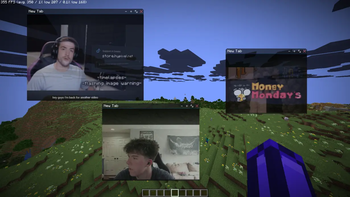
OvercastUI
A Steam Overlay-style Chromium browser, built into Minecraft. Browse the web without alt-tabbing or pausing your game. Client-side only, Fabric.
Features
- 🪟 Multiple windows draggable, resizable, with tab support
- 🌐 Full browser back/forward/reload/home, address bar, find-in-page, per-tab zoom
- 📺 Picture-in-Picture videos keep playing after you close the overlay
- 🔲 Split view two pages side by side
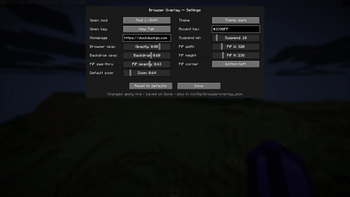
- 🎨 Theming adjustable opacity and backdrop
- ⌨️ Rebindable hotkey default Shift+Tab, in-game settings menu
- 💤 Tab suspension sleeps idle tabs to save resources
- ⏸️ Never pauses your game
How to use
- Press Shift+Tab in-game to open the overlay (rebindable in settings).
- Wait 10-15 seconds for Chromium to download (Only on first install)
- Enjoy!
Compatibility
- Loader: Fabric
- Minecraft: 1.21.1, 1.21.11, 26.1, 26.1.1, 26.1.2
- Side: Client only
- Requires: Fabric API
**Description Whether you want an in-game browser to keep a wiki open, a Steam-style web overlay to watch videos while you play, or picture-in-picture for a stream on your second monitor's worth of screen OvercastUI keeps it all inside Minecraft, no alt-tabbing.
- Edition: Minecraft Java
- File type: .jar
- Minecraft version listed: 26.2
- How to install: Install the matching mod loader (Forge, Fabric or NeoForge) for your Minecraft version. → Download the .jar. → Put it in the .minecraft/mods folder and launch that loader profile.
- Where to get it: Opens on Modrinth — not every file is mirrored on our own servers.
Install steps are the general flow for this file type — How to install Minecraft Java mods & modpacks walks through it step by step.
- Ships as overcast-1.2.1.jar — drop this file into the mods folder
- Download size: 347 KB
- Download link checked 15 Oct 2026 — working
These come from our own check of the pack file, not from the source page.