
Vinculum
Java mod listed for Minecraft 26.x. Downloads from the MC Java Mods app on Android.
⬇ Download on Modrinth
Vinculum
Vinculum is a Fabric mod that helps players keep their Minecraft mod list aligned with the servers they join.
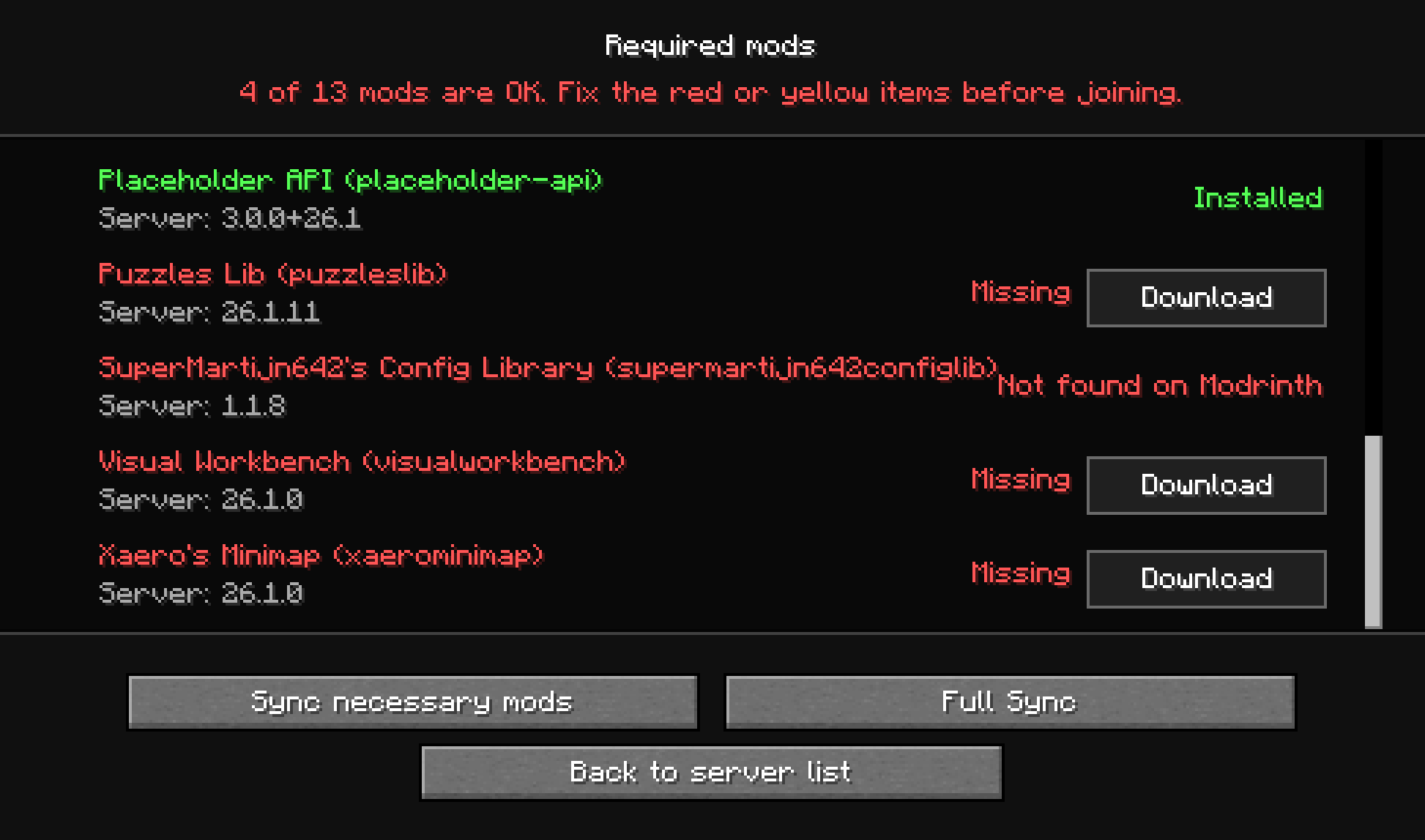
When a server or game with LAN open is running Vinculum, it advertises its Minecraft version, loader version, and installed mods through the server list. The client compares that information with the local mods folder before joining, then shows a clear status screen for anything that is missing or using a different version.
Features
- Detects missing server-required mods before joining.
- Highlights version mismatches between the client and server.
- Marks client-only mods separately so players know which entries do not block joining.
- Downloads missing Fabric mods from Modrinth when a matching file is available.
- Falls back to server-provided transfers when Modrinth cannot resolve a required mod and server transfers are enabled.
- Requires explicit confirmation before downloading any JAR directly from a server, with a security warning and the advertised file metadata.
- Offers Necessary Sync for join-blocking mods and Full Sync for the complete server mod set.
- Backs up mismatched or extra local mods before replacing them.
- Shows sync progress directly in the Minecraft UI.
How It Works
Server-side Vinculum gathers the active user mods and publishes a compact compatibility payload with the server status. Client-side Vinculum reads that payload, compares it against the player's installed mods, and opens a required-mods screen when action is needed.
Players can choose to sync only the mods required to join, or run a full sync to align the complete advertised server set. Both modes prefer Modrinth. If one or more matching files are unavailable there, Vinculum lists the JARs that would come directly from the server—including name, ID, version, authors, environment, filename, and size—and requires the player to choose Trust and download. Unapproved server fallbacks are blocked.
Before replacing a mismatched mod, Vinculum moves the old JAR to a .bak file. Full Sync also backs up local top-level mods that are not advertised by the server. After downloads complete, restart the game so Minecraft can load the updated mod set.
Configuration
Vinculum creates a modsync.json config file in the Fabric config directory.
{
  "transferPort": 9123,
  "allowServerTransfers": true,
  "filterMode": "none",
  "filterRules": []
}
transferPort: port used for server-hosted mod transfers.allowServerTransfers: enables or disables direct downloads from the server.filterMode: controls which JARs Vinculum manages. Usenone,blacklist, orwhitelist.filterRules: JAR names or gitignore-like patterns. Blacklisted JARs and JARs outside a whitelist are not advertised, transferred, compared, or moved to backups.
Rules without a slash match a JAR filename in any directory. Rules containing a slash are relative to the mods directory. Matching is case-insensitive, * matches any characters except /, ? matches one character except /, ** can cross directories, and a trailing / matches a directory and everything below it. Blank rules and rules beginning with # are ignored.
For example:
{
  "transferPort": 9123,
  "allowServerTransfers": true,
  "filterMode": "blacklist",
  "filterRules": [
    "client-only/",
    "mod-proprietario-*",
    "optional/**/*.jar"
  ]
}
Both values can also be overridden with the modsync.transferPort and modsync.allowServerTransfers system properties, or the MODSYNC_TRANSFER_PORT and MODSYNC_ALLOW_SERVER_TRANSFERS environment variables.
Requirements
- Minecraft 26.1.2
- Fabric Loader 0.19.3 or newer
- Fabric API
- Java 25 or newer
License
This project is licensed under the MIT License. You may reuse, modify, and distribute it, provided that the original copyright notice and license are preserved.
- Edition: Minecraft Java
- File type: .jar
- Minecraft version listed: 26.1.2
- How to install: Install the matching mod loader (Forge, Fabric or NeoForge) for your Minecraft version. → Download the .jar. → Put it in the .minecraft/mods folder and launch that loader profile.
- Where to get it: Opens on Modrinth — not every file is mirrored on our own servers.
Install steps are the general flow for this file type — How to install Minecraft Java mods & modpacks walks through it step by step.
- Ships as vinculum-1.0.1-26.1.2.jar — drop this file into the mods folder
- Download size: 114 KB
- Download link checked 25 Sept 2026 — working
These come from our own check of the pack file, not from the source page.