
ModsJava
CubeEco
Java mod listed for Minecraft 1.21–26.x. Downloads from the MC Java Mods app on Android.
⬇ Download on Modrinth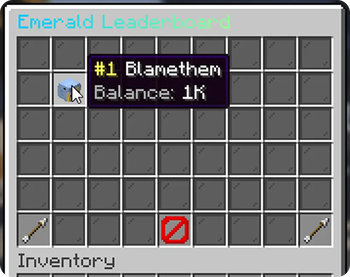

An unlimited‑currency economy plugin
Define as many currencies as you like in simple YAML files — each gets its own command, leaderboard, withdrawable notes, tax rules, and formatting. CubeEco bridges seamlessly to Vault, PlaceholderAPI, ShopGUI+, EconomyShopGUI, and Towny right out of the box.
📌 Requirements & Compatibility
| Requirement | Supported Version / Tech |
|---|---|
| Plugin Version | v1.0.0 |
| Server Software | Paper 1.21+ (Folia supported) |
| Java Version | Java 21+ |
| Storage Options | SQLite (default), MySQL, or flat‑file YAML |
✨ Key Features
- ♾️ Unlimited Currencies — Every
.ymlfile incurrencies/becomes a fully-featured, independent currency. - ⚡ Per-Currency Commands — Dynamically registers
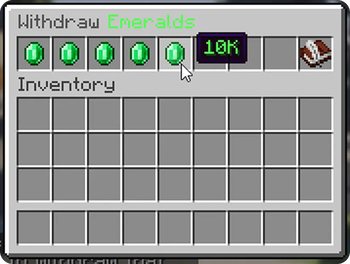
/<currency> balance | pay | withdraw | topat runtime. - 📜 Physical Notes — Withdraw any balance into a physical, right-click-to-redeem item.
- 🏆 Dynamic Leaderboards — View top players via chat or chest-GUI menus, refreshed automatically on a schedule.
- 💸 Tax Rules — Configure optional percentage + flat fees on payments, routed to void, a bank account, or broadcast server-wide.
- 🖥️ Interactive GUIs — Beautiful, built-in menus for balance overviews, leaderboards, and withdraw denominations.
- 🔌 Deep Integrations — Native support for Vault, PlaceholderAPI, ShopGUI+ (multi-currency), EconomyShopGUI, and Towny.
- 🎨 MiniMessage Support — Full support for modern formatting: gradients, hover effects, colors, and custom styles everywhere.
- 🚀 Async, Cached Storage — High-performance architecture with in-memory caching flushed safely off the main thread.
- 🔄 Hot Reloading — Add, remove, or edit currencies on the fly and reload without restarting your server.
Quick facts
- Edition: Minecraft Java
- File type: .jar
- Minecraft versions listed: 1.21, 1.21.1, 1.21.2
- How to install: Install the matching mod loader (Forge, Fabric or NeoForge) for your Minecraft version. → Download the .jar. → Put it in the .minecraft/mods folder and launch that loader profile.
- Where to get it: Opens on Modrinth — not every file is mirrored on our own servers.
Install steps are the general flow for this file type — How to install Minecraft Java mods & modpacks walks through it step by step.
File checked by MCModsHub
- Ships as CubeEco-1.0.0-SNAPSHOT.jar — drop this file into the mods folder
- Download size: 16.4 MB
- Download link checked 15 Oct 2026 — working
These come from our own check of the pack file, not from the source page.