
TwitchInteract
TwitchInteract puts your Minecraft world in the hands of your Twitch chat! Turn your stream into a chaotic co-op adventure where viewers decide if you…
⬇ Download on Modrinth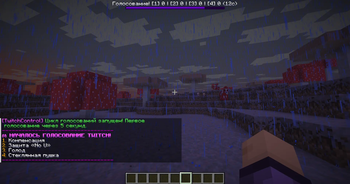
TwitchInteract
TwitchInteract puts your Minecraft world in the hands of your Twitch chat! Turn your stream into a chaotic co-op adventure where viewers decide if you survive or perish.
How it works
Link your Twitch channel and let your chat take the wheel! Every few minutes, viewers vote on upcoming events by typing 1, 2, 3, or 4. Once the timer runs out, the winning event triggers instantly!
Key Features
Live Interactive Gameplay: 100% integration with Twitch chat for instant viewer response.
Massive Event Arsenal: A perfect balance of helpful perks, chaotic twists, and brutal challenges.
Helpful: Instant feeding, healing, valuable loot, flight mode, or the "Midas Touch."
Harmful: Sudden zombie spawns, lightning strikes, inventory clears, or the floor turning into lava.
Chaotic: Complete inventory shuffles, random enchantments, and renaming your items after viewers.
Fully Customizable: Easily adjust timers and settings to perfectly match the pace of your stream.
Settings
- Install the plugin
- Then configure the plugin in /plugins/TwitchControlEvents/config.yml
twitch:
  # Just paste the link to your Twitch channel — you don't need a token or a bot account!
  channel-url: "https://www.twitch.tv/MyChannel"

settings:
  voting-duration: 15   # Voting time in seconds
  pause-duration: 30    # Pause between votes in seconds
  options-per-vote: 4   # How many options to show in the voting (2-9)
Start the fun
Commands
Starts the cycle of automatic voting
/tc start
It completely stops everything: the cycle, the current vote, and removes the boss bar
/tc stop
Forcibly starts voting right now (interrupts the pause)
/tc vote start
Forcibly ends the current vote — the winner is applied immediately
/tc vote end
Outputs events
/tc event <id> [игрок\@a]
Shows the ID of all 75 events
/tc list
- Edition: Minecraft Java
- File type: .jar
- Minecraft versions listed: 1.21, 1.21.1, 1.21.2
- How to install: Install the matching mod loader (Forge, Fabric or NeoForge) for your Minecraft version. → Download the .jar. → Put it in the .minecraft/mods folder and launch that loader profile.
- Where to get it: Opens on Modrinth — not every file is mirrored on our own servers.
Install steps are the general flow for this file type — How to install Minecraft Java mods & modpacks walks through it step by step.
- Ships as TwitchInteract-1.0.0.jar — drop this file into the mods folder
- Download size: 58 KB
- Download link checked 4 Sept 2026 — working
These come from our own check of the pack file, not from the source page.