Low Fire — Lowered Flame Overlay (Full Animation)
Lowers the fire overlay (in-world and GUI) so it never blocks your view — full flame, full animation, just shorter.
⬇ Download on Modrinth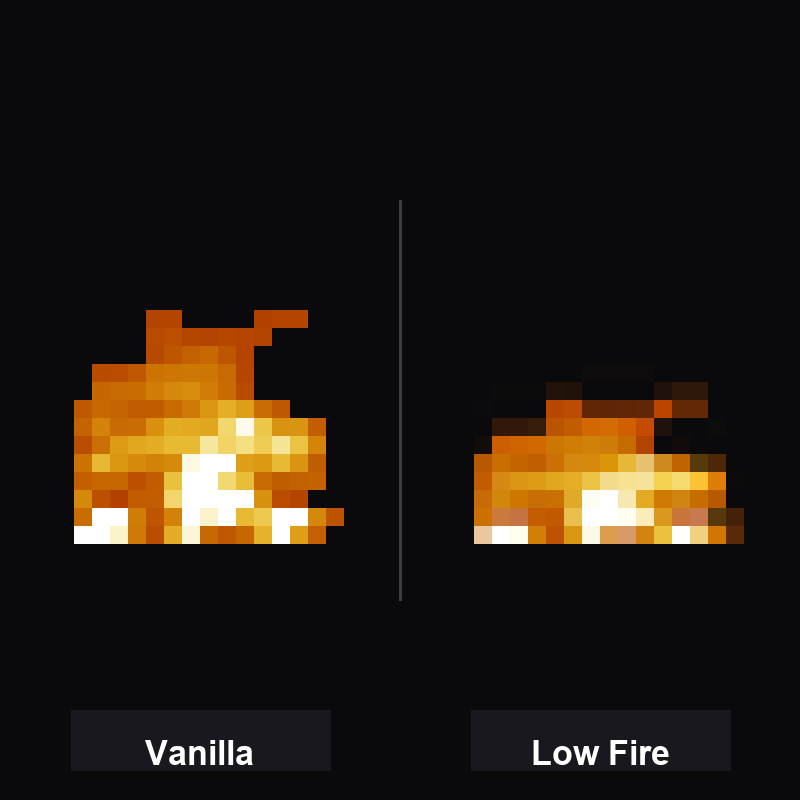
Tired of the vanilla fire taking over your whole screen? This pack lowers the flame while keeping the complete fire animation.\n\n- 🔥 Lowered flame — the whole fire sits lower, tip and animation intact (no cut-off flame)\n- 🖥️ GUI included — the on-screen fire overlay is lowered too\n- ✅ Works on every launcher — just drop in resourcepacks and enable\n\n---\n\n### 🚀 Want everything in one pack?\nThis feature is part of PvP Essentials — the all-in-one pack with crosshair, visible ores, short sword, low fire and clear pumpkin.\n> 💡 CurseForge is the source of truth for this pack — the most up-to-date, bug-free versions are always there first: CurseForge page
- Edition: Minecraft Java
- File type: .zip (resource pack)
- Minecraft versions listed: 1.19, 1.19.2, 1.19.4
- How to install: Download the .zip resource pack — do not unzip it. → Put it in .minecraft/resourcepacks. → Enable it in Options → Resource Packs.
- Where to get it: Opens on Modrinth — not every file is mirrored on our own servers.
Install steps are the general flow for this file type — How to install Minecraft Java resource packs walks through it step by step.
- Downloads as fliflight-low-fire-1.0.0-resourcepack-1.21.4.zip
- Download size: 27 KB
- Download link checked 5 Sept 2026 — working
These come from our own check of the pack file, not from the source page.