
ChestDiff
Java mod listed for Minecraft 26.x. Downloads from the MC Java Mods app on Android.
⬇ Download on Modrinth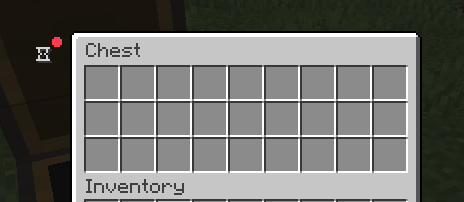
ChestDiff
English
ChestDiff is a client-side Fabric mod that remembers the contents of containers you have opened and clearly shows what changed since your previous observation.
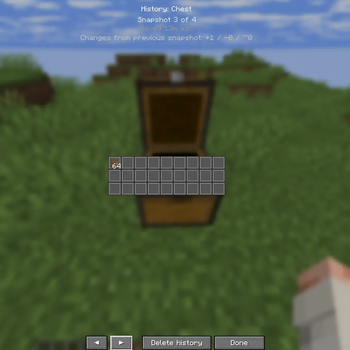
When a container is opened for the first time, ChestDiff saves a local snapshot. On later openings, the mod compares the current contents with the previous snapshot. If something changed, a small red notification dot appears next to the history icon. Left-click the icon to highlight changed slots or use Shift + left click to open the complete snapshot history for that container.
Features
- Automatic local snapshots for chests, double chests, trapped chests, barrels, shulker boxes, hoppers, dispensers, droppers, furnaces, smokers and blast furnaces
- Green highlights for added items, red for removed items and blue for replaced or modified items
- Clear hover tooltips showing the item, amount, previous state, new state and observation time
- A compact backgroundless history icon positioned outside the container slots
- A per-container timeline where every saved snapshot can be viewed with its original item layout
- A global container history opened with
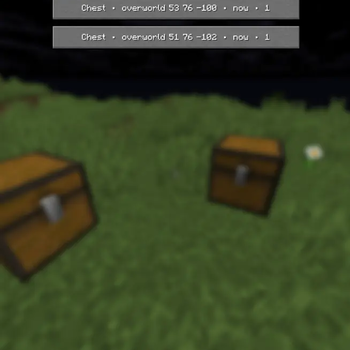
H - Container dimension and block coordinates in the global history list
- Consecutive identical observations are deduplicated: the last-seen time is updated without creating duplicate snapshots
- Separate local data for every singleplayer world, multiplayer server and player profile
- Configurable snapshot limit, retention period and disk usage cap
- Per-container history deletion and controls for deleting the current world/server history or all ChestDiff data
- Fully client-side: the server does not need the mod
- English and Russian translations
How to use
- Install Fabric Loader, Fabric API and the ChestDiff JAR made for your Minecraft version.
- Start the game and open a supported container. The first opening creates its baseline snapshot.
- Open the same container later. A red dot on the history icon means its contents changed.
- Hover the history icon to see the available controls.
- Left-click the icon to show or hide changed-slot highlights.
- Hover a highlighted slot to see exactly what was added, removed or modified.
- Use
Shift + left clickon the icon to browse that container's snapshots. - Press
Hanywhere in-game to open the global container history. The key can be changed in Minecraft's controls menu.
Colors
- Green — an item or quantity was added
- Red — an item or quantity was removed
- Blue — an item was replaced or its components changed
Important limitations
ChestDiff only knows what your client has actually observed. It cannot inspect unopened containers, determine which player changed a container, or reconstruct changes made while you were offline. Coordinates are shown when the opened screen can be reliably associated with a block. Player-specific, entity-based or virtual storage may not have block coordinates.
History is stored locally in the chestdiff-data directory inside the Minecraft game directory. It is a personal visual aid, not a server-authoritative audit log or proof of another player's actions.
Русский
ChestDiff — клиентский Fabric-мод, который запоминает содержимое открытых вами контейнеров и наглядно показывает, что изменилось с прошлого наблюдения.
При первом открытии контейнера ChestDiff сохраняет локальный снимок. При следующих открытиях мод сравнивает текущее содержимое с предыдущим снимком. Если что-то изменилось, рядом с иконкой истории появляется маленькая красная точка. Нажмите ЛКМ по иконке, чтобы подсветить изменённые слоты, или используйте Shift + ЛКМ, чтобы открыть полную историю снимков этого контейнера.
Возможности
- Автоматические локальные снимки обычных и двойных сундуков, сундуков-ловушек, бочек, шалкеровых ящиков, воронок, раздатчиков, выбрасывателей и печей
- Зелёная подсветка добавленных предметов, красная — удалённых, синяя — заменённых или изменённых
- Понятные подсказки с предметом, количеством, прошлым состоянием, новым состоянием и временем наблюдения
- Компактная иконка истории без фона, расположенная вне слотов контейнера
- История отдельного контейнера с просмотром каждого сохранённого снимка и исходного расположения предметов
- Общая история контейнеров по клавише
H - Измерение и координаты блока в общем списке истории
- Одинаковые последовательные наблюдения не дублируются: обновляется время последнего просмотра, но новый снимок не создаётся
- Отдельные локальные данные для каждого одиночного мира, сервера и профиля игрока
- Настраиваемое число снимков, срок хранения и ограничение занимаемого места
- Удаление истории отдельного контейнера, текущего мира/сервера или всех данных ChestDiff
- Полностью клиентская работа: устанавливать мод на сервер не требуется
- Русская и английская локализация
Как пользоваться
- Установите Fabric Loader, Fabric API и JAR ChestDiff для вашей версии Minecraft.
- Запустите игру и откройте поддерживаемый контейнер. Первое открытие создаст начальный снимок.
- Откройте тот же контейнер позже. Красная точка возле иконки истории означает, что содержимое изменилось.
- Наведите курсор на иконку истории, чтобы увидеть доступные действия.
- Нажмите ЛКМ по иконке, чтобы показать или скрыть подсветку изменённых слотов.
- Наведите курсор на цветной слот, чтобы увидеть, что именно добавилось, удалилось или изменилось.
- Используйте
Shift + ЛКМпо иконке для просмотра снимков этого контейнера. - Нажмите
Hв игре, чтобы открыть общую историю контейнеров. Клавишу можно изменить в настройках управления Minecraft.
Значение цветов
- Зелёный — предмет или его количество добавлено
- Красный — предмет или его количество удалено
- Синий — предмет заменён или изменились его компоненты
Важные ограничения
ChestDiff знает только о том, что действительно увидел ваш клиент. Мод не может проверить неоткрытые контейнеры, определить игрока, который изменил содержимое, или восстановить изменения за время вашего отсутствия. Координаты показываются, когда открытый экран можно надёжно связать с блоком. У личных, сущностных или виртуальных хранилищ координат блока может не быть.
История хранится локально в папке chestdiff-data внутри игровой директории Minecraft. Это удобная личная подсказка, а не серверный журнал и не доказательство действий другого игрока.
- Edition: Minecraft Java
- File type: .jar
- Minecraft version listed: 26.2
- How to install: Install the matching mod loader (Forge, Fabric or NeoForge) for your Minecraft version. → Download the .jar. → Put it in the .minecraft/mods folder and launch that loader profile.
- Where to get it: Opens on Modrinth — not every file is mirrored on our own servers.
Install steps are the general flow for this file type — How to install Minecraft Java mods & modpacks walks through it step by step.
- Ships as chestdiff-1.0.0+mc26.2.jar — drop this file into the mods folder
- Download size: 1.2 MB
- Download link checked 16 Oct 2026 — working
These come from our own check of the pack file, not from the source page.