Andy's Loaded Compass
Bedrock add-on listed for Minecraft 26.x. Download on the author's site.
Bind a compass to as many lodestones as you like in Minecraft Bedrock—name each place, switch targets from an in-game list, keep them all if the compass…
⬇ Download on CurseForge
Andy's Loaded Compass
A compass that remembers every lodestone you have ever bound, not just the last one. Name each place, then pick from the list whenever you want to change where the needle points. Your list belongs to you, not to the item — lose the compass, craft another, and every location is still there.
It points. It never teleports you.
Vanilla-friendly by design
This add-on does not replace or alter the vanilla compass, the lodestone, or any vanilla recipe. The Loaded Compass is a separate item with its own recipe. Nothing about normal Minecraft navigation changes, and removing the add-on leaves your world intact.
Requirements
- Minecraft Bedrock Edition 1.26.30 or newer
- No experimental toggles
- No cheats or operator permissions
- Works in Standard graphics and with Vibrant Visuals
- No dependencies on other add-ons
Installation
Windows / desktop
- Download the
.mcaddon. - Double-click it. Minecraft imports both packs automatically.
- In your world settings, activate Andy's Loaded Compass under Behavior Packs. The Resource Pack activates with it.
Android / iOS
- Download the
.mcaddonand open it with Minecraft. - Activate the behavior pack in your world settings.
Consoles Import on a phone or PC, then join a Realm that has the add-on active.
Servers and Realms Upload both packs and enable them on the world. The add-on is fully server-side compatible; each player keeps their own private location list.
Updating
Import the newer .mcaddon and select the new version in your world's pack list.
Quick start
- Craft a Loaded Compass (recipe below).
- Place or find a lodestone.
- Right-click the lodestone while holding the compass.
- Type a name for the place and confirm.
- The needle now points there. Crouch + right-click to open your list and switch targets.
Crafting
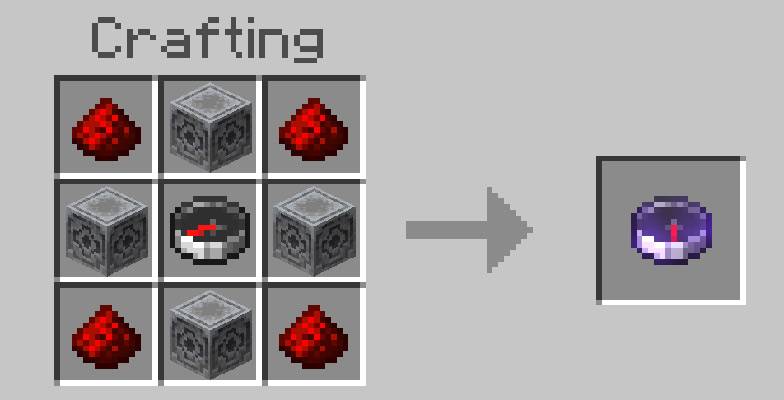
Unlocks the first time you pick up an iron ingot.
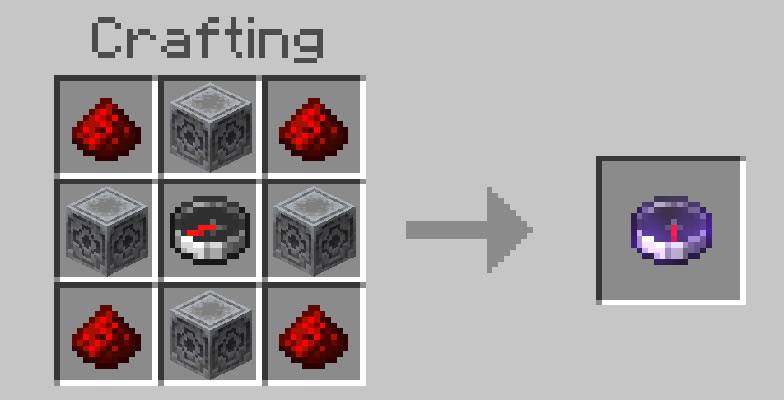
Redstone Dust | Lodestone | Redstone Dust
   Lodestone  |  Compass  |   Lodestone
Redstone Dust | Lodestone | Redstone Dust
Four lodestones, four redstone dust and one vanilla compass, in a crafting table.
Binding a location
Hold the Loaded Compass and right-click any lodestone. A prompt asks what to call it. The name, coordinates, dimension and biome are saved, and the compass immediately begins pointing there.
Bind as many lodestones as you like. Each one is a separate saved entry.
Choosing where the needle points
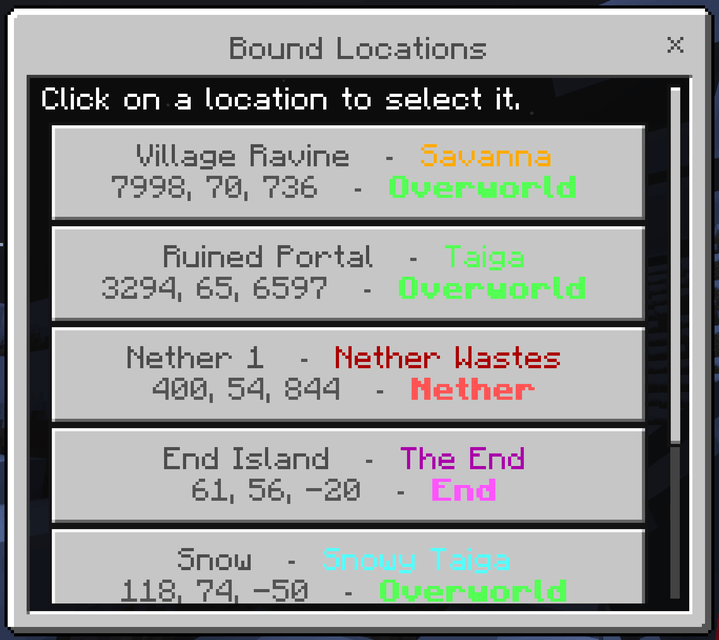
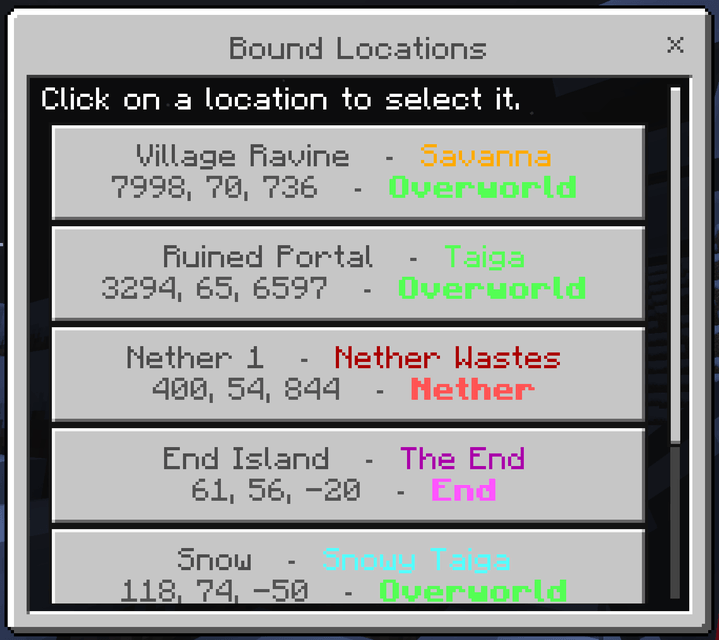
Crouch and right-click to open Bound Locations. Each entry uses two lines — the place and its biome on top, where it is underneath:
Village Ravine - Savanna
7998, 70, 736 - Overworld
The biome is colored to match the place it describes, so gold reads as badlands and desert, aqua as snow and ice, dark green as jungle and swamp, and dark red as the Nether wastes.
The dimension is spelled out in bold and color-coded: green for the Overworld, red for the Nether, purple for the End. Your current target is marked with an arrow. Tap any entry to switch to it.
Deleting locations
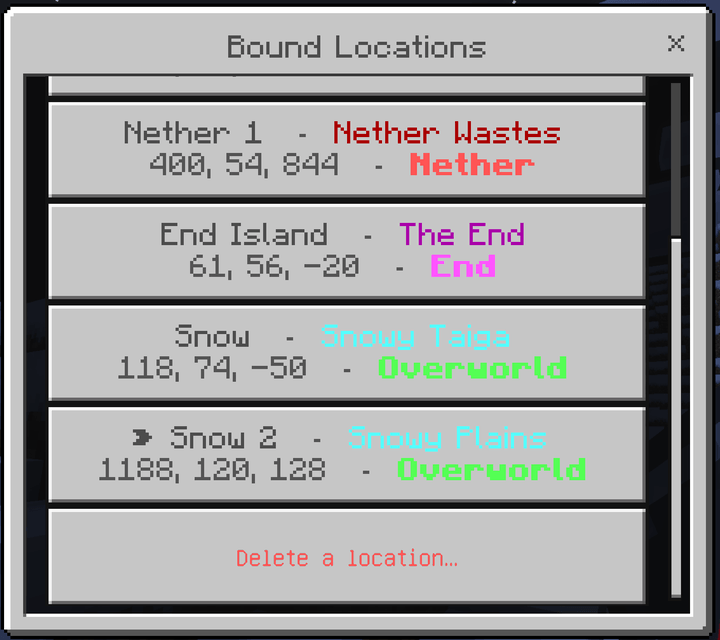
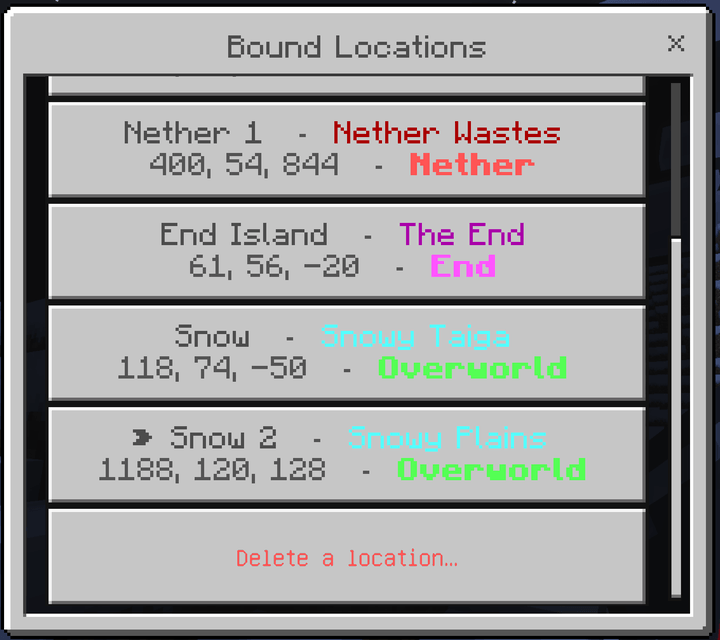
Open the list and choose Delete a location… at the bottom. Deleting is on its own screen so a mis-tap in the list switches targets rather than destroying an entry. Removing an entry only affects your compass — the lodestone itself is untouched.
If a lodestone is broken, the entry for it is removed from your compass automatically and you are told which one was lost.
How the needle behaves
- Points continuously at your selected lodestone, in your hand and in your inventory.
- With nothing bound yet, it points at world spawn, exactly like an unbound vanilla compass.
- If your selected lodestone is in another dimension, the needle spins idly — the same behavior vanilla shows when a lodestone cannot be reached.
Your saved locations
The list is stored on your player, not on the item. Losing the compass, dying, or crafting a replacement never costs you a location. In multiplayer every player keeps their own private list; nobody sees or shares anyone else's.
Compatibility
- Minecraft Bedrock 1.26.30 and newer
- Standard graphics and Vibrant Visuals
- Single-player, multiplayer, Realms and dedicated servers
- Overworld, Nether and End
- Achievement-friendly: no experiments, cheats or operator permissions are required
This add-on modifies the player entity definition in order to draw the compass in your hand. Add-ons that also modify the player entity may conflict; if you run one, load order decides which wins.
Troubleshooting
The recipe does not appear. Pick up an iron ingot at least once. The recipe unlocks on first pickup.
The needle spins and will not settle. Your selected lodestone is in a different dimension. Switch targets, or travel to that dimension.
A location disappeared. Its lodestone was broken. Entries are removed automatically when their lodestone is destroyed.
A location that should be gone is still listed. If you were offline when the lodestone was broken, the entry is cleaned up next time you play.
Nothing happens when I right-click a lodestone. Confirm the behavior pack is active in the world, not just imported.
Reporting problems
Please report issues with: your Minecraft version, the platform you play on, whether you are in single-player, on a Realm or a server, the other add-ons you have active, and what you did just before the problem. Screenshots of the content log help enormously.
Keep Exploring with Andy
If Andy's Loaded Compass keeps your world connected—or simply makes every lodestone more useful—come explore what else Andy is building. Visit AndyTheMakerMC.xyz for more Minecraft Bedrock add-ons, .mcstructure downloads, HoloPrint files, world lore, tutorials, guides, videos, and other creations.
Join the AndyTheMakerMC Community
Follow @AndyTheMakerMC for new add-on releases, development updates, tutorials, showcases, streams, and more Minecraft adventures:
- YouTube
- Twitch
- <input type="checkbox" disabled style="margin: 0px 0.35em 0.25em -1.6em; vertical-align: middle;" checked>(https://x.com/AndyTheMakerMC)
- TikTok
Help Bring More Add-ons to Life
Enjoying the add-on? Ratings, favorites, recommendations, and kind comments all help more Bedrock players discover Andy's work. If you would also like to support future add-ons, guides, videos, and other AndyTheMakerMC projects, you can contribute through Ko-fi or make a direct Stripe contribution. Every bit of support is appreciated, but it is never required.
End-user permission
You may use this add-on in your own worlds, on your own servers, and on your own Realms, including with friends. You may not redistribute the files or re-upload them anywhere.
Content-creator permission
Videos and streams featuring this add-on are welcome and encouraged. Please credit AndyTheMakerMC and link to the official CurseForge page rather than mirroring the download.
License — All Rights Reserved
Copyright AndyTheMakerMC. All rights reserved. Not affiliated with Mojang Studios or Microsoft. Minecraft is a trademark of Mojang Studios.
- Edition: Minecraft Bedrock
- File type: .mcpack or .mcaddon
- Minecraft versions listed: 26.30, 26.40
- How to install: Download the .mcpack or .mcaddon file. → Open it — Minecraft imports it. → In your world: Behavior Packs → Available → Activate, then the same under Resource Packs.
- Where to get it: Opens on CurseForge — not every file is mirrored on our own servers.
Install steps are the general flow for this file type — How to install Minecraft Bedrock addons & mods walks through it step by step.
Andy's Loaded Compass is a free Minecraft Bedrock addon. Compatible with Minecraft 26.30, 26.40. Downloaded 28 times (via CurseForge). Download it and open it directly in the game.