
Ztpa2
Java mod listed for Minecraft 1.21–26.x. Downloads from the MC Java Mods app on Android.
ZTPA is a lightweight, modern teleportation plugin that provides easy-to-use TPA requests, cooldowns, warmups, safe teleportation, and fully customizable…
⬇ Download on Modrinth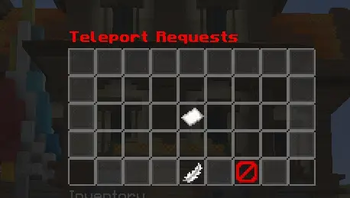
ZTPA
ZTPA is a lightweight, modern and highly configurable teleport-request plugin designed to make player-to-player teleportation simple, safe and enjoyable.
Players can easily send teleport requests to each other using /tpa, while recipients can accept or deny requests with simple commands or clickable chat buttons.
ZTPA is designed with performance, reliability and server-owner customization in mind.
✨ Features
/tpa— Send a teleport request/tpaccept— Accept a teleport request/tpdeny— Deny a teleport request/tpahere— Request another player to teleport to you/tpatoggle— Enable or disable incoming teleport requests- Configurable teleport warmup
- Configurable request cooldown
- Configurable request expiration
- Cancel teleport when the player moves
- Optional damage cancellation during warmup
- Teleport safety checks
- Prevent teleporting into unsafe locations
- Configurable sounds
- Fully customizable messages
- Clickable Accept/Deny buttons
- Multiple pending requests
- Request management
- Permission-based controls
- Admin bypass permissions
- Configurable teleport delay
- Configurable cooldowns
- Lightweight and optimized
- No client-side mod required
- Works completely server-side
- Easy configuration
- Reload-friendly configuration system
🎯 Commands
/tpa <player>
Send a teleport request to another player.
/tpahere <player>
Ask another player to teleport to you.
/tpaccept [player]
Accept a teleport request.
/tpdeny [player]
Deny a teleport request.
/tpatoggle
Toggle whether other players can send you teleport requests.
/tpcancel
Cancel your active teleport.
🔐 Permissions
| Permission | Description | Default |
|---|---|---|
ztpa.tpa |
Use /tpa |
true |
ztpa.tpahere |
Use /tpahere |
true |
ztpa.accept |
Use /tpaccept |
true |
ztpa.deny |
Use /tpdeny |
true |
ztpa.toggle |
Use /tpatoggle |
true |
ztpa.cancel |
Cancel teleportation | true |
ztpa.bypass.cooldown |
Bypass teleport cooldown | op |
ztpa.bypass.warmup |
Bypass teleport warmup | op |
ztpa.bypass.movement |
Ignore movement cancellation | op |
ztpa.admin |
Access administrative features | op |
⚙️ Configuration
ZTPA is designed to be highly configurable.
You can customize:
- Teleport delay
- Request expiration
- Request cooldown
- Movement cancellation
- Damage cancellation
- Fall protection
- Teleport safety
- Sounds
- Messages
- Prefix
- Chat formatting
- Request notifications
- Accept/Deny buttons
- Permission requirements
- World restrictions
- Disabled worlds
- Admin bypass settings
🛡️ Safe Teleportation
ZTPA can check the destination before teleporting.
The plugin can prevent teleportation to locations that are:
- Inside blocks
- Unsafe
- In invalid locations
- Outside configured worlds
- Otherwise prohibited by your configuration
This helps prevent players from accidentally teleporting into dangerous locations.
⏱️ Teleport Warmup
Server owners can configure a teleport delay.
Example:
Teleporting in 5 seconds...
If the player moves before the warmup finishes, the teleport can automatically be cancelled.
This makes ZTPA suitable for survival, SMP, economy and multiplayer servers where instant teleportation may be undesirable.
💬 Clickable Requests
Teleport requests can be displayed using clickable chat components.
Example:
Steve wants to teleport to you.
[ ACCEPT ] [ DENY ]
Players can simply click the appropriate button instead of typing a command.
🔊 Sounds
Optional sounds can be played when:
- A request is sent
- A request is received
- A request is accepted
- A request is denied
- A teleport begins
- A teleport succeeds
- A teleport is cancelled
All sounds should be configurable.
🌍 World Control
Server owners can configure worlds where teleport requests are:
- Allowed
- Disabled
- Restricted
- Completely blocked
This allows ZTPA to work alongside lobby, minigame and survival server setups.
🚀 Performance
ZTPA is designed to remain lightweight.
The plugin avoids unnecessary repeating tasks and expensive operations while keeping teleport requests responsive.
Its goal is to provide useful teleportation features without adding unnecessary server overhead.
🧩 Compatibility
ZTPA is designed for modern Minecraft server environments.
No client-side installation is required.
Players can use the plugin with a normal Minecraft client.
📦 Installation
- Download the latest ZTPA
.jar. - Stop your Minecraft server.
- Place
ZTPA.jarinside yourpluginsfolder. - Start the server.
- Configure the generated files inside the ZTPA folder.
- Restart or reload the plugin according to the plugin's supported configuration workflow.
- Give players the required permissions.
📝 Example
Player A:
/tpa PlayerB
Player B receives:
PlayerA wants to teleport to you.
[ ACCEPT ] [ DENY ]
Player B accepts the request.
Player A receives:
Teleporting in 5 seconds. Do not move!
After the warmup:
Teleportation successful!
🔧 Recommended Server Types
ZTPA is suitable for:
- Survival servers
- SMP servers
- Lifesteal servers
- Economy servers
- Towny-style servers
- Prison servers
- Skyblock servers
- Factions servers
- Community servers
- Network survival servers
📌 Why ZTPA?
ZTPA focuses on the features players actually need from a teleport-request system while keeping the plugin lightweight and easy for server owners to configure.
Simple commands.
Clean messages.
Safe teleportation.
Flexible configuration.
Reliable performance.
That's ZTPA.
- Edition: Minecraft Java
- File type: .jar
- Minecraft versions listed: 1.21, 1.21.1, 1.21.2
- How to install: Install the matching mod loader (Forge, Fabric or NeoForge) for your Minecraft version. → Download the .jar. → Put it in the .minecraft/mods folder and launch that loader profile.
- Where to get it: Opens on Modrinth — not every file is mirrored on our own servers.
Install steps are the general flow for this file type — How to install Minecraft Java mods & modpacks walks through it step by step.
- Ships as ZTpa-1.0.0.jar — drop this file into the mods folder
- Download size: 59 KB
- Download link checked 17 Oct 2026 — working
These come from our own check of the pack file, not from the source page.