
Downs
Timed area-mining tools with their own AFK-earned currency.
Nine tools across three tiers. Buy them with Downs, a coin your players earn by standing still. Every tool breaks a rectangle of blocks in one swing, then destroys itself when its timer runs out — so nobody keeps a 36-block pickaxe forever.
Everything is driven from one commented config.yml. Sizes, prices, timers, colours, messages, the shop layout and the scoreboard are all editable without touching code, and /downs reload applies changes live.
The tools
Three sections, three tiers each. Every tool is Netherite with Mending, Unbreaking V and Efficiency V.
| Area | Blocks / swing | Pickaxe | Axe | Shovel | Lifetime | |
|---|---|---|---|---|---|---|
| Down | 3 × 3 | 9 | 90 | 150 | 150 | 3 h |
| Stripe | 7 × 3 | 21 | 250 | 400 | 400 | 3 h |
| Owen | 9 × 4 | 36 | 600 | 900 | 900 | 8 h |
The rectangle follows your aim. It is drawn on the face you are looking at, so mining downward carves a flat floor and mining into a wall carves a flat tunnel. Set depth above 1 to cut into the wall as well.
Self-destruct starts the moment the tool is bought — real time, not playtime. A live countdown sits on the item lore, the player is warned at 60 seconds, and the tool is deleted at zero. Set self-destruct-seconds: 0 for a permanent tool.
Your builds are safe
Each section only breaks what it should:
- Pickaxes — stone, deepslate, dirt, gravel, sand, netherrack, every ore (57 blocks)
- Axes — logs, stripped logs, planks, leaves, mushroom blocks (56 blocks)
- Shovels — dirt, sand, gravel, clay, mud, snow, soul sand (25 blocks)
A 9-wide tool cannot chew through houses, chests or farms. The block you actually click always breaks as normal, so single blocks of anything still mine fine — only the extra area is filtered. Every list is editable, and emptying one removes the restriction.
Containers break the vanilla way so their contents spill out instead of vanishing, and liquids are skipped so nobody drains an ocean.
Downs currency
Players type /downs afk and earn 1 Down every 30 seconds while standing still, shown above the hotbar. Walking more than 1.5 blocks ends it and they retype to restart. Rate, radius and movement cancelling are all configurable. Balances save on quit, on shutdown, and every 5 minutes.
Paged shop
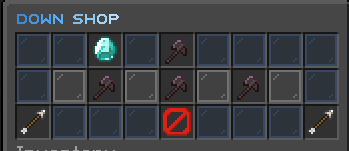
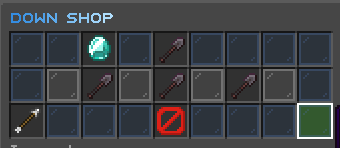
/downshop opens one page per section with next / previous arrows. Each page shows your balance, which section you are on, and its three tiers with live prices — including how many more Downs you need if you can't afford one.
Scoreboard
A sidebar showing the player's balance, on by default. Any player can hide or show their own with /downs sb, and the choice is remembered across restarts. The red score number Minecraft normally prints beside each line is hidden.
Commands
| Command | Permission | |
|---|---|---|
/downshop |
downs.shop (everyone) |
Open the shop |
/downs |
downs.use (everyone) |
Your balance |
/downs afk |
downs.use (everyone) |
Toggle AFK earning |
/downs sb |
downs.use (everyone) |
Scoreboard on / off |
/downs help |
downs.use (everyone) |
Command list |
/downs reload |
downs.admin (op) |
Reload config live |
/downs give <player> <amount> |
downs.admin (op) |
Add Downs |
/downs take <player> <amount> |
downs.admin (op) |
Remove Downs |
/downs set <player> <amount> |
downs.admin (op) |
Set a balance |
/downs tool <player> <id> |
downs.admin (op) |
Give a tool free |
/downs <player> |
downs.admin (op) |
Another player's balance |
Aliases: /dshop /pshop · /down /coins · /dp /downsadmin
Tool ids: down_pickaxe stripe_pickaxe owen_pickaxe down_axe stripe_axe owen_axe down_shovel stripe_shovel owen_shovel
All commands have tab completion, and it adapts — players only see afk, sb and help.
Permissions
| Node | Default | |
|---|---|---|
downs.use |
everyone | /downs, afk, sb, help |
downs.shop |
everyone | /downshop |
downs.tool.use |
everyone | Lets the area effect trigger |
downs.tool.<section>.<tier> |
everyone | Buying one specific tool |
downs.admin |
op | All admin subcommands |
Theme
Every string is Unicode sᴍᴀʟʟ ᴄᴀᴘs with hex colours and gradients — no & codes anywhere:
"<gradient:#1877C4:#8ED0FF:#FFFFFF><bold>ᴏᴡᴇɴ ᴘɪᴄᴋᴀxᴇ</bold></gradient>"
Type new messages in normal letters and small-caps-auto converts them for you, leaving colour tags and %placeholders% untouched.
Adding your own
Copy a section in tools: and you have a new category — the shop picks it up as another page automatically, no code required.
Requirements
- Paper 1.21+
- Java 21
- No dependencies
Drop the jar in plugins/ and restart. config.yml generates itself on first run, and carries a version stamp so an outdated config is backed up and regenerated rather than half-breaking.
Known limits
- Blocks removed by the area effect do not fire
BlockBreakEvent, so land-protection plugins (WorldGuard, GriefPrevention, Towny) will not see them. Restrict the tools to a mine world, or lean on the breakable lists.
- Edition: Minecraft Java
- File type: .jar
- Minecraft versions listed: 1.21, 1.21.1, 1.21.2
- How to install: Install the matching mod loader (Forge, Fabric or NeoForge) for your Minecraft version. → Download the .jar. → Put it in the .minecraft/mods folder and launch that loader profile.
- Where to get it: Opens on Modrinth — not every file is mirrored on our own servers.
Install steps are the general flow for this file type — How to install Minecraft Java mods & modpacks walks through it step by step.
- Ships as Downs-1.6.0 3.jar — drop this file into the mods folder
- Download size: 56 KB
- Download link checked 6 Sept 2026 — working
These come from our own check of the pack file, not from the source page.