Biner SlashServer
Java mod listed for Minecraft 1.20–26.x. Downloads from the MC Java Mods app on Android.
BinerSlashServer is a lightweight Velocity plugin that simplifies server switching by allowing players to connect to servers using simple slash commands…
⬇ Download on Modrinth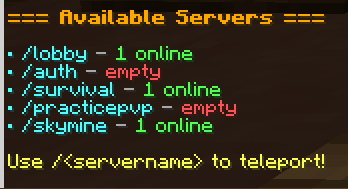
ADDED COMMANDS FOR VELOCITY!
BinerSlashServer adds a set of simple and powerful commands to your Velocity network, making server navigation and player management faster and more convenient.
🚀 Commands
/servers→ View all available servers along with their current player counts./glist→ Display a complete list of players across all connected servers./<servername>→ Instantly connect to the specified server without using/server <name>.
✨ Why BinerSlashServer?
BinerSlashServer is designed to provide a cleaner and faster server-switching experience for players.
Instead of typing:
/server survival
Players can simply type:
/survival
The plugin detects the server name and automatically handles the connection through Velocity.
It also provides quick access to network-wide server and player information, making it easier to see what's happening across your entire network.
⚡ Features
- Lightweight and optimized for Velocity
- Fast server switching
- Simple and intuitive commands
- Network-wide player information
- Supports multiple backend servers
- No complicated commands required
- Designed for modern Minecraft networks
- Easy to use for both players and staff
🌐 Our Server
Play.BinerCraft.iR
BinerSlashServer is built for modern Minecraft networks and provides a clean, simple way to navigate between servers.
Made for Velocity. Built for BinerCraft.
- Edition: Minecraft Java
- File type: .jar
- Minecraft versions listed: 1.20.4, 1.20.5, 1.20.6
- How to install: Install the matching mod loader (Forge, Fabric or NeoForge) for your Minecraft version. → Download the .jar. → Put it in the .minecraft/mods folder and launch that loader profile.
- Where to get it: Opens on Modrinth — not every file is mirrored on our own servers.
Install steps are the general flow for this file type — How to install Minecraft Java mods & modpacks walks through it step by step.
- Ships as binerslashserver-1.0.0.jar — drop this file into the mods folder
- Download size: 7 KB
- Download link checked 17 Oct 2026 — working
These come from our own check of the pack file, not from the source page.