
VoiceGroupCleaner
Java mod listed for Minecraft 26.x. Downloads from the MC Java Mods app on Android.
Keeps Simple Voice Chat groups locked to an allow-list, auto-kicks and cleans up any custom group players try to make.
⬇ Download on Modrinth
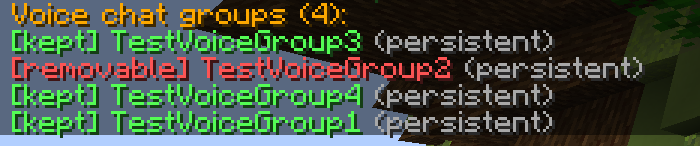
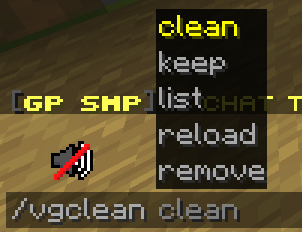



Keeps Simple Voice Chat groups locked to an allow-list. Any group not on your list gets cleaned up automatically, and anyone who tries to make their own custom group gets bounced straight back out: instantly, with a warning.
No more random voice groups cluttering your server. You decide which groups exist, everything else gets swept away.


✨ Features
- Allow-list based cleanup: any Simple Voice Chat group not on your list is removed on a timer.
- Instant group-create guard: the moment a player creates a disallowed group, they're kicked out of it, see an actionbar warning, hear a sound, and any extra commands you've configured run for them.
- Fully configurable reaction: nothing is hardcoded. Which commands run, what sound plays, what text the player sees: all set in
config.yml. /vgcleanadmin command: reload, list, manually clean, and manage the allow-list in-game.- Placeholders:
%player%,%displayname%,%group%,%count%,%flags%across commands and messages.
🧩 Supported Platforms
Compiled against the Paper API, which stays backwards compatible within a Minecraft version line: so one jar covers all of these, from 1.20 through the latest release:




Click a loader above to jump straight to the matching version list.
There is no Quilt/Fabric build: Quilt is a mod loader, not a plugin loader, and this plugin can't run on it without a Bukkit-compatibility layer like Cardboard, which isn't officially supported here.
📥 Installation
- Install Simple Voice Chat on your server first: it's a hard dependency.
- Drop
VoiceGroupCleaner-<version>.jarinto yourplugins/folder. - Restart the server, then edit
plugins/VoiceGroupCleaner/config.ymlto your liking. - Run
/vgclean reloadto apply changes without a restart.
⚙️ Commands
Permission required for all subcommands: vgclean.reload (default: op)
| Command | Description |
|---|---|
/vgclean reload |
Reloads config.yml and restarts the cleanup timer. |
/vgclean list |
Lists every Simple Voice Chat group and whether it's kept, removable, protected, or auto-managed. |
/vgclean clean |
Runs a cleanup pass immediately instead of waiting for the timer. |
/vgclean keep <name> |
Adds a group name to allowed-groups and saves it. |
/vgclean remove <name> |
Removes a group name from allowed-groups and saves it. |
✅ How to Allow-List a Group
There are two ways to add a group to the allow-list:
Option 1: In-game command (recommended, no restart and reload needed)
/vgclean keep <group-name>
This adds <group-name> straight into allowed-groups in config.yml and saves the file immediately: the group is protected from that point on.
Option 2: Edit config.yml directly
allowed-groups:
  - "Squad Alpha"
  - "Staff Chat"
  - "Building Team"
Add the exact group name (case-sensitive, must match the Simple Voice Chat group name) as a new line under allowed-groups, save the file, then run /vgclean reload to apply it.
To remove a group from the list instead, use /vgclean remove <group-name> or delete its line from config.yml and reload.
Any group not on this list is fair game for cleanup on the next timer sweep (or immediately if you run /vgclean clean).
🛠️ Configuration Reference
| Key | What it does |
|---|---|
check-interval |
How often (in ticks, 20 = 1 second) the cleanup sweep runs. |
debug |
Logs every action the plugin takes when true. |
ignore-password-protected |
Password-protected groups are never auto-removed when true. |
allowed-groups |
The only group names players are allowed to be in. Everything else is fair game for cleanup. |
group-create-guard.enabled |
Turns the instant kick-on-create behavior on/off. |
group-create-guard.delay-ticks |
Delay before acting on a disallowed group. |
group-create-guard.commands |
List of commands run as the player when they get kicked. Add as many as you like, one per line. |
group-create-guard.sound / sound-volume / sound-pitch |
The sound played on the player when they're kicked. Any Bukkit Sound name works. |
messages.* |
Every player-facing string, &-color-coded. |
Example group-create-guard.commands:
group-create-guard:
  commands:
    - "voicechat leave"
    - "playsound minecraft:block.anvil.land player %player% ~ ~ ~ 1 1"
    - "tell %player% &7Custom voice groups aren't allowed here."
Full breakdown of every option lives in the docs linked below.
🔗 Links







- Edition: Minecraft Java
- File type: .jar
- Minecraft version listed: 26.2
- How to install: Install the matching mod loader (Forge, Fabric or NeoForge) for your Minecraft version. → Download the .jar. → Put it in the .minecraft/mods folder and launch that loader profile.
- Where to get it: Opens on Modrinth — not every file is mirrored on our own servers.
Install steps are the general flow for this file type — How to install Minecraft Java mods & modpacks walks through it step by step.
- Ships as vgcleaner-spigot-1.2.0+mc26.2.jar — drop this file into the mods folder
- Download size: 36 KB
- Download link checked 7 Nov 2026 — working
These come from our own check of the pack file, not from the source page.