
🎲 TickRandomizer
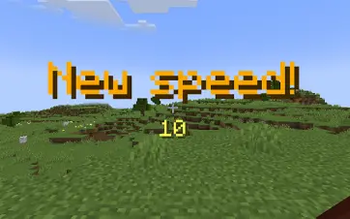
TickRandomizer is a fun and chaotic plugin that randomly changes the speed of your Minecraft server every 100 seconds! Perfect for YouTube challenges, chaotic SMPs, or just having fun with your friends.
Instead of just instantly changing the speed, the plugin features a suspenseful roulette spin animation on the screen, building hype before the new tick rate (TPS) drops!
✨ Features
- Dynamic Speed Changes: Every 100 seconds, the server tick rate is randomized. It can go down to super slow-motion (
1.0TPS) or up to extreme speeds! - Roulette Animation: When the timer hits zero, a spinning wheel animation plays on screen with titles and pitch-increasing sounds, followed by particles when the new speed is chosen.
- Action Bar HUD: Players can easily track the current server speed and the time remaining until the next randomization via a clean action bar message.
- Auto-Pause: If no players are online, the timer automatically resets and pauses, returning the server to the default
20.0TPS to save resources. - Native API: Built using the official ServerTickManager API introduced in 1.20.3 for smooth, crash-free speed modifications.
⚙️ Commands & Permissions
Server admins can easily control the maximum speed limit the roulette can land on.
/tickrandomizer max <value>- Sets the maximum possible tick rate (from1.0to10000.0). Default is100.0.- Permission required:
tickrandomizer.admin(or Server OP).
🛠️ Requirements
Because this plugin utilizes the native tick manipulation methods, your server must be running Paper or Spigot 1.20.3 or newer. Older versions are not supported.
- Edition: Minecraft Java
- File type: .jar
- Minecraft versions listed: 1.21, 1.21.1, 1.21.2
- How to install: Install the matching mod loader (Forge, Fabric or NeoForge) for your Minecraft version. → Download the .jar. → Put it in the .minecraft/mods folder and launch that loader profile.
- Where to get it: Opens on Modrinth — not every file is mirrored on our own servers.
Install steps are the general flow for this file type — How to install Minecraft Java mods & modpacks walks through it step by step.
- Ships as TickRandomizer-1.0.jar — drop this file into the mods folder
- Download size: 8 KB
- Download link checked 7 Sept 2026 — working
These come from our own check of the pack file, not from the source page.