
Cocoria Top10
This plugin adds the command top10, that shows the top10 on diferent categories. You can add more in the config
⬇ Download on Modrinth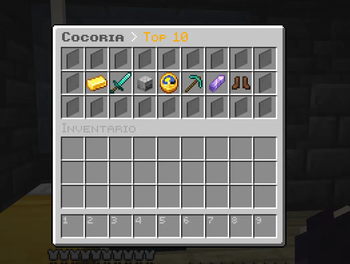
🏆 Top10Plugin
Top10Plugin adds a clean, fully configurable Top 10 leaderboard system to your Minecraft Paper server.
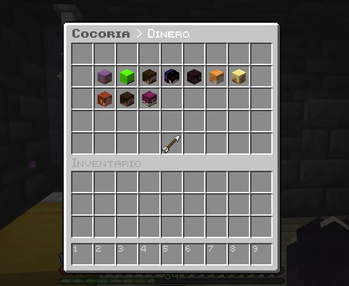
Players can use /top10 to open a GUI and choose between different rankings. Each leaderboard displays the Top 10 players with their Minecraft heads, making it easy to see who is leading each category.
📊 Included Rankings
- 💰 Money — Players with the highest economy balance
- ⚔️ Kills — Players with the most player kills
- 💀 Deaths — Players with the most deaths
- ⏱️ Playtime — Players with the most time played
- ⛏️ Blocks Mined — Players who have mined the most blocks
- 💎 Shards — Players with the most PlayerPoints
- 👟 Distance Walked — Players who have walked the furthest
⚙️ Fully Configurable
Almost everything can be customized through config.yml.
You can change:
- GUI titles
- GUI sizes
- Category names
- Category icons
- Category slots
- Leaderboard slots
- Value formats
- Descriptions
- Update intervals
➕ Add Your Own Categories
Top10Plugin is designed to be expandable.
You can add additional leaderboard categories through the configuration without modifying the plugin source code, using the supported statistic types.
For example, you can create rankings for other Minecraft statistics such as jumps, items used, or other supported statistics.
🖥️ GUI
Use:
/top10
to open the main leaderboard menu.
Choose a category and the plugin will display the Top 10 players.
Each player is shown with:
- 🏅 Their position
- 👤 Their Minecraft head
- 📛 Their username
- 📊 Their current value
Player heads also work for players who are currently offline.
🔌 Integrations
Vault
Used for the Money leaderboard.
Vault acts as the bridge between Top10Plugin and your server's economy plugin.
PlayerPoints
Used for the Shards leaderboard.
Both integrations are optional. The other leaderboards will continue working if Vault or PlayerPoints is not installed.
🧩 Commands
/top10
Opens the Top 10 menu.
/top10 reload
Reloads the plugin configuration.
Aliases
/topten/rankings
🔐 Permissions
| Permission | Description | Default |
|---|---|---|
top10.use |
Allows the player to use /top10 |
Everyone |
top10.admin |
Allows the player to reload the configuration | OP |
📦 Requirements
- Paper 26.1.2+
- Java 25+
- Vault (optional, required for the Money leaderboard)
- PlayerPoints (optional, required for the Shards leaderboard)
🎮 Perfect For
Top10Plugin is ideal for:
- 🏠 SMP servers
- 🌎 Survival servers
- 💰 Economy servers
- ⚔️ Competitive servers
- 🏆 Community servers
Give your players something to compete for and make your server's best players visible!
📜 License
Top10Plugin is licensed under the MIT License.
- Edition: Minecraft Java
- File type: .jar
- Minecraft versions listed: 26.1, 26.1.1, 26.1.2
- How to install: Install the matching mod loader (Forge, Fabric or NeoForge) for your Minecraft version. → Download the .jar. → Put it in the .minecraft/mods folder and launch that loader profile.
- Where to get it: Opens on Modrinth — not every file is mirrored on our own servers.
Install steps are the general flow for this file type — How to install Minecraft Java mods & modpacks walks through it step by step.
- Ships as Top10Plugin-1.0.0.jar — drop this file into the mods folder
- Download size: 24 KB
- Download link checked 27 Sept 2026 — working
These come from our own check of the pack file, not from the source page.