
CactusAFK
A lightweight AFK rewards plugin with custom AFK zones, configurable rewards, an AFK shop, PlaceholderAPI support, and admin tools.
⬇ Download on Modrinth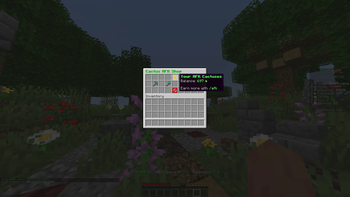
🌵 CactusAFK
CactusAFK is a lightweight and highly configurable AFK rewards plugin for Minecraft servers.
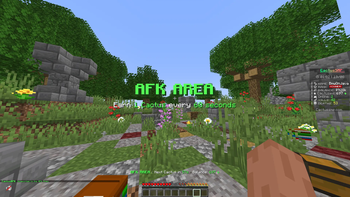
Create your own AFK area where players can earn AFK Cactuses over time and spend them in a fully configurable GUI shop.
Perfect for Survival, SMP, Economy and Community servers that want to reward players while they are AFK.
✨ Features
- 🌵 Custom AFK currency
- ⏱️ Automatic AFK rewards
- 🏝️ Custom AFK area
- 🛒 Configurable
/afkshopGUI - 🎁 Customizable shop rewards
- 💾 Player balances are automatically saved
- 🚀
/afkteleport system - ⏳ Configurable teleport countdown
- 🚫 Moving cancels the teleport
- 🛡️ AFK area protection
- 🔧 Admin management commands
- 📊 PlaceholderAPI support
- ⚙️ Configurable messages and settings
- 🔄 Automatic configuration updates
- 🪶 Lightweight and easy to configure
🎮 Player Commands
/afk
Teleports you to the configured AFK area.
A countdown is displayed before teleporting. Moving during the countdown will cancel the teleport.
/afkshop
Opens the AFK Shop.
Players can spend their earned AFK Cactuses 🌵 on configurable rewards.
/cactusafk balance
Shows your current AFK Cactus balance.
🛠️ Admin Commands
/cactusafk give <player> <amount>
Gives AFK Cactuses to a player.
/cactusafk take <player> <amount>
Removes AFK Cactuses from a player.
/cactusafk set <player> <amount>
Sets a player's AFK Cactus balance.
/cactusafk reload
Reloads the plugin configuration.
Additional setup commands are available for configuring the AFK area and teleport location.
🌵 AFK Rewards
Players inside the configured AFK area automatically receive AFK Cactuses.
The reward amount and interval can be customized in the configuration.
For example:
1 AFK Cactus every 60 seconds
Balances are saved automatically and remain available after server restarts.
🛒 AFK Shop
CactusAFK includes a configurable inventory-based shop.
Server owners can customize:
- Item material
- Display name
- Lore
- Slot
- Price
- Reward amount
- Console commands
- Shop layout
- Sounds
- Messages
This means you can create your own rewards without modifying the plugin.
Example rewards could include:
- Diamonds
- Golden Apples
- XP Bottles
- Iron
- Crate Keys
- Server currency
- Ranks
- Custom rewards
Rewards from other plugins can also be configured using console commands.
📊 PlaceholderAPI
CactusAFK supports PlaceholderAPI.
This allows you to display AFK Cactus information in scoreboards, TAB lists, holograms and other PlaceholderAPI-compatible plugins.
⚙️ Configuration
CactusAFK is designed to be configurable without editing the plugin itself.
The generated configuration files allow you to customize the AFK system, shop, rewards and messages.
Existing configuration values are preserved when new configuration options are added in future updates.
📦 Installation
- Download CactusAFK.
- Stop your Minecraft server.
- Place the
.jarinside your/plugins/folder. - Start the server.
- Configure your AFK area.
- Customize the generated configuration files.
- Reload or restart the server.
🔌 Compatibility
Server Software:
- Paper
Minecraft:
- 1.21.x
Java:
- Java 17+
Optional Dependency
- PlaceholderAPI
💬 Support
Need help setting up CactusAFK, found a bug, or have a question?
Join our Discord server for support:
discord.gg/cactussmp
Feel free to ask questions, report bugs, or suggest new features!
🔒 License
All Rights Reserved
You may use CactusAFK on your Minecraft server.
You may not redistribute, resell, modify, reupload, decompile, or claim CactusAFK or its source code as your own without explicit permission from the author.
© CactusAFK. All rights reserved.
- Edition: Minecraft Java
- File type: .jar
- Minecraft versions listed: 1.21, 1.21.1, 1.21.2
- How to install: Install the matching mod loader (Forge, Fabric or NeoForge) for your Minecraft version. → Download the .jar. → Put it in the .minecraft/mods folder and launch that loader profile.
- Where to get it: Opens on Modrinth — not every file is mirrored on our own servers.
Install steps are the general flow for this file type — How to install Minecraft Java mods & modpacks walks through it step by step.
- Ships as CactusAFK-1.2.2-Public.jar — drop this file into the mods folder
- Download size: 34 KB
- Download link checked 7 Sept 2026 — working
These come from our own check of the pack file, not from the source page.