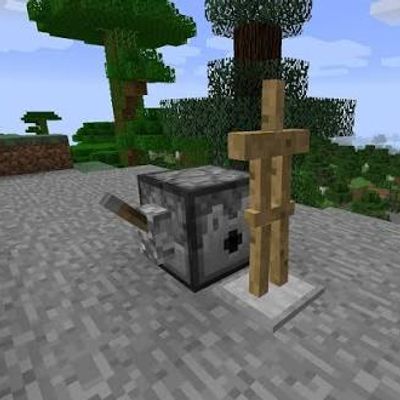
Armor Stand dispenser
Bedrock add-on listed for Minecraft 1.21–26.x (behavior pack only). File opened and checked on 6 Oct 2026; installs from the MC Bedrock Mods app on Android.
⬇ Download on CurseForgeThe author built this one for Minecraft 26.40. On other versions it may install and then do nothing.
# Armor Stand Dispenser
The Armor Stand Dispenser is a Minecraft Bedrock add-on that allows dispensers to automatically place armor stands when activated by redstone.
## Features
• Automatically spawns an armor stand when a dispenser is activated.
• One activation spawns exactly one armor stand.
• Supports redstone activation using buttons, levers, pressure plates, and other redstone mechanisms.
• The armor stand is placed in the direction the dispenser is facing.
• Designed to work with trap builds, automated contraptions, PvP setups, and other redstone creations.
• Lightweight and simple to use.
## How It Changes Gameplay
Normally, dispensers cannot directly place armor stands. This add-on adds a convenient way to automate armor stand placement, making it possible to create more advanced redstone mechanisms and traps.
For example, you can connect a dispenser to a redstone trigger and use it to automatically place an armor stand as part of a trap or hidden mechanism. This can save time when building large automated systems and gives Bedrock players more possibilities for redstone creations.
## How To Use
1. Install and activate the add-on in your Minecraft Bedrock world.
2. Place the Armor Stand Dispenser.
3. Add an armor stand to the dispenser.
4. Connect the dispenser to a redstone signal.
5. Activate the redstone signal.
6. One armor stand will be placed in front of the dispenser.
The Armor Stand Dispenser is especially useful for players who build PvP traps, redstone machines, automated systems, and custom Minecraft maps.
## Important
This add-on is made for Minecraft Bedrock Edition. Make sure you are using a compatible Minecraft version and have the required behavior pack enabled.
Have fun building! ⚡(also its the first version so it might be bugged
- Edition: Minecraft Bedrock
- File type: .mcpack or .mcaddon
- Minecraft version listed: 26.40
- How to install: Download the .mcpack or .mcaddon file. → Open it — Minecraft imports it. → In your world: Behavior Packs → Available → Activate, then the same under Resource Packs.
- Where to get it: Opens on CurseForge — not every file is mirrored on our own servers.
Install steps are the general flow for this file type — How to install Minecraft Bedrock addons & mods walks through it step by step.
- Pack type: .mcpack — a single pack
- Manifest requires Minecraft 1.21.0 or newer
- Complete pack — everything it depends on is inside the file
- Download size: 2 KB
- Download link checked 18 Oct 2026 — working
These come from our own check of the pack file, not from the source page.