
DuskChat
Java mod listed for Minecraft 1.20–26.x. Downloads from the MC Java Mods app on Android.
A lightweight, configurable chat plugin for Paper and Folia with custom formats, mentions, private messages, moderation filters, and safe inventory…
⬇ Download on Modrinth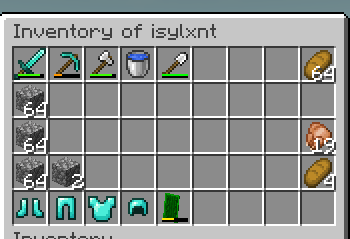
DuskChat
DuskChat is a configurable chat plugin for Paper and Folia servers. It handles chat formatting, mentions, private messages, moderation tools, player information and interactive item or inventory previews without making players install anything on their clients.
Public chat never waits for the database. Player preferences are saved to SQLite on a separate worker, while player and inventory actions use the correct Paper or Folia scheduler.
Chat formatting
Create as many chat formats as you need and assign them through permissions and priorities. Formats support:
- Legacy color and decoration codes
- Hex colors
- Supported MiniMessage tags
- PlaceholderAPI values
- LuckPerms prefixes, suffixes and primary groups
Player names can show a configurable hover with their rank, kills, deaths, ping, playtime and any PlaceholderAPI values you add. Clicking the name can suggest or run a private-message command.
Mentions
Players can mention someone by typing their exact name. Requiring @Name is optional.
Mention highlighting, sounds, actionbars and chat notifications can all be configured separately. Mentions also respect ignored players when that option is enabled.
Item and inventory previews
Players can share information directly in chat with:
[item]to show the item in their hand[inv]to share a snapshot of their inventory[ec]to share a snapshot of their ender chest
Inventory previews are read-only. They expire automatically, have a configurable cache limit and close when DuskChat reloads or disables.
Private and staff chat
DuskChat includes:
/msgand/reply/ignore/msgtoggle/chattoggle/staffchat/spy/chatmute/chatclear
Private-message formats and sounds are configurable. The receiving player hears an amethyst chime by default, and selected commands can use their own sounds.
Chat filters
Each filter can be enabled, disabled or bypassed with a separate permission. Available filters include:
- Repeated-character flooding
- Excessive capital letters
- Domains and IPv4 addresses
- Custom Java regular expressions
- Repeated or closely similar messages
- Message length and chat cooldown
Configuration
Most settings are kept in config.yml, while command and filter messages are stored in messages.yml.
Both files can be reloaded without restarting the server. DuskChat adds missing defaults after an update, creates a backup before migrating older configs and includes /duskchat validate to report configuration problems in the console.
Dependencies
DuskChat has no required plugin dependencies.
- PlaceholderAPI: Optional, used for external placeholders
- LuckPerms: Optional, used for native rank information
SQLite is included as a runtime library, so no external database server is needed.
Compatibility
- Built for Paper and Folia
- Compiled against the Paper 1.20.3 API
- Uses Java 17 bytecode
- Server-side only; players do not need to install anything
Your Paper or Folia build may require a newer Java version.
Installation
- Place the DuskChat JAR in your server's
pluginsfolder. - Start the server once to generate the configuration files.
- Edit
plugins/DuskChat/config.ymlandmessages.yml. - Run
/duskchat validate, then/duskchat reload.
For production updates, replacing the JAR during a full server restart is recommended.
License
DuskChat is licensed under the MIT License.
- Edition: Minecraft Java
- File type: .jar
- Minecraft versions listed: 1.20.1, 1.20.2, 1.20.3
- How to install: Install the matching mod loader (Forge, Fabric or NeoForge) for your Minecraft version. → Download the .jar. → Put it in the .minecraft/mods folder and launch that loader profile.
- Where to get it: Opens on Modrinth — not every file is mirrored on our own servers.
Install steps are the general flow for this file type — How to install Minecraft Java mods & modpacks walks through it step by step.
- Ships as DuskChat-1.0.jar — drop this file into the mods folder
- Download size: 86 KB
- Download link checked 28 Sept 2026 — working
These come from our own check of the pack file, not from the source page.