VxRent
Java mod listed for Minecraft 1.21. Downloads from the MC Java Mods app on Android.
⬇ Download on Modrinth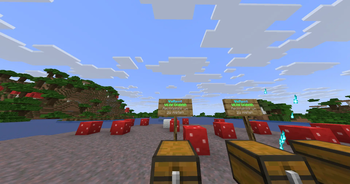
VxRent – Professional Chest Rental System
About VxRent
VxRent is the ultimate solution for server administrators who want to implement a fair and immersive economic system. Whether for roleplay servers where players rent marketplace stalls or storage spaces, or for survival servers needing organized storage, VxRent delivers maximum flexibility with minimal resource consumption.
Developed by VXPlugins, VxRent stands for stability, easy configuration, and an intuitive user experience.
Features
- Platform Support: Full support for Folia, Paper, and Purpur.
- Flexible Rental System: Players can rent chests for defined periods.
- Perfect for RP: Create vibrant marketplaces, public warehouses, or bank safety deposit boxes.
- Fully Configurable: Individually set rental prices, maximum rental durations, and currencies.
- GUI-Based: Intuitive controls for players to check rental status and expiration times.
- High Performance: Optimized to prevent server lag even with many active rental contracts.
Commands & Permissions
| Command | Permission | Description |
|---|---|---|
/vxrent |
(None) | Main command & info |
/vxrent admin |
vxrentchests.admin |
Admin panel for settings |
Installation
- Download the
VxRent.jarfile. - Copy the file into your
/pluginsfolder. - Restart your server.
- Done! (The configuration file will be generated automatically).
Support
Do you have questions or suggestions for new features? At VXPlugins, we are continuously working on improving our tools. Visit our repository or leave us feedback on Discord!
- Edition: Minecraft Java
- File type: .jar
- Minecraft versions listed: 1.21, 1.21.1, 1.21.2
- How to install: Install the matching mod loader (Forge, Fabric or NeoForge) for your Minecraft version. → Download the .jar. → Put it in the .minecraft/mods folder and launch that loader profile.
- Where to get it: Opens on Modrinth — not every file is mirrored on our own servers.
Install steps are the general flow for this file type — How to install Minecraft Java mods & modpacks walks through it step by step.
- Ships as vxrentchests-1.0-SNAPSHOT.jar — drop this file into the mods folder
- Download size: 643 KB
- Download link checked 18 Oct 2026 — working
These come from our own check of the pack file, not from the source page.