
Zoey's Expanded Vanilla
Java mod listed for Minecraft 26.x. Downloads from the MC Java Mods app on Android.
Adds a number of QoL changes, fills out block sets, and adds few features for equipment while trying to remain vanilla friendly.
⬇ Download on Modrinth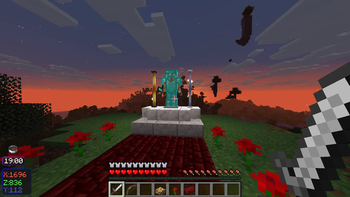
Zoey's Expanded Vanilla
Zoey's Expanded Vanilla is a project aimed at adding relatively vanilla-friendly features and functionality to survival Minecraft.
What does ZEV change?
There are four major areas where changes are made:
Expanded resource recycling. More organic items can be composted, while more gear and blocks can be smelted back down into raw ingredients.
New Curios utility slots. Six new utility slots breathe new life into vanilla equipment, with a seventh slot dedicated to a brand-new quiver item with unique and customizable behavior. These slots not only aim to make existing equipment more useful, but also help free up inventory space by moving utility items into dedicated slots.
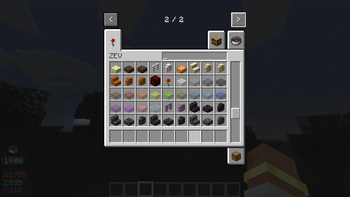
New blocks that fill gaps in existing block sets. This includes things Mojang never added, such as cracked stone brick walls and red Nether brick fences, as well as slabs for blocks that benefit from extra decorative options, such as glass, dirt, and more.
New and standardized crafting recipes. For example, all slabs can now be crafted back into their parent blocks, bells have a new crafting recipe, and blocks with smooth variants can be smelted directly from their corresponding base variants, such as sandstone stairs into smooth sandstone stairs.
And more! Check the full list of changes below for all the details.
Please feel free to report any issues you run into, or just leave feedback.
This is my first mod, which I began creating for myself, mostly on a whim. I've put a lot of soul and thought into it, and I hope you enjoy.
Full Feature List
Equipment & Utility
1. Quiver
In ye olden days, Minecraft had a quiver item, but it never received full functionality before being cut. ZEV's quiver recreates that idea with an updated texture and fully functional inventory system.
Right-click the item while holding it, or press X by default while it is equipped in your quiver slot, to open a three-slot inventory.
You can store up to three stacks of valid ammunition for bows and crossbows. Both weapons can automatically pull ammunition from the quiver while it is equipped, but bows prioritize the left side while crossbows prioritize the right. This allows you to organize ammunition priorities without thinking about it during combat.
You can also customize the quiver's automatic pickup behavior to suit your needs.
If all of that sounds like too much tech, don't worry—you can also just use it as a place to store arrows and forget the rest exists.
2. Clock & Compass
The clock and compass utility slots add HUD elements that display the time of day, your coordinates, and a compass icon that always points north.
This does not interfere with the normal use of a compass.
3. Elytra
A dedicated Elytra slot lets you wear chest armor and an Elytra at the same time.
4. Lanterns
A lantern slot accepts all lantern variants and provides you with a constant light source while one is equipped.
Soul Lanterns function as expected while equipped.
5. Totems
While a Totem is equipped in this slot, the game treats it as though it were in your hand. This means you no longer need to constantly occupy your offhand or panic-swap to one right before dying.
If you don't want your Totem active, simply move it back into your regular inventory.
Note: Totems held in your main hand or offhand are always prioritized before the equipped Totem.
6. Spyglass
One of my biggest gripes with spyglasses is that they are not useful enough to justify carrying around all the time. If I want to scope something out, I either need to dedicate a hotbar slot to one or dig through my inventory first. With zoom mods such as Zoomify, spyglasses become even more redundant.
So ZEV gives you a more vanilla friendly middle ground.
While a spyglass is equipped in its slot, you can use its scope without keeping it in your hotbar, and you can scroll while zooming to adjust the magnification.
This only works while the zoom key is held down, even if the spyglass itself is currently in your hand.
Enchanting & Gamerules
7. Enchanting Range
A new gamerule adjusts the range at which enchanting tables detect bookshelves.
I've always found the default range overly restrictive, limiting how creative an enchanting setup can be.
The gamerule has three levels, with each number representing how many air blocks may exist between the enchanting table and the bookshelf. Each level also inherits every level below it.
- 1 — Completely vanilla behavior, and the default setting.
- 2 — Increases the bookshelf detection range outward, upward, and downward by one block.
- 3 — Increases the range by one block more.
Level 1 is useful for players with redstone setups that rely on vanilla mechanics or anyone who simply prefers the original behavior.
The math required to make the extra range work results in a somewhat more generous bookshelf detection than vanilla, including some arrangements where the bookshelf is not physical visible from the table, but the enchanting table still detects it.
Though this behavior wasn't initially intended, I've decided to keep it.
The feature is not meant to be especially "balanced"; it is meant to give players more creative freedom when building enchanting rooms.
Nether Additions
8. Wither Bones
Wither Bones and Wither Bone Meal have been added.
Wither Bone Meal can be used on Nether Wart as well as other Nether-related plants and blocks in much the same way regular Bone Meal works elsewhere.
A second gamerule determines whether Nether plants and blocks may only be fertilized using Wither Bone Meal.
ZEV is intended to be primarily additive, rather than a rebalance, so removing the existing ability to use regular Bone Meal in the Nether did not feel appropriate as the default behavior.
I do, however, personally think requiring Wither Bone Meal for Nether plants is super cool and fun, so the option is there.
Strict Nether Bone Meal is disabled by default.
9. Wither Potions
Speaking of Wither!
Corrupting a Potion of Regeneration with Wither Bone Meal creates a Potion of Wither.
- Glowstone Dust upgrades it to Wither II.
- Redstone Dust extends its duration.
- Splash, lingering, and tipped-arrow variants are also available.
10. Levitation Potions
That's not the only new potion!
Corrupt a Potion of Slow Falling using a Fermented Spider Eye to create a Potion of Levitation.
It can also be extended, and splash, lingering, and tipped-arrow variants are available.
11. Red Nether Bricks
Red Nether Bricks now have full parity with their regular Nether Brick cousins.
The biggest recipe change is that Red Nether Bricks can no longer be crafted using the vanilla recipe.
Instead, surround a single piece of Nether Wart with eight Nether Bricks to craft eight Red Nether Bricks, which can then be used to craft a Red Nether Bricks block in the same way regular Nether Bricks are crafted.
Plants, Farming & Nature
12. Roses
Old-school Minecraft Rose, my beloved! You have returned!
For all you Minecraft boomers out there. :)
13. Placeable Rods
Ever wish there were a Blaze Rod equivalent to the End Rod?
Suffer no more!
Place a Blaze Rod above a block of Obsidian in a crafting table to create four placeable Blaze Rods.
Breeze Rods can be turned into placeable blocks too, using a block of Nether Quartz instead of Obsidian.
14. Silk Touch
Silk Touch functionality has been added to:
- Farmland
- Dirt Paths
- Chorus Plants
- Budding Amethyst
- Infested blocks
15. Bone Meal
Sugar Cane and Cacti can now be Bone Mealed.
16. Anvil Repair
Anvils can now be repaired by surrounding them with eight Iron Ingots in a crafting table.
17. Armor Stands
Armor Stands now have arms by default!
You can place and retrieve items in their offhand by shift-clicking the Armor Stand.
18. Furnace Fuel
Blaze Powder and Arrows can now be used as furnace fuel.
- Blaze Powder burns for half as long as a Blaze Rod.
- Arrows burn for the same duration as sticks.
19. Creeper Drops
Creepers now drop nearly all blocks they destroy.
20. Crop Replanting
Breaking a crop growing on farmland with a Hoe will automatically replant it if the appropriate planting item is present in the player's inventory.
This works even if the crop isn't fully grown, meaning an accidental swing won't force you to manually replant it.
New & Changed Recipes
21. Powder Snow
Powder Snow Buckets are now craftable in a shapeless recipe.
Combine:
- 3 Snowballs
- 1 Bucket
- 1 Wind Charge
22. Bells
Bells can now be crafted.
Place any log above a Gold Block with two Stone blocks on each side in a crafting table.
23. Enchanted Golden Apples
Enchanted Golden Apples can be crafted again!
Surround an Apple with seven Gold Blocks and place a Bottle o' Enchanting in the top-middle slot.
You can also upgrade a regular Golden Apple using the same basic recipe, replacing the Apple with a Golden Apple and placing a Gold Ingot in the bottom-middle slot.
24. Red Sand Smelting
Smelting Red Sand now produces Orange Stained Glass instead of regular Glass, allowing you to skip part of the dyeing process.
Smelting a Red Sand Slab likewise produces an Orange Stained Glass Slab.
New Building Blocks
25. Glass Slabs
Stained Glass Slabs are here!
Due to the way Minecraft applies textures, stacking two stained glass slabs on top of one another does not visually create a seamless full glass block. Instead, you can still see the individual slab textures.
It's a weird quirk, and maybe one day I'll figure out how to work around it.
For now, if you have two stained glass slabs and desperately want a full stained glass block, you can simply craft them back into one full block.
26. Decorative Slabs
Speaking of slab weirdness, the oddball slabs such as Sand, Soul Sand, Soul Soil, and similar blocks do not inherit their parent blocks' special properties.
They do not fall, slow you down, speed you up, or otherwise behave unusually.
These slabs are purely decorative.
There's a reason Mojang hasn't added these, and I'm not good enough to recreate every special behavior either.
They can all be crafted back into their parent blocks, so you should never be stuck with slabs you don't want.
Recycling & Resource Recovery
27. Composting
There are many new compostable items.
I'm not going to list the exact composting chance for every single one, but gold and glistening foods are especially effective.
As for why you would want to compost an Enchanted Golden Apple?
That's between you and God.
Most newly compostable items have a lower success chance than vanilla's lowest standard chance of 30%, because I didn't want to go too crazy with it.
The point is not to dramatically change game balance or redstone systems, but to provide a meaningful use for excess items instead of throwing them into lava or letting them pile up in a chest.
The full list of newly compostable items includes:
Rotten Flesh, Spider Eyes, Fermented Spider Eyes, String, all chicken eggs, Rabbit's Foot, Phantom Membrane, Feathers, Rabbit Hide, Leather, all raw and cooked meats and fish, both inks, Bamboo, Dead Bushes, Poisonous Potatoes, all Chorus blocks and items, all gold and glistening foods, Sticks, Sculk and Sculk Veins, Sugar, all Wool blocks, Golden Dandelion, Cobwebs, Honey Blocks and Honeycombs, Slimeballs and Slime Blocks, Magma Cream, all sea vegetation, all Candles, Boomer Roses, and all Moss blocks.
28. Metal Recycling
As a rule of thumb, if a metal component is used in an item's recipe, that item can usually be smelted back down into part of that material.
Whether it returns an ingot or a nugget depends on the item.
Additionally, all solid Copper blocks and Copper stairs can be smelted into a regular Copper Block. This provides a way to effectively uncraft them and remove wax.
Raw Copper, Iron, and Gold Blocks can also be smelted directly into their refined block counterparts and award nine times as much experience as smelting a single raw item.
29. Amethyst Recycling
Calibrated Sculk Sensors, both Amethyst blocks, and Tinted Glass can be smelted into a single Amethyst Shard.
I can't really imagine why you'd want to do this very often, but it's there.
30. Diamond Recycling
Diamonds!
You can now blast almost anything containing Diamond in its crafting recipe back into a single Diamond. As well as uncraftable Diamond items.
Diamond Blocks are excluded, hopefully for obvious reasons.
Expanded Block Sets
31. Expanded Block Sets
Calcite received some extra love.
It now has slab, stair, and wall variants, along with a new Polished Calcite block set featuring custom textures.
Beyond that, the following block families have been expanded with slabs, stairs, and walls where appropriate:
- Stone
- All Stone Brick variants
- All Prismarine variants
- All regular and Red Sandstone variants
- Purpur Blocks
- All Quartz variants
- Regular and Red Nether Bricks
- All Blackstone variants
- Deepslate variants
- Deepslate Brick and Tile variants
- Granite
- Diorite
- Andesite
Some sets also include fences, such as Purpur, Quartz, and Nether Brick variants.
The major exception is chiseled blocks, because chiseled textures tend to look terrible when stretched across stairs and walls.
There is, however, a Chiseled Red Nether Bricks block.
32. New Slabs
The following blocks received slab variants only:
- Glowstone
- Shroomlight
- Soul Sand
- Soul Soil
- Red Sand
- Sand
- Clay
- Gravel
- Dirt
- Coarse Dirt
- Rooted Dirt
- Mud
- Packed Mud
- Netherrack
- End Stone
- Moss Block
- Pale Moss Block
Inventory Improvements
33. Item Stacking
Equipment, tools, weapons, armor, and certain special or stateful items remain unstackable where appropriate.
Identical potions can now stack as well, while potions with different effects or other different item data remain separate.
Thanks you checking out Zoey's Expanded Vanilla!
This is my first Minecraft mod and it was created using MCreator, which is a free Minecraft mod creation software. They're doing amazing work, and I encourage anyone who's interested to check out their website.
Bug reports and feedback are always appreciated. I hope ZEV makes your survival worlds just a little more complete. Enjoy :)
- Edition: Minecraft Java
- File type: .jar
- Minecraft version listed: 26.1.2
- How to install: Install the matching mod loader (Forge, Fabric or NeoForge) for your Minecraft version. → Download the .jar. → Put it in the .minecraft/mods folder and launch that loader profile.
- Where to get it: Opens on Modrinth — not every file is mirrored on our own servers.
Install steps are the general flow for this file type — How to install Minecraft Java mods & modpacks walks through it step by step.
- Ships as zoeys_expanded_vanilla-1.0.0-neoforge-26.1.2.jar — drop this file into the mods folder
- Download size: 851 KB
- Download link checked 18 Oct 2026 — working
These come from our own check of the pack file, not from the source page.