
Particle control panel - PcP
This mod lets you control the size and amount of any particle. It helps with visibility, while keeping the particles looks from the texturepack.
⬇ Download on Modrinth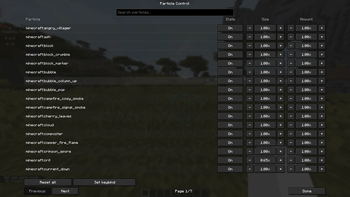
This mod allows you to control the size and the amount of every particle in the game or to turn off a particular particle. It helps with visibilty while keeping the vanilla look, without turning the particles off. What's great is that it keeps the texture from your resourcepack. It is mostly designed with the thought of clearing up your screen so u have less distractions during pvp. You need modmenu and Fabric API for this mod to work.
- Edition: Minecraft Java
- File type: .jar
- Minecraft version listed: 1.21.11
- How to install: Install the matching mod loader (Forge, Fabric or NeoForge) for your Minecraft version. → Download the .jar. → Put it in the .minecraft/mods folder and launch that loader profile.
- Where to get it: Opens on Modrinth — not every file is mirrored on our own servers.
Install steps are the general flow for this file type — How to install Minecraft Java mods & modpacks walks through it step by step.
- Ships as particle-control-1.0.0+1.21.11.jar — drop this file into the mods folder
- Download size: 29 KB
- Download link checked 8 Sept 2026 — working
These come from our own check of the pack file, not from the source page.