
Zap's Enhanced HUD Utilities
Java mod listed for Minecraft 26.x. Downloads from the MC Java Mods app on Android.
⬇ Download on Modrinth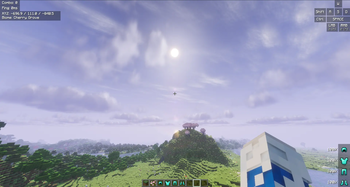
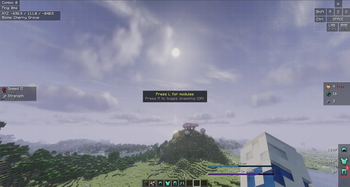
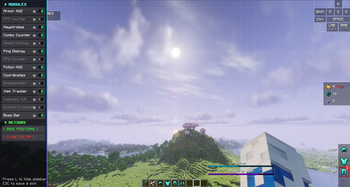
ZEHU — Zap's Enhanced HUD Utilities
A high-performance, modular, HUD utility mod for Minecraft 1.21.11, 26.1.x & 26.2 on Fabric.
Overview
ZEHU — Zap's Enhanced HUD Utilities is a HUD mod designed for Minecraft 1.21.11, 26.1.x and 26.2. ZEHU aims to provide essential HUD utilities in a simple mod without being bundled in with proprietary launchers, resolution-independent relative scaling, and zero-garbage rendering routines.
Essential PvP HUD utilities as other miscellaneous and survival based utilities are included in this mod as well as different themes for each of these specific utilities.
Warning
[!Warning] This mod is currently and will be in development, If there are bugs, or if you find somethings that are not polished enough that is due to this mod still being in development, If you find any bugs or you find things that needs more improvement please open a issue at the Github source repository. I'm a Solo Developer and I don't have the time to look at every nook and cranny of this mod so I would really appreciate it if you can report them to me so i can take a look at it.
Key Features & Offered Modules
1. Armour & Equipment HUD
- Live Durability Tracking: Displays equipped helmet, chestplate, leggings, boots with live durability bars, raw numbers, or percentages.
- Low-Durability Warnings: Visual warning highlights trigger when equipment durability drops below configurable thresholds (percentage or raw durability points).
- Flexible Layouts: Supports vertical or horizontal stacking, reversed rendering order, and customizable text positioning.
2. Keystrokes & Input HUD
- Real-Time Input Display: Displays WASD, Left/Right Mouse Buttons, Left Shift, Control, and Spacebar inputs.
- Integrated CPS Indicators: Displays live clicks-per-second directly inside the mouse button keys.
3. Combat Utilities (Combo, Reach, Ping, CPS)
- Combo Counter
- Reach Display
- Ping Monitor
- CPS Counter
- FPS Counter
4. Navigation (Coords, Speedometer & Compass)
- Coords HUD: Displays X, Y, Z position, cardinal facing direction (North, South, East, West), current biome, and automatic Nether coordinate calculations.
- Speedometer: Tracks horizontal travel speed in meters per second ($m/s$).
- Compass Ribbon: A smooth linear compass strip featuring player head icons (
PlayerFaceExtractor) and cardinal tick markers.
5. Item Tracker HUD
- Custom Item Count: Track specific inventory items (Ender Pearls, Golden Apples, Arrows, Totems, etc.) with live count overlays.
- Item Search & Selector Screen: Built-in registry search screen to quickly select items for tracking.
- Potion & Stack Overlays: Live duration indicators for active potion effects and item stack counts.
7. Custom Crosshair
[!WARNING]
Currently Being Worked On and Improved, Not at a Usable State
- Vector Styles: Choose from
DOT,CROSS,CIRCLE,ARROW, orVANILLA. - Precision Parameters: Fully adjustable gap, line thickness, outer size, and RGB/Hex colors.
8. Boss Bar
[!WARNING]
Currently Being Worked On and Improved, Not at a Usable State
- Single & Multi-Bar Stacking: Custom stack directions (
UPorDOWN) for multiple active boss bars. - Unified Bounding Box Selection: Editor bounding boxes enclose all active boss bars together as a single interactive element.
Interactive Drag-and-Drop Editor (HudLayoutScreen)
Press Right Shift (configurable) in-game to launch the HUD Layout Editor.
- Pixel-Grid Snapping: Align widgets to an overlay grid for clean positioning.
- Dynamic Alignment Guidelines: Cyan and purple snap lines appear dynamically during movement to align elements with screen center or adjacent widgets.
- Eight-Point Scale Handles: Grab corners or midpoints to scale X and Y dimensions independently ($25% \text{--} 200%$).
- Relative Screen Scaling: Stores coordinates as screen-relative percentages (
relativeX,relativeY), ensuring your HUD layout stays centered across different monitors (1080p, 1440p, 4K) or GUI scales. - In-Editor Context Menu: Click any widget's gear icon to open a glassmorphic popup panel for tweaking colors, scale, and module-specific toggles.
Technical Architecture & Performance Efficiency
ZEHU is engineered specifically to eliminate micro-stutters and frame spikes common in heavy HUD mods.
1. Zero Garbage Allocation in Render Loop
Standard HUD mods instantiate new String, Component, or Vector objects every single frame, causing frequent Java Garbage Collection (GC) pauses.
- Cached Formatted Sequences: ZEHU caches string representations and primitive color integers.
- Primitive Buffers: Calculations for CPS, Combo, and Speedometer use fixed-size primitive arrays (
long[]/float[]) to prevent heap allocation during rendering.
2. Event-Driven Time-Window Sampling
Rather than continuously polling entity lists or iterating inventories every tick:
- Clicks & Hits: Captured on native input events and stored in circular ring-buffers.
- Item Tracking: Inventory counts are evaluated only on inventory tick events, reducing CPU overhead.
3. Surgical Mixin Interceptions
ZEHU uses targeted SpongePowered Mixins (GuiMixin, BossHealthOverlayMixin) to intercept vanilla GUI render routines (extractEffects, extractCrosshair, extractRenderState):
- When a ZEHU module is enabled, the corresponding vanilla render routine is canceled at
@At("HEAD"). - This avoids double-rendering overhead and prevents texture buffer fighting.
4. GPU State Extraction (GuiGraphicsExtractor)
Designed for Fabric 1.21.11, 26.1.x and 26.2, ZEHU utilizes Mojang's modern GuiGraphicsExtractor pipeline (extractRenderState). Render passes are batched directly into GPU pipelines, avoiding unnecessary matrix stack pushes and draw call splits.
Configuration & Installation
Requirements
- Minecraft:
1.21.11, 26.1.xor26.2.x - Fabric Loader:
>=0.19.0 - Fabric API
Configuration File
Config data is automatically saved to:
.minecraft/config/zehu.json
Roadmap & Future Developments
- HUD Profile Import / Export
- Frame Time & CPS Sparklines
- Waypoints & Beacon Tracking
- Custom Shader Backdrops
- Toggle Sprint/Sneak
- Fullbright Toggle
- Customizable F3 Display Mod
- Particle Changer
- Clock
- Inventory HUD
- Custom Fonts & More Control Over HUD Fonts
- Background Opacity Sliders
- Chroma Color Cycles
- And tons of more modules
License
Distributed under the LGPLv3 License. Created by Zapaxe.
- Edition: Minecraft Java
- File type: .jar
- Minecraft version listed: 26.2
- How to install: Install the matching mod loader (Forge, Fabric or NeoForge) for your Minecraft version. → Download the .jar. → Put it in the .minecraft/mods folder and launch that loader profile.
- Where to get it: Opens on Modrinth — not every file is mirrored on our own servers.
Install steps are the general flow for this file type — How to install Minecraft Java mods & modpacks walks through it step by step.
- Ships as zehu-1.0.0-26.2.jar — drop this file into the mods folder
- Download size: 151 KB
- Download link checked 19 Oct 2026 — working
These come from our own check of the pack file, not from the source page.