
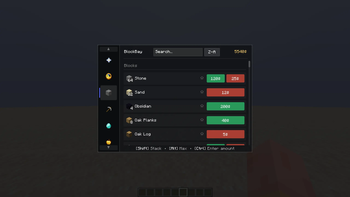
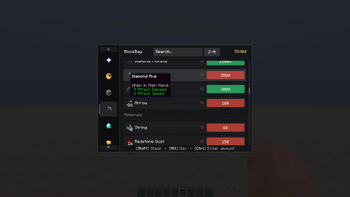
BlockBay is modern and simple economy and shop interface designed for modded servers and modpacks utilizing trading. It provides a clean and simple UI equipped with many additions that fit perfectly with the aim of making your life easier.
Key Features:
- Simplicity: Everything is working in simple and logic way, so you can use it without learning anything.
- Search: You can simply search items up, only items (at least partially) matching search will remain.
- Sorting: By default you will see same items order that is present in config file, but you can change it, with just one button you can sort items in pricing or alphabetical orders.
- Favorites & Recents: Quickly pin items to your favorites or browse your recently traded items history, they are just above other categories.
- Mass Trades: You can buy/sell items by amount defined in config [LMB], whole stack [Shift + LMB] or even trade as much as you can at once [Alt + LMB]. If you want to be precise, you can simply click on button while holding [Ctrl], popup will appear allowing you to decide how many times you want to buy/sell amount from the config.
- Clarity: Displayed price and amount are changing when you hold different keys [Shift], [Ctrl] or [Alt]
- Lightweight: Mod almost does not affect performance, i ensured it was optimized best i could. But you can be sure that i will try to optimize it even further in the future, sky is the limit.
- Server Priority: Config file is always sent from Server to Client on joining and even after it, still server decides what you can buy and what can not. No cheating.
- Simple Configuration: Whole configuration happens in one json file that is advanced by default to show you its possibilities. With NBT support only imagination limits you (comment if its otherwise, i will make sure to fix it and add more functionality).
Quick facts
- Edition: Minecraft Java
- File type: .jar
- Minecraft versions listed: 1.20.1, 1.20.2, 1.20.3
- How to install: Install the matching mod loader (Forge, Fabric or NeoForge) for your Minecraft version. → Download the .jar. → Put it in the .minecraft/mods folder and launch that loader profile.
- Where to get it: Opens on Modrinth — not every file is mirrored on our own servers.
Install steps are the general flow for this file type — How to install Minecraft Java mods & modpacks walks through it step by step.
Verified by MCModsHub
- Ships as BlockBay-1.0.0.jar — drop this file into the mods folder
- Download size: 42 KB
- Download link checked 10 Sept 2026 — working
These come from our own check of the pack file, not from the source page.