AI Block Mini
Bedrock add-on listed for Minecraft 1.21 (behavior + resource pack). File opened and checked on 9 Sep 2026; installs from the MC Bedrock Mods app on Android.
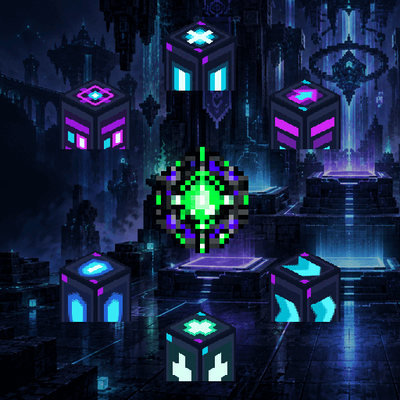
Add six futuristic utility blocks with movement, healing, defense, lighting, and threat\-scanning functions to Minecraft Bedrock\.
⬇ Download on CurseForgeThe author built this one for Minecraft 1.21.80. On other versions it may install and then do nothing.
AI Block Mini adds six futuristic utility blocks to Minecraft Bedrock. Craft the AI Block Core, place each block where it is needed, and build smarter bases, courses, and adventure maps.
Utility blocks
● AI Light Node — Emits maximum light and grants Night Vision for 30 seconds when activated. Cooldown: 10 seconds.
● AI Jump Pad — Launches entities upward. Players launched by a pad take no fall damage when landing on another Jump Pad.
● AI Speed Lane — Grants Speed III and accelerates players in the displayed arrow direction. Its electric trail follows the same direction.
● AI Heal Station — Grants Regeneration II for five seconds. Cooldown: eight seconds.
● AI Shield Station — Grants Resistance II and Fire Resistance for ten seconds. Cooldown: 15 seconds.
● AI Scanner — Scans hostile mobs within 16 blocks and reports CLEAR, CAUTION, WARNING, or CRITICAL according to the nearest threat.
Jump Pads and Speed Lanes rotate to match the direction in which they are placed. This makes it easy to build readable launch routes and high-speed tracks.
Each player automatically receives the AI Block Manual once when joining a world. The manual explains the AI Block Core recipe, all six blocks, cooldowns, and the AI network diagnostic.
Installation
1. Download and open the .mcaddon file.
2. Activate both the Behavior Pack and Resource Pack in your world.
3. Enter the world and use the automatically supplied AI Block Manual.
Minecraft Bedrock 1.21.80 or newer is required. Java Edition is not supported.
日本語
「このブロック、AIが作りましたmini」は、拠点・アスレチック・配布ワールドを便利にする6種類の近未来AIブロックを追加するMinecraft Bedrock用アドオンです。
最大光量と暗視を備えたAIライトノード、着地ダメージを補正するAIジャンプパッド、矢印方向へ自動加速するAIスピードレーン、回復用のAIヒールステーション、防御用のAIシールドステーション、周囲の敵を4段階で解析するAIスキャナーを収録しています。
プレイヤーには初回参加時に「AIブロックマニュアル」が1冊配布されます。AIブロックコアと各ブロックの作成方法、機能、クールタイム、AIネットワーク診断をゲーム内で確認できます。
本作品は非公式のMinecraft向け作品であり、Mojang StudiosまたはMicrosoftによる承認・提携を受けたものではありません。
- Edition: Minecraft Bedrock
- File type: .mcpack or .mcaddon
- Minecraft version listed: 1.21.80
- How to install: Download the .mcpack or .mcaddon file. → Open it — Minecraft imports it. → In your world: Behavior Packs → Available → Activate, then the same under Resource Packs.
- Where to get it: Opens on CurseForge — not every file is mirrored on our own servers.
Install steps are the general flow for this file type — How to install Minecraft Bedrock addons & mods walks through it step by step.
- Pack type: .mcaddon — behaviour and resource pack in one file
- Manifest requires Minecraft 1.21.80 or newer
- Complete pack — everything it depends on is inside the file
- Download size: 115 KB
- Download link checked 20 Oct 2026 — working
These come from our own check of the pack file, not from the source page.