Live Durability Viewer
Bedrock add-on listed for Minecraft 1.20–26.x (behavior + resource pack). File opened and checked on 9 Sep 2026; installs from the MC Bedrock Mods app on Android.
Real-time durability HUD & inventory tooltips for weapons, tools, shields & armor! Features smart 2-line layout, color-coded health states, low durability…
⬇ Download on CurseForge
# 🛡️ Durability Viewer Add-on (Bedrock Edition) [v1.0]
Never break your favorite diamond or netherite tools again! **Durability Viewer** brings real-time, live durability status directly to your screen with a non-intrusive **Actionbar HUD** and detailed **Inventory Tooltip Lore**.
Designed by srkuls for Minecraft Bedrock 1.20.80+ and 1.21+, this add-on offers lightweight performance, smart 2-line layout, color-coded health states, low durability alerts, and an interactive in-game settings menu.
---
## ✨ Key Features
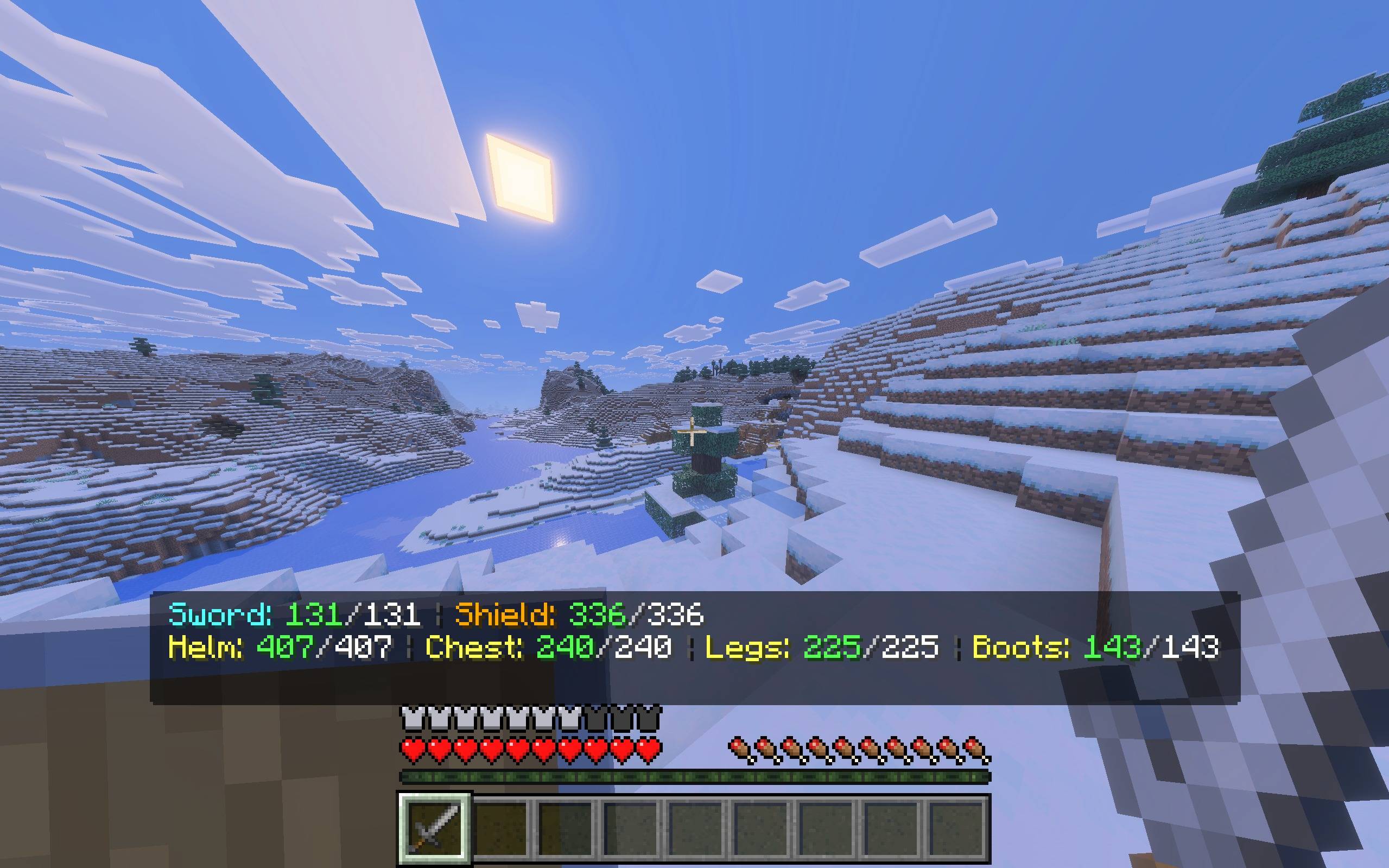
### 📊 1. Real-Time Actionbar HUD (Smart 2-Line Layout)
* Live status display floating cleanly above your hotbar:
* **Line 1 (Active Weapons & Offhand):** Swords, pickaxes, axes, shovels, bows, crossbows, tridents, maces, shears, fishing rods, and shields!
* **Line 2 (Equipped Armor Pieces):** Helmets, Chestplates/Elytras, Leggings, and Boots!
* **Smart 2-Line Wrapping:** Automatically splits weapons and armor across two clean lines so full armor sets NEVER get cut off on screen edges!
* **No Overlap Elevation:** Elevated cleanly above vanilla item switch popups and enchantment texts.
* **Auto-Hide:** Automatically hides when holding non-durable items or wearing no armor to keep your screen clean!
---
### ⚙️ 2. Resource Pack Subpack Slider (2 Modes)
Configure the HUD directly from the **Resource Pack Settings (⚙️ Gear Icon)** or in-game via `!durability`:
* 🟢 **1. Actionbar HUD Enabled (Default):** Shows held tools/weapons on Line 1 and equipped armor on Line 2.
* 🔴 **2. Actionbar HUD Disabled:** Completely turns off the actionbar HUD for players who only want inventory tooltips.
---
### 🎨 3. Color-Coded Durability System
Instantly know your gear's health at a single glance:
* 🟢 **Green (Healthy):** Remaining durability is **60% or higher**.
* 🟡 **Yellow (Medium):** Remaining durability is between **25% and 59%**.
* 🟠 **Gold / Orange (Low):** Remaining durability is between **10% and 24%**.
* 🔴 **Flashing Red (Critical):** Remaining durability is **under 10%**!
---
### ⚠️ 4. Critical Durability Warning (< 10%)
* When any equipped weapon, tool, shield, or armor piece drops below 10% (or under 12 durability points):
* Plays an audible warning sound.
* Sends a clear chat warning: `⚠️ WARNING: Your Diamond Pickaxe is about to break! (10/1561)`.
* Prevents accidental breakage of expensive enchanted tools!
---
### 🎒 5. Inventory Tooltip Lore
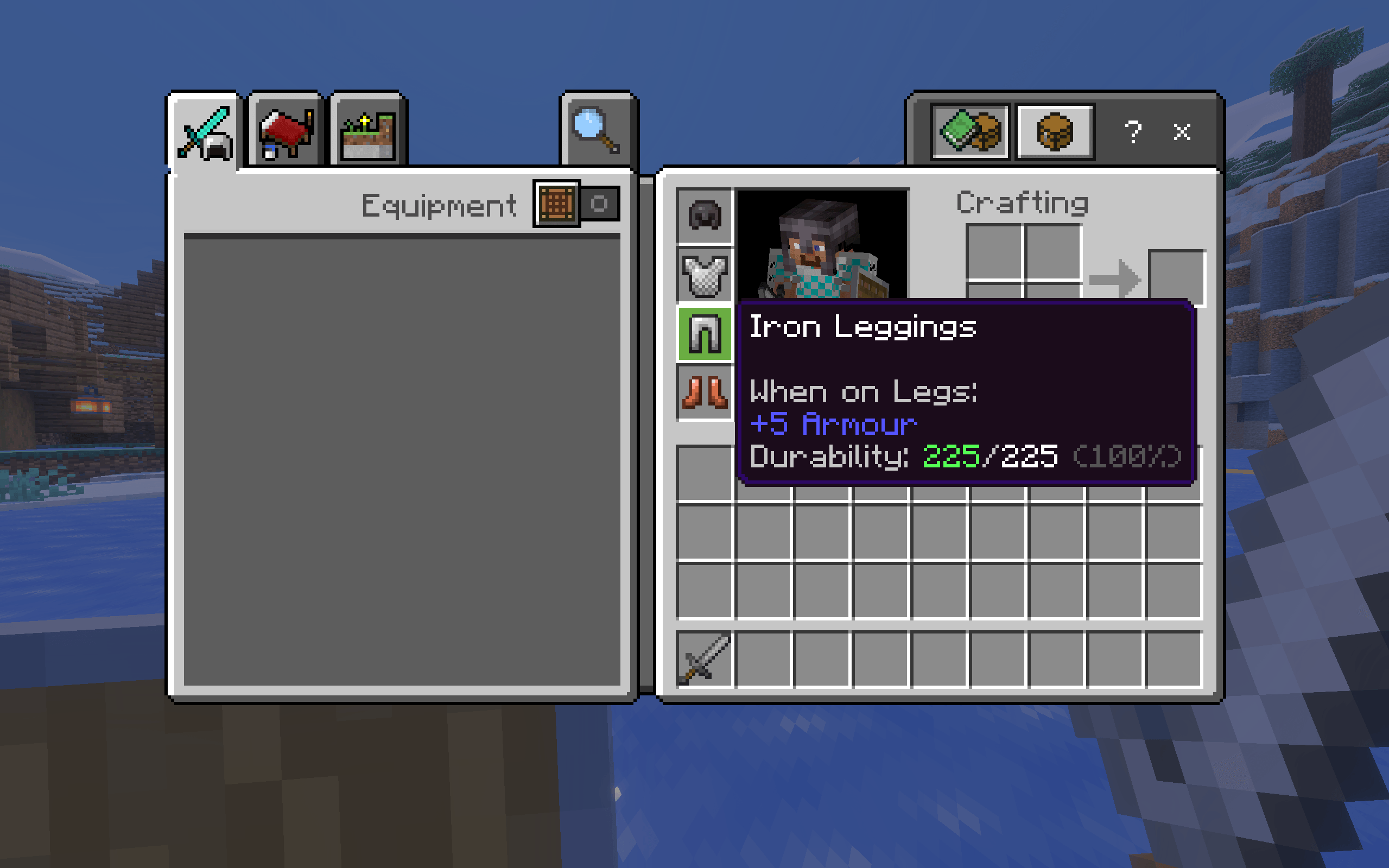
* Hover over any tool, weapon, or armor in your inventory or hotbar to see an exact durability line:
Durability: 1420/1561 (91%)
- Edition: Minecraft Bedrock
- File type: .mcpack or .mcaddon
- Minecraft versions listed: 1.21.130, 1.21.131, 1.21.132
- How to install: Download the .mcpack or .mcaddon file. → Open it — Minecraft imports it. → In your world: Behavior Packs → Available → Activate, then the same under Resource Packs.
- Where to get it: Opens on CurseForge — not every file is mirrored on our own servers.
Install steps are the general flow for this file type — How to install Minecraft Bedrock addons & mods walks through it step by step.
- Pack type: .mcaddon — behaviour and resource pack in one file
- Manifest requires Minecraft 1.20.80 or newer
- Complete pack — everything it depends on is inside the file
- Download size: 211 KB
- Download link checked 20 Oct 2026 — working
These come from our own check of the pack file, not from the source page.