
AdaptiveRuinedPortals
Java mod listed for Minecraft 26.x. Downloads from the MC Java Mods app on Android.
⬇ Download on Modrinth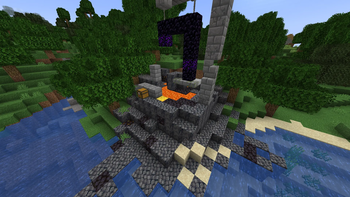
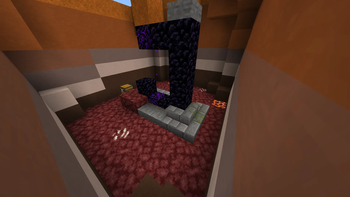
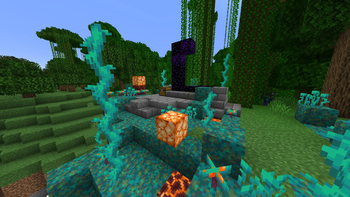
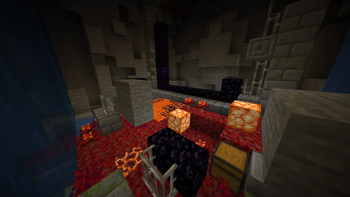
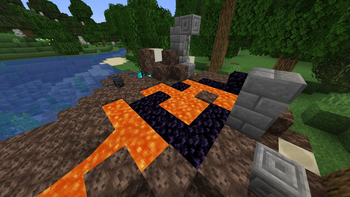
Ruined Portals have always had the same look. This mod changes the environment around the portal to the Nether biome it leads to, and the chest loot contains items specific to that biome! Such as Crimson Fungus and Roots around the portal that takes you to Crimson Forest, Bones and Wither Skulls around the portal that takes you to Soul Sand Valley, etc.
Nether Wastes
A small chance for Netherrack to turn into Nether Quartz Ore
Crimson Forest
Netherrack turns into Crimson Nylium Crimson Nylium may sprout Crimson Fungus or Crimson Roots Rare Shroomlights growing above the Nylium
Warped Forest
Netherrack turns into Warped Nylium Warped Nylium may sprout Warped Fungus, Warped Roots, or Twisting Vines Rare Shroomlights growing above the Nylium
Soul Sand Valley
Netherrack turns into Soul Sand, with a chance of Bone Block instead Magma Blocks turn into Soul Soil Soul Sand and Soul Soil may spontaneously ignite with Soul Fire
Basalt Deltas
Netherrack turns into Basalt Magma Blocks turn into Blackstone, with a chance of Gilded Blackstone instead A rare Wither Skeleton Skull may be found resting atop the blackened terrain
Little warning: Vanilla Minecraft takes quite time to calculate position of the matching nether portal(if the terrain is hard for a portal to generate). Because of this, the mod can not 100% predict the portal's biome(especially if portal takes the player to the border of 2 biomes). I could write the code so it can predict, but then the mod would have to generate a few chunks, slowing down chunk generation on low end PCs.
Notice for Forge users: Versions 1.0.0, 1.0.1, 1.1.0 works completely normal. But, the new portal's color change that is added on 1.2.0 doesn't work on .jar files, even though they work in dev mode. Sorry for Forge users.. :( Also, Forge will be discontinued starting from 1.21.3
- Edition: Minecraft Java
- File type: .jar
- Minecraft version listed: 26.2
- How to install: Install the matching mod loader (Forge, Fabric or NeoForge) for your Minecraft version. → Download the .jar. → Put it in the .minecraft/mods folder and launch that loader profile.
- Where to get it: Opens on Modrinth — not every file is mirrored on our own servers.
Install steps are the general flow for this file type — How to install Minecraft Java mods & modpacks walks through it step by step.
- Ships as adaptive_ruined_portals-neoforge-26.2-1.2.2.jar — drop this file into the mods folder
- Download size: 74 KB
- Download link checked 21 Oct 2026 — working
These come from our own check of the pack file, not from the source page.