
The Iron Age
The Iron Age is a technology mod that completely reworks the vanilla Minecraft progression system, filling the massive gap between stone, iron, and diamond tiers. Forget about simple and boring smelting: you will have to master the art of blacksmithing and metallurgy to survive.
Core Features
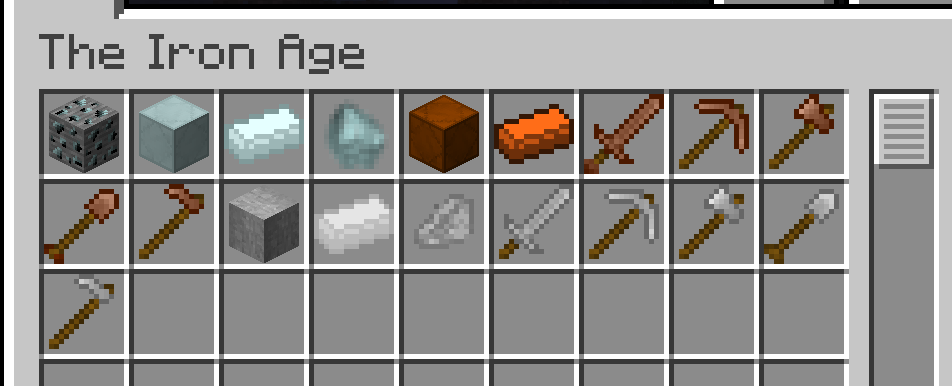
Bronze Age: Copper and Tin
- New Ore: Discover veins of Tin Ore in regular caves, mine it with a stone pickaxe, and obtain Raw Tin.
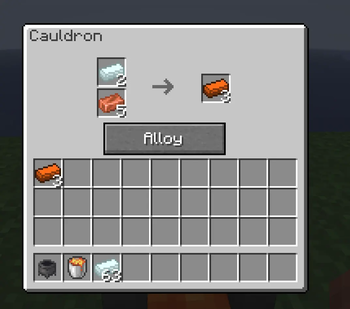
- The Cauldron: Create a custom alloy workshop. Place your cauldron directly above a lava block to heat it up. Without the extreme heat from below, the interface will simply refuse to open.
- Shapeless Crafting: Put copper and tin into the cauldron slots in any order and press the Alloy button to forge your first Bronze Ingots.
- Equipment: Bronze tools and armor are more durable than stone, serving as an excellent early-game alternative that finally puts your extra vanilla copper to good use.
Steel Age: Hardened in Fire
- The Intermediate Product: Combine 2 pieces of raw iron and 2 pieces of coal/charcoal inside the cauldron to get Raw Steel.
- Long Smelting Process: Raw steel is a highly refractory material. To temper it into a proper Steel Ingot, you will need to subject it to 300 ticks (15 seconds) of continuous baking inside a furnace.
- Heavy Metal: Steel equipment features increased mining speed and attack damage, comfortably outperforming vanilla iron and serving as a long-lasting bridge toward the diamond tier.
New Advancements
The mod is fully integrated into the vanilla advancement journal:
- Alloys — Unlock a dedicated metallurgy tab in your advancements menu.
- Knight's Right — Forge your first steel sword and claim your right as a true knight.
Licensing and Copyright
The project is fully copyrighted. All necessary configurations are specified within the mods.toml file, and legal terms are established in the LICENSE.txt file.
- Modpacks: You are free to include this mod in any modpack hosted on Modrinth.
- Re-uploads and Modifications: Distribution on third-party websites or modifying the source code without explicit permission from the author is strictly prohibited. For detailed terms of use, please refer to the license file bundled inside the archive.
Quick facts
- Edition: Minecraft Java
- File type: .jar
- Minecraft version listed: 26.1.2
- How to install: Install the matching mod loader (Forge, Fabric or NeoForge) for your Minecraft version. → Download the .jar. → Put it in the .minecraft/mods folder and launch that loader profile.
- Where to get it: Opens on Modrinth — not every file is mirrored on our own servers.
Install steps are the general flow for this file type — How to install Minecraft Java mods & modpacks walks through it step by step.
Verified by MCModsHub
- Ships as tia-1.0.0-neoforge-26.1.2.jar — drop this file into the mods folder
- Download size: 449 KB
- Download link checked 10 Sept 2026 — working
These come from our own check of the pack file, not from the source page.