
Kaleidoscope Sauce
Adds 8 sauces to Kaleidoscope Cookery. Mix in a bowl, place for dipping. New crops: sesame, peanut, soybean & edamame. JEI + JADE compatible.
⬇ Download on Modrinth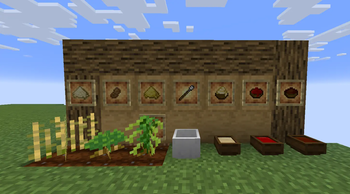
Kaleidoscope Sauce 森罗物语:酱料: Summary:
Adds 8 sauces and new crops to Kaleidoscope Cookery. Mix by hand, dip your food, and enjoy unique effects!
Description:
Kaleidoscope Sauce is an addon for Kaleidoscope Cookery that brings 8 flavorful sauces and matching crops to your kitchen.
8 Sauces — Chili, Tomato, Peanut, Sesame, Soybean, Sweet Bean, Sweet & Sour, and Yolk. Each with a unique effect (spicy, sticky, sweet-sour, greasy, etc.).
Hand-Made — Use the mixing bowl and stir stick to combine ingredients and craft sauces by following recipes.
Dip & Enjoy — Place a sauce bowl down, right-click with any food to dip it. Each bowl has 4 levels of sauce; when empty, the bowl remains.
3 New Crops — Sesame, Peanut, and Soybean grow through 8 stages. Harvesting soybeans early drops edamame. The crop's fruit is its seed.
Seed Sourcing — Wear a straw hat and break grass for a chance to find seeds. Fortune increases the drop rate.
Alternative Ingredients — Chili Sauce and Tomato Sauce can replace chili peppers and tomatoes in Kaleidoscope Cookery recipes.
Compatibility — Supports JEI for recipe viewing and JADE for checking mixing bowl contents and sauce bowl levels.
Dependencies: Kaleidoscope Cookery · Kaleidoscope ChineseFood
- Edition: Minecraft Java
- File type: .jar
- Minecraft version listed: 1.20.1
- How to install: Install the matching mod loader (Forge, Fabric or NeoForge) for your Minecraft version. → Download the .jar. → Put it in the .minecraft/mods folder and launch that loader profile.
- Where to get it: Opens on Modrinth — not every file is mirrored on our own servers.
Install steps are the general flow for this file type — How to install Minecraft Java mods & modpacks walks through it step by step.
- Ships as [森罗物语_酱料] kaleidoscope_sauce-1.0.0.jar — drop this file into the mods folder
- Download size: 206 KB
- Download link checked 10 Sept 2026 — working
These come from our own check of the pack file, not from the source page.