
Pixel Keybind Overlay
A clean, minimal, and satisfying keybind overlay built for Minecraft Fabric.
Pixel Keybind Overlay is designed to feel like a natural extension of Minecraft's HUD rather than another distracting overlay.
Every key press is brought to life with smooth fade animations and subtle lighting, creating a responsive visual rhythm that feels incredibly satisfying while keeping the interface clean and unobtrusive.
Whether you're PvPing, speedrunning, building, recording videos, or simply enjoying survival, Pixel Keybind Overlay delivers a polished experience with extensive customization and minimal performance impact.
✨ Features
🎮 Beautiful Key Press Animations
Every key smoothly fades in and out, creating a clean and satisfying visual effect instead of harsh on/off transitions.
🖱️ Keyboard & Mouse Input
Display real-time keyboard and mouse inputs with reliable detection for:
- Left Mouse Button
- Right Mouse Button
- Middle Mouse Button
- Any keyboard key
🎨 Fully Customizable
Make the overlay truly yours.
- RGB & RGBA color picker - Coming Soon
- Hex color input - Coming Soon
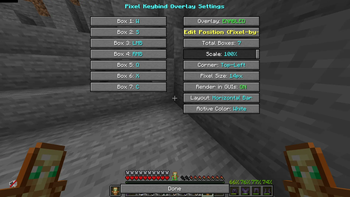
- Adjustable scale
- Configurable fade duration
- Custom key bindings
- Supports 1–9 key boxes
📍 Pixel-Perfect Positioning
Position the overlay exactly where you want it.
- Drag-and-drop editor
- Arrow key fine tuning
- Pixel-perfect movement
- Designed for a clean top-left layout
⚙️ Modern Configuration
Powered by YACL 3, providing an intuitive configuration screen with instant previews and seamless customization.
🚀 Performance Focused
Pixel Keybind Overlay was built with efficiency in mind.
- Lightweight rendering
- Optimized update logic
- Smooth animations
- Designed for minimal performance impact
Perfect for both low-end and high-end systems.
Why Pixel Keybind Overlay?
Many key overlay mods simply display pressed keys.
Pixel Keybind Overlay focuses on how they feel.
Every movement softly illuminates the overlay, creating a subtle visual feedback that is satisfying to watch without becoming distracting.
It's minimal.
It's smooth.
It's elegant.
Compatibility
| Component | Support |
|---|---|
| Loader | Fabric |
| Minecraft | 1.21.x – 1.26.2 |
| Config Library | YACL 3 |
Perfect For
- ⚔️ PvP
- 🏃 Speedrunning
- 🎥 Recording Videos
- 📺 Streaming
- 🏗️ Building
- 🌍 Everyday Survival
Screenshots

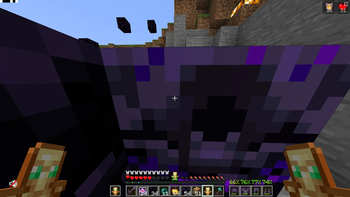
Nothing sells a HUD mod better than showing it in action.
License
Released under the MIT License.
Have a Great Day! Mind Checking out my other projects I would be so grateful!
- Edition: Minecraft Java
- File type: .jar
- Minecraft versions listed: 1.21, 1.21.1, 1.21.2
- How to install: Install the matching mod loader (Forge, Fabric or NeoForge) for your Minecraft version. → Download the .jar. → Put it in the .minecraft/mods folder and launch that loader profile.
- Where to get it: Opens on Modrinth — not every file is mirrored on our own servers.
Install steps are the general flow for this file type — How to install Minecraft Java mods & modpacks walks through it step by step.
- Ships as PixelKeyOverlay-1.0.0.jar — drop this file into the mods folder
- Download size: 26 KB
- Download link checked 10 Sept 2026 — working
These come from our own check of the pack file, not from the source page.