
My MC Optimized Pack
Java modpack listed for Minecraft 26.x. Downloads from the MC Java Mods app on Android.
⬇ Download on Modrinth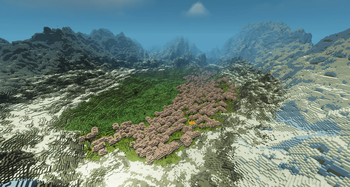
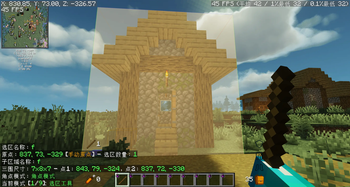
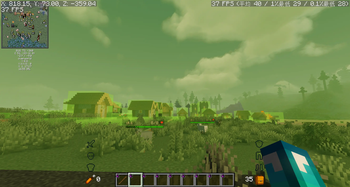
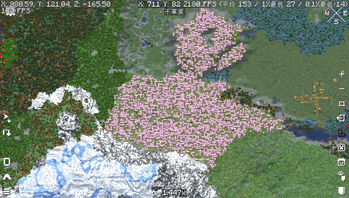
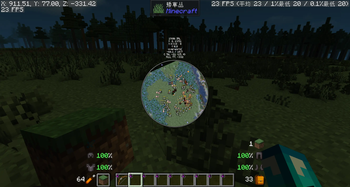
My MC Technical Optimization Modpack
A lightweight Fabric modpack tailor-made for MC technical redstone players.
This pack bundles cutting-edge performance optimization mods, essential redstone utility tools, and a vanilla-friendly survival expansion, drastically boosting your technical building, redstone testing and long-term world exploration experience.
Mod List & Brief Introduction Performance Optimization (FPS & Memory Boost)
- Sodium: Render engine overhaul, huge frame rate improvement.
- Lithium: Game logic & tick optimization, reduces lag from mob/entity calculations.
- Ferrite Core: Memory usage reduction, fixes memory leaks.
- Entity Culling: Hides off-screen entities and block entities to significantly reduce rendering lag in dense scenes.
- OBE (Offscreen Block Entity): Further optimizes block entity rendering (chests, furnaces, hoppers, etc.) by skipping those not visible on screen.
Technical / Redstone Utility (Core for Technical Players)
- Litematica: Schematic import/copy-paste for large-scale redstone builds.
- MiniHUD: Custom on-screen HUD (coordinates, tick speed, light level, entity count, redstone status, etc.).
- Zoomify: Smooth adjustable zoom for long-distance observation of massive redstone arrays.
- Freecam: Free-roaming spectator camera to inspect redstone wiring and signal flow inside machines.
- Tweakeroo: Fine-tune game mechanics for technical testing (flight, block placement, speed adjustments, etc.).
Vanilla Survival Expansion
- Farmer's Delight: Expands farming and cooking without breaking redstone mechanics.
Terrain & World Gen
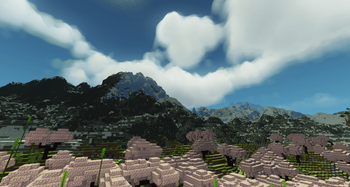
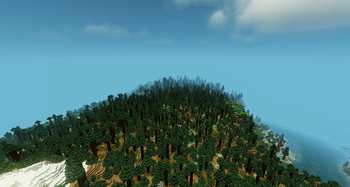
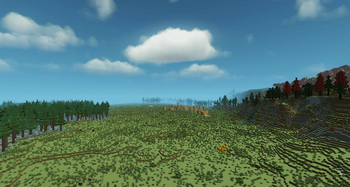
- Terralith: Adds 95+ biomes and completely overhauls Overworld terrain generation.
- Tectonic: Expands continents, deepens oceans, and creates giant mountain ranges. (Pre-configured to work seamlessly with Terralith.)
FAQ
Q: What MC version does this modpack support?
A: Check the version tag in the release title for the corresponding MC version.
Q: Am I allowed to add or delete custom mods?
A: You may freely add/remove any mods at your own risk. We will not provide troubleshooting or compatibility support for issues caused by manual mod edits.
Q: Does this pack support Forge loader?
A: This modpack is Fabric-only. Forge is not supported and will not launch properly.
Q: Is this pack compatible with multiplayer servers?
A: Compatible with most vanilla/Fabric servers. Note: Certain Tweakeroo features (e.g., Freecam, ghost block placement) may be restricted by server anti-cheat plugins.
Q: What RAM allocation do you recommend?
A: Minimum 4GB RAM allocated; 6GB–8GB recommended for smooth shader usage and large redstone worlds.
Q: Litematica and Tweakeroo keybind conflicts?
A: Default keybinds are pre-configured. If conflicts occur, adjust them via Mod Menu → Key Binds. Recommended: set Litematica menu to M and Tweakeroo to X + combo keys.
My MC 生电优化整合包
专为红石生电玩家制作的轻量 Fabric 整合包。
内置全套性能优化模组、生电刚需辅助工具,搭配不破坏原版平衡的生存拓展模组,大幅提升红石建造、机器调试、大型存档运行流畅度。
模组清单 & 功能说明 性能优化(显著提升帧率、降低内存占用)
- Sodium(钠):重构渲染引擎,帧数大幅提升。
- Lithium(锂):优化游戏刻运算,减少生物、实体造成的卡顿。
- Ferrite Core(铁氧体磁芯):降低内存占用,缓解存档内存泄漏。
- Entity Culling:隐藏屏幕外实体和方块实体,大幅降低多实体、多机器场景的渲染卡顿。
- OBE(Offscreen Block Entity,方块实体视距剔除):进一步优化箱子、熔炉、漏斗等方块实体的渲染,仅渲染屏幕内可见部分。
生电核心辅助工具(Client-Side,客户端模组)
- Litematica:schematic 原理图导入/复制粘贴,批量建造大型红石机器。
- MiniHUD:自定义屏幕悬浮信息(坐标、刻速、光照、实体数量、红石信号状态等)。
- Zoomify:平滑缩放视角,远距离观测大型阵列机器。
- Freecam:自由视角,穿透方块检视机器内部布线及红石信号走向。
- Tweakeroo:生电调试专属微调功能(飞行、放置、速度自定义等)。
原版生存拓展
- Farmer's Delight(农夫乐事):拓展农耕、烹饪内容,不干扰红石机制平衡。
地形生成
- Terralith:新增 95+ 生物群系,完全重塑主世界地貌。
- Tectonic:扩大大陆板块、加深海洋深度、生成巨型山脉。(已与 Terralith 做好兼容配置。)
常见问题 FAQ
Q:整合包适配哪个我的世界版本?
A:请查看版本发布标题中标注的 MC 对应版本。
Q:我可以自行添加/删除其他模组吗?
A:允许自由增减模组,但手动修改模组后产生的冲突、闪退、报错问题,不再提供任何技术支持。
Q:整合包支持 Forge 加载器吗?
A:本整合包仅适配 Fabric 加载器,Forge 无法正常运行。
Q:这个整合包能进多人服务器吗?
A:兼容大多数原版/Fabric 服务器。请注意:Tweakeroo 的部分功能(如 Freecam、幽灵方块放置)可能被服务器反作弊插件拦截或限制。
Q:推荐分配多少运行内存?
A:最低分配 4GB 内存;使用光影、建造大型红石存档建议分配 6–8GB。
Q:Litematica 和 Tweakeroo 按键冲突怎么办?
A:本包已预设默认按键,若发现功能重叠,请在 模组菜单 → 按键绑定 中自行调整。推荐将 Litematica 菜单键设为 M,Tweakeroo 设为 X + 组合键。
- Edition: Minecraft Java
- File type: .jar
- Minecraft version listed: 26.2
- How to install: Install the matching mod loader (Forge, Fabric or NeoForge) for your Minecraft version. → Download the .jar. → Put it in the .minecraft/mods folder and launch that loader profile.
- Where to get it: Opens on Modrinth — not every file is mirrored on our own servers.
Install steps are the general flow for this file type — How to install Minecraft Java mods & modpacks walks through it step by step.
- Downloads as 26.2-Fabric.mrpack
- Download size: 119 KB
- Download link checked 21 Oct 2026 — working
These come from our own check of the pack file, not from the source page.