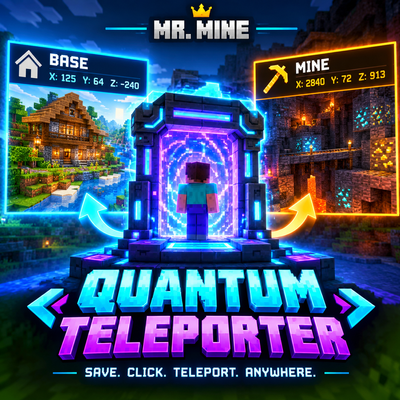
Mr. Mine's Quantum Teleporter
⚡ Instantly teleport between saved locations in Minecraft Bedrock! Save your Base, Mines, Villages, Nether portals & more with exact X, Y, Z coordinates…
⬇ Download on CurseForge⚡ MR. MINE'S QUANTUM TELEPORTER
🚨 TIRED OF WALKING THOUSANDS OF BLOCKS?
Why spend minutes—or even hours—travelling across your Minecraft world?
Quantum Teleporter brings instant point-to-point fast travel to Minecraft Bedrock Edition.
Save the exact X, Y, Z coordinates of your most important locations, then jump directly between them whenever you want.
No long journeys. No getting lost. Just SAVE → CLICK → TELEPORT. ⚡
---
🌌 WHAT IS QUANTUM TELEPORTER?
Quantum Teleporter is a coordinate-based teleportation system designed to make long-distance travel fast, simple, and convenient.
Whether you're returning to your base after a massive mining trip, travelling to a distant village, or moving between important locations, your saved coordinates are always ready.
---
🚀 KEY FEATURES
📍 Coordinate-Based Teleportation
Save exact X, Y, Z coordinates and use them as destinations.
⚡ Instant Point-to-Point Travel
Teleport directly to your selected location instead of travelling thousands of blocks manually.
🏠 Save Your Base
Never lose your way home again.
⛏️ Mining Hub Travel
Save important mining locations and return instantly.
🔥 Nether Portal Locations
Keep your important Nether coordinates ready for quick travel.
🏘️ Village & Structure Locations
Save villages, builds, farms, strongholds, or any location you want.
🎯 Simple Destination System
Designed to make teleportation quick and easy to understand.
---
💡 PERFECT FOR
🏠 Survival Bases
⛏️ Mining Expeditions
🔥 Nether Travel
🏘️ Villages
🏰 Mega Builds
🌾 Farms
🗺️ Exploration
👥 Multiplayer Worlds
---
⚙️ HOW IT WORKS
STEP 1 — SAVE
Choose an important location and save its exact coordinates.
STEP 2 — SELECT
Choose the destination you want to visit.
STEP 3 — TELEPORT
Activate the teleport and instantly travel to your destination.
That's it.
SAVE → CLICK → TELEPORT → ARRIVE. ⚡
---
🧭 EXAMPLE
Imagine your base is thousands of blocks away from your mining area.
Instead of travelling all the way back:
Mining Hub
"X: 2840 | Y: 72 | Z: 913"
⬇️ QUANTUM TELEPORT
Home
"X: 125 | Y: 64 | Z: -240"
One teleport—and you're home.
---
🎮 MINECRAFT BEDROCK EDITION
Built specifically for Minecraft Bedrock Edition.
Check the Files section for the currently supported Minecraft version.
---
📦 INSTALLATION
1. Download the latest Quantum Teleporter file.
2. Import the ".mcaddon" file into Minecraft.
3. Activate the required pack in your world.
4. Enter your world.
5. Set up your teleport locations.
6. Start travelling instantly!
---
⚠️ IMPORTANT
Always verify your destination coordinates before teleporting.
Make sure the destination area is safe and suitable for teleportation.
---
🔥 WHY WALK WHEN YOU CAN TELEPORT?
Your Minecraft world is huge.
Your time is valuable.
Quantum Teleporter turns long-distance travel into instant fast travel.
⚡ SAVE. CLICK. TELEPORT. ANYWHERE.
---
👑 CREATED BY MR. MINE
Created by Mr. Mine for Minecraft Bedrock Edition.
⭐ Enjoying Quantum Teleporter? Follow Mr. Mine on CurseForge to stay updated with future releases, improvements, and new Minecraft projects.
Thanks for supporting Mr. Mine! ❤️
---
💬 NEED HELP?
Found a bug, facing an issue, or have a suggestion?
Let me know in the CurseForge comments! Your feedback helps me improve Quantum Teleporter and make future updates even better. 🛠️
❤️ Enjoying Quantum Teleporter?
If you like the addon, consider giving it a Follow on CurseForge. It helps support Mr. Mine and keeps you updated about future projects and updates.
⚡ SAVE. CLICK. TELEPORT. ANYWHERE.
👑 — Mr. Mine
- Edition: Minecraft Bedrock
- File type: .mcpack or .mcaddon
- Minecraft versions listed: 1.20, 1.21, 26.40
- How to install: Download the .mcpack or .mcaddon file. → Open it — Minecraft imports it. → In your world: Behavior Packs → Available → Activate, then the same under Resource Packs.
- Where to get it: Opens on CurseForge — not every file is mirrored on our own servers.
Install steps are the general flow for this file type — How to install Minecraft Bedrock addons & mods walks through it step by step.
- Pack type: .mcaddon — behaviour and resource pack in one file
- Manifest requires Minecraft 1.20.60 or newer
- Complete pack — everything it depends on is inside the file
- Download size: 18 KB
- Download link checked 30 Sept 2026 — working
These come from our own check of the pack file, not from the source page.