Gamemode Switcher Stick || Achievements Friendly by UpCraftX
GameMode Switcher Stick [Achievements Friendly] lets you quickly switch between Survival and Creative by crouching with a Stick. Lightweight and easy to…
⬇ Download on CurseForge
🕹️ GameMode Switcher Stick [Achievements Friendly]
Switch between Survival and Creative mode quickly using a simple Stick — without needing commands!
✨ Features
🪵 Stick-Based Gamemode Switcher
- Hold a normal Minecraft Stick in your hand.
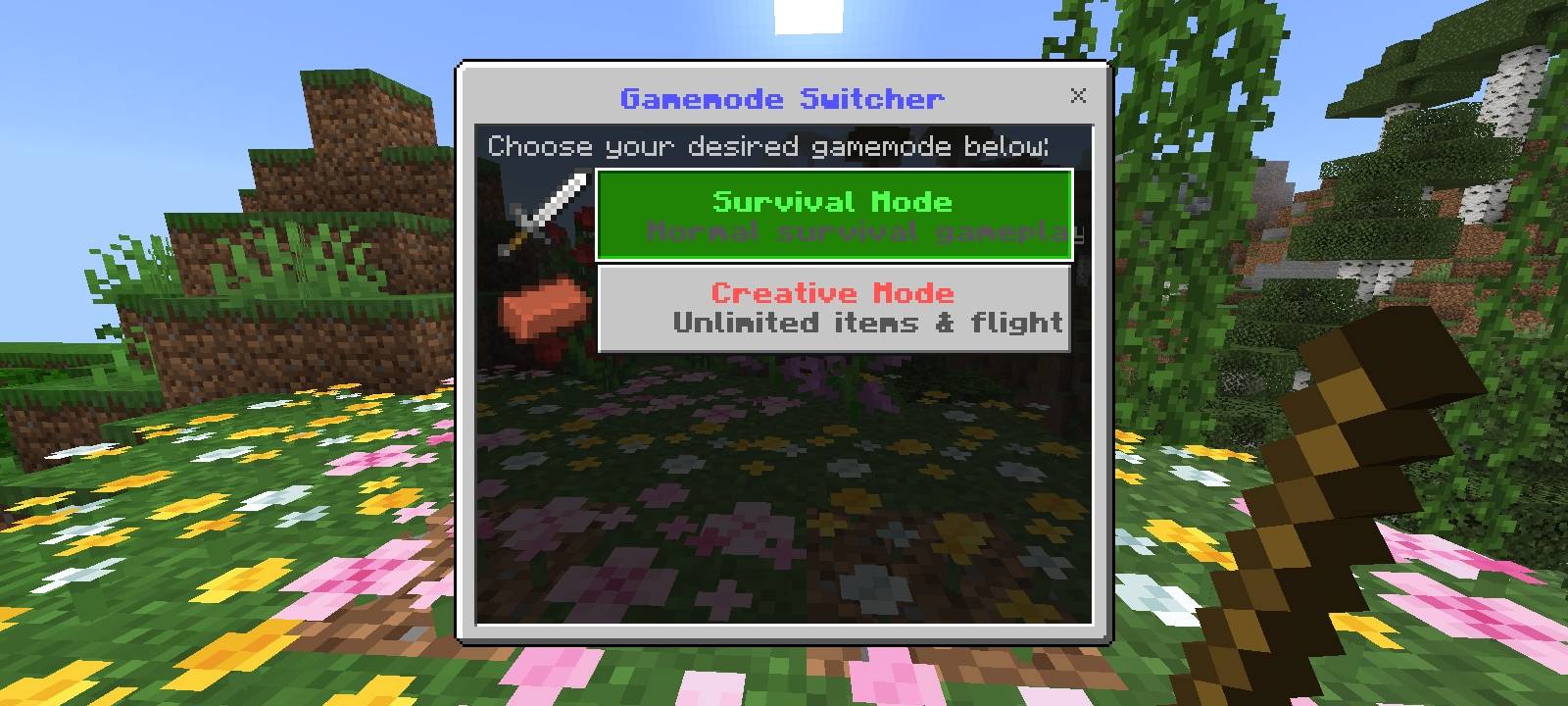
- Crouch/Sneak while holding the Stick to open the Gamemode Switcher menu.
🎮 Easy Gamemode Selection
Choose between:
* 🟢 **Survival Mode** — Normal survival gameplay.
* 🔴 **Creative Mode** — Unlimited items and flight.
🖥️ Simple & Clean UI
- A dedicated menu makes switching gamemodes quick and convenient.
- No need to manually type
/gamemodecommands.
🔊 Sound Feedback
- A level-up sound plays after successfully switching gamemodes.
🏆 Achievements Friendly
- Designed to switch gamemodes while keeping the add-on focused on a lightweight gameplay experience.
- Important: Achievement availability can still depend on the Minecraft world, settings, and other active add-ons.
⚡ Lightweight System
- Uses a small script-based detection system.
- Includes a short cooldown to prevent the menu from repeatedly opening while crouching.
🕹️ How To Use
Enter your Minecraft Bedrock world.
Take a Stick in your hand.
Crouch/Sneak while holding the Stick.
The Gamemode Switcher menu will appear.
Select:
- 🟢 Survival Mode
- 🔴 Creative Mode
Your gamemode will change instantly.
⚙️ How It Works
The add-on continuously checks whether the player is:
- Holding a Minecraft Stick.
- Currently crouching/sneaking.
When both conditions are detected, the add-on opens the Gamemode Switcher UI. After selecting a mode, the add-on switches the player's gamemode and provides visual and sound feedback.
A 1.5-second cooldown prevents the menu from opening repeatedly while the player continues to crouch.
📋 Compatibility
| Information | Details |
|---|---|
| Minecraft Edition | Bedrock Edition |
| Minimum Version | 1.21.100+ |
| Add-on Type | Behavior Pack / Script |
| Gamemodes | Survival & Creative |
| Activation Item | Vanilla Stick |
| UI System | Action Form |
| Creator | UpCraftX |
⚠️ Important Notes
- The add-on uses the vanilla Stick, so no custom item is required.
- Make sure the add-on's behavior pack is enabled in your world.
- The Gamemode Switcher menu is triggered specifically while holding a Stick and crouching.
- Other add-ons that modify gamemode commands, player scripts, or UI systems may cause compatibility issues.
📜 Redistribution Policy
Creator: UpCraftX
- ❌ Do not re-upload this add-on to other websites or platforms without permission from the original creator.
- ❌ Do not claim this add-on as your own work.
- ❌ Do not modify and redistribute the add-on without permission.
- ❌ Do not sell or monetize this add-on or its files.
- ✅ You may share the original download page/link with proper credit to UpCraftX.
- ✅ You may use this add-on in your Minecraft gameplay, videos, showcases, and modpacks while giving appropriate credit.
- 📩 For redistribution, modification, or other permissions, contact the original creator UpCraftX.
© Credits
Gamemode Switcher Stick [Achievements Friendly] Created by: UpCraftX
Please respect the creator's work and redistribution policy.
- Edition: Minecraft Bedrock
- File type: .mcpack or .mcaddon
- Minecraft versions listed: 1.21.100, 1.21.131, 1.21.132
- How to install: Download the .mcpack or .mcaddon file. → Open it — Minecraft imports it. → In your world: Behavior Packs → Available → Activate, then the same under Resource Packs.
- Where to get it: Opens on CurseForge — not every file is mirrored on our own servers.
Install steps are the general flow for this file type — How to install Minecraft Bedrock addons & mods walks through it step by step.
- Pack type: .mcpack — a single pack
- Manifest requires Minecraft 1.21.100 or newer
- Complete pack — everything it depends on is inside the file
- Download size: 2.0 MB
- Download link checked 10 Sept 2026 — working
These come from our own check of the pack file, not from the source page.