
ResourcepacksJava
Unstable Essentials
Java resource pack listed for Minecraft 1.20–26.x. Downloads from the MC Java Mods app on Android.
A lightweight, performance-focused resource pack designed to boost FPS, clear visual clutter, and improve PvP visibility with lower fire, clean hearts…
I don't know my version or loader
Open the Minecraft launcher and look at the profile you play on — it names both, like fabric-loader-1.21.4. The version also shows in the bottom-right corner of the game's main menu.
No loader in the profile name? Then it's plain Minecraft, and these mods won't run — you need Fabric or NeoForge installed first.
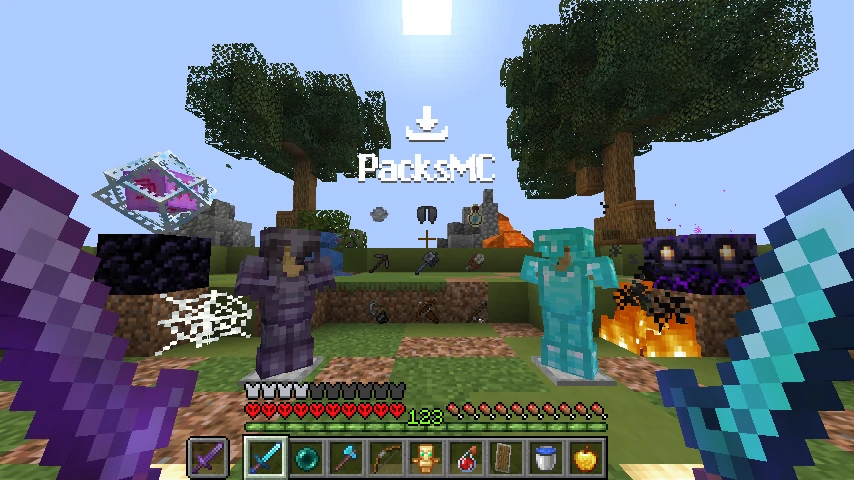
⚡ Unstable Essentials
Unstable Essentials is a clean, lightweight, and performance-friendly Minecraft resource pack designed to boost FPS, minimize screen clutter, and maximize visibility during PvP and survival gameplay.
🚀 Key Features
🔥 Low & Clean Fire
- Unobstructed View: Both standard fire and Soul Fire have been lowered and cleaned, preventing fire from blocking your crosshair during combat or Nether exploration.
❤️ Refined HUD & Heart Icons
- Clear Health Status: Completely redesigned health icons for all status effects—absorption, freezing, poison, wither, custom damage animations, and standard hearts.
💥 Optimized Explosion Particles
- Zero Lag Spikes: Cleaned explosion animations (TNT, End Crystals, Creeper explosions) that enhance combat clarity and prevent frame drops in intense battles.
🛡️ Cleaned Item & Block Models
Optimized 3D models for better visual clarity:
- 🛡️ Shields: Cleaner blocking animation (
shield_blocking) and holding angle. - 🗿 Totem of Undying: Compact and less intrusive held perspective.
- 🛏️ Beds: Refined models for all 16 color variants.
- 📦 Containers: Sleek models for Chests, Ender Chests, Trapped Chests, and Shulker Boxes.
- 💀 Heads & Skulls: Optimized Player, Zombie, Skeleton, Wither Skeleton, Creeper, Dragon, and Piglin heads.
- 🚩 Banners, Decorated Pots, and Conduits.
👁️ Minimal Vignette
- Softened screen edges for a brighter, more consistent, and clean visual experience.
⚙️ Compatibility
- Minecraft Versions: 1.20 / 1.21+ (Vanilla & Modded)
- Performance Mods & Clients: Fully compatible with Sodium, Iris, OptiFine, Feather Client, Lunar Client, and Badlion.
- Client-Side: 100% safe for all multiplayer servers and PvP networks.
📥 Installation Guide
- Download the
.zipfile from the Versions tab. - In Minecraft, open Options ➔ Resource Packs...
- Drag and drop the downloaded
.zipfile into the game window or into yourresourcepacksfolder. - Move Unstable Essentials to the top of the selected list and click Done!
Quick facts
- Edition: Minecraft Java
- File type: .zip (resource pack)
- Minecraft versions listed: 1.20, 1.20.1, 1.20.2
- How to install: Download the .zip resource pack — do not unzip it. → Put it in .minecraft/resourcepacks. → Enable it in Options → Resource Packs.
- Where to get it: Opens on Modrinth — not every file is mirrored on our own servers.
Install steps are the general flow for this file type — How to install Minecraft Java resource packs walks through it step by step.
File checked by MCModsHub
- Downloads as Unstable Essentials.zip
- Download size: 148 KB
- Download link checked 22 Oct 2026 — working
These come from our own check of the pack file, not from the source page.