Prismatic Selection
A lightweight resource pack that adds a fast, animated rainbow block selection outline without requiring shaders or Iris.
⬇ Download on Modrinth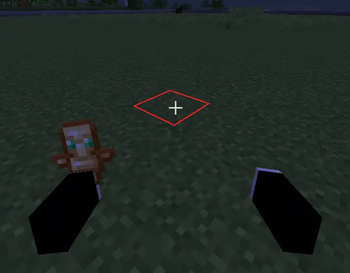
Prismatic Selection adds a colorful animated rainbow effect to Minecraft's block selection outline.
It works through Minecraft's core shaders, so you don't need Iris, OptiFine, or a shader pack just to get a rainbow selection box.
Features:
Fast animated rainbow selection outline, no shader pack required, no Iris or OptiFine required, lightweight resource pack, designed for Minecraft Java 26.2 and works alongside normal resource packs.
Installation:
Download Prismatic Selection. Place the ZIP in your resourcepacks folder. Enable it in Resource Packs. Place Prismatic Selection above other resource packs if necessary.
Compatibility: Currently made for Minecraft Java 26.2. Other Minecraft versions are not guaranteed to work because Minecraft's core shaders can change between versions.
- Edition: Minecraft Java
- File type: .zip (resource pack)
- Minecraft version listed: 26.2
- How to install: Download the .zip resource pack — do not unzip it. → Put it in .minecraft/resourcepacks. → Enable it in Options → Resource Packs.
- Where to get it: Opens on Modrinth — not every file is mirrored on our own servers.
Install steps are the general flow for this file type — How to install Minecraft Java resource packs walks through it step by step.
- Downloads as Prismatic 1.0.0.zip
- Download size: 11 KB
- Download link checked 12 Sept 2026 — working
These come from our own check of the pack file, not from the source page.