
LowShield
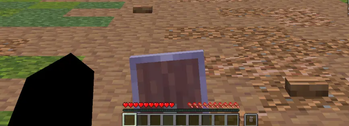
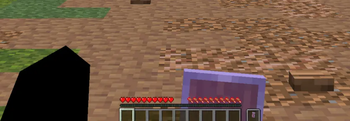
Free up your field of view and never lose sight of your enemies! 🛡️👀
How to install
Download the LowShield resource pack and place it in your resourcepacks/ folder
Enjoy your newly unobstructed adventures! 🎉
✨ Features
- 🛡️ Lowered Position: The shield is held lower on your screen, significantly improving your overall field of view.
- ⚔️ Combat Optimized: Perfect for PvP and PvE—never let your own defense block your line of sight during a fight.
- ⚡ Ultra Lightweight: Only modifies the 3D display properties of the shield without impacting your FPS.
- 🎨 Vanilla Friendly: Keeps the original shield texture and animations, simply adjusting its position on your screen!
🎮 How it works
🔍 Exploration and Combat
- ✅ Equip a shield in your main hand or off-hand.
- ✅ Notice how much more of your screen is visible, whether you are running or actively blocking.
- 🔄 Works instantly upon pack activation, no game restart required.
📊 Requirements
- ✅ Minecraft: v:1.21 to 26.2
🐛 Support & Issues
The shield still takes up half your screen in-game?
- 📝 Verify that the pack is at the very top of your resource packs list (especially above other PvP or texture packs).
All rights reserved to VTH Studios
Stay safe and happy fighting! ⚔️
Quick facts
- Edition: Minecraft Java
- File type: .zip (resource pack)
- Minecraft versions listed: 1.21.4, 1.21.5, 1.21.6
- How to install: Download the .zip resource pack — do not unzip it. → Put it in .minecraft/resourcepacks. → Enable it in Options → Resource Packs.
- Where to get it: Opens on Modrinth — not every file is mirrored on our own servers.
Install steps are the general flow for this file type — How to install Minecraft Java resource packs walks through it step by step.
Verified by MCModsHub
- Downloads as LowShieldVery.zip
- Download size: 152 KB
- Download link checked 12 Sept 2026 — working
These come from our own check of the pack file, not from the source page.